Radar Detector vs Waze: Which Is Better? (October 2026)
In the radar detector vs Waze choice, choose Waze for navigation and driver reports and a detector for nearby radar signals. Use both if you want separate sources of road information, but neither guarantees advance warning.
On this page (10 sections)
- Radar detector vs Waze: how do their alerts differ?
- When is Waze alone the better choice?
- When does a radar detector add useful information?
- Which detector suits your way of driving?
- Can either option warn you about laser enforcement?
- How should you set up Waze and a detector together?
- How do you keep the setup useful over time?
- Which mistakes make either tool less useful?
- What rules should you check before choosing a setup?
- Radar detector vs Waze: which should you choose?
In the radar detector vs Waze choice, use Waze for navigation and shared road reports, and choose a detector when you also want alerts to nearby radar signals. They answer different questions, so neither fully replaces the other.
Waze tells you what drivers have reported along the road. A detector listens for supported signals reaching your vehicle, including signals that nobody has reported.
Start with the information you need on your usual trips. Buying more equipment makes sense only if its alerts add useful information without becoming another source of distraction.
Radar detector vs Waze: how do their alerts differ?
Waze provides reported observations, while a radar detector provides signal alerts. A police sighting and a radar signal are separate pieces of information, even when they concern the same stretch of road.
A driver can report a visible officer who isn't using radar. Conversely, a detector can receive radar without any officer being visible or anyone submitting an app report.
| Question | Waze | Radar detector |
|---|---|---|
| Where does the alert come from? | Reports shared through the app | Signals received by the device |
| Can it report a visible officer without radar use? | Yes, if someone submits a report | No signal means no radar alert |
| Can it alert without another driver's report? | A shared report needs a contributor | Yes, if a supported signal reaches it |
| Does it provide route guidance? | Yes | A detector alone does not replace navigation |
| What can make an alert unhelpful? | An old report or a report for another direction | A non-police signal or too little warning |
Neither alert proves that your vehicle's speed is being measured. Treat each as information to interpret while keeping your eyes on the road.
For more detail on receivers and signals, read how radar detectors work.
What a radar detector vs Waze comparison means on your route
A busy commute gives Waze more chances to receive reports, but traffic volume doesn't guarantee useful contributions. A quiet road may have fewer reports even when something worth reporting is present.
A detector's usefulness depends on signals and surroundings rather than the number of app users nearby. Hills, curves and obstructions can affect reception, so an open highway and a winding road may produce very different warning opportunities.
When is Waze alone the better choice?
Waze alone suits drivers who mainly want route guidance and road reports. Start there if you don't have a clear reason to add a separate receiver.
It is also the simpler choice if you dislike cables, windshield hardware or learning alert settings. You can assess whether shared reports meet your needs before committing to another device.
On familiar urban trips, reported crashes and road hazards may be more useful to you than extra signal information. Judge the app by how it helps with your actual journey, rather than by how many alerts it produces.
Skip a detector if you expect it to identify every officer or provide permission to exceed posted limits. Those expectations won't be met by adding hardware.
Waze has limits of its own: a report may be old, refer to the opposite direction or disappear before you reach the location. The absence of a report tells you little about what lies ahead.
When does a radar detector add useful information?
A detector adds value when you want signal awareness independent of driver reports. It can alert to supported radar reaching your car even when nobody has reported that location.
That makes it worth considering for frequent drivers who accept some setup and understand false alerts. It is a weaker fit for someone who will ignore every beep or keep changing controls while moving.
The main trade-off is attention. Non-police sources, including some vehicle systems, can produce alerts, so useful filtering matters more than simply receiving the greatest number of warnings.
Don't choose by a promised distance alone. Signal direction, terrain and how radar is used can matter more than a broad range claim.
Brief or instant-on radar use may offer little notice if no earlier signal reaches your vehicle. A receiver cannot give advance warning of a transmission that hasn't occurred.
Read whether radar detectors are worth it if you're still deciding whether that extra information justifies the equipment and upkeep.
Which detector suits your way of driving?
Choose the RAD 490i for connected alerts, the Radenso XP for a regular commute, or the RAD 390 for a simpler detector setup. These choices address different habits rather than offering three versions of the same benefit.
The practical question is what you'll use each week. Community features, saved false-alert locations and adjustable controls solve different problems.
Cobra RAD 490i: for drivers who want connected road reports
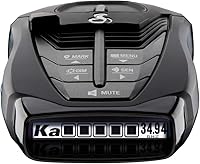
The Cobra RAD 490i suits drivers who want a detector linked to a driver community. Its Drive Smarter connection provides shared alerts, with Apple CarPlay and Android Auto compatibility for a compatible vehicle display.
That community is separate from Waze. Connecting the detector doesn't mean it imports Waze reports, so decide which app will handle navigation and which alerts you want to hear.
Cobra includes a USB-C power cord, a cigarette-lighter adapter and an adhesive windshield mount with static cling film. The detachable bracket and adjustable angle help with positioning and removing the unit.
Skip this option if you have no interest in its connected features. A driver who wants only a powered receiver has less reason to choose it for this comparison.
Radenso XP: for commuters managing repeat false alerts
The Radenso XP fits a regular route where the same non-police signals become a daily nuisance. Its manual GPS lockouts let you save recurring false-alert locations by pressing and holding a button.
It also offers muting below a speed you select and automatic sensitivity adjustment based on speed. Those controls suit stop-and-go trips where constant low-speed notifications would be unwelcome.
GPS here doesn't mean turn-by-turn navigation or a live police-report feed. It helps the detector use location and speed to manage its own behavior.
Choose another approach if you don't want to identify recurring false alerts carefully. Saving every annoying alert defeats the purpose of having a receiver you can interpret.
Cobra RAD 390: for drivers keeping navigation separate
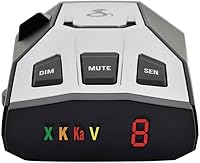
The Cobra RAD 390 suits drivers who want signal alerts while using their existing navigation setup separately. It supports X, K and Ka radar bands, plus front and rear laser detection.
Its adjustable sensitivity and filtering modes let you balance alert activity for your route. Cobra's IVT filter is designed to reduce false alerts from blind spot and other vehicle avoidance systems.
The included power cord, adapter and adhesive mount cover the basic installation. Firmware updates provide a way to keep its software current.
Choose it for this simpler role, rather than expecting it to provide the RAD 490i's connected community features. Front and rear laser sensing also doesn't mean radar-direction arrows.
Can either option warn you about laser enforcement?
Neither option promises advance notice of laser enforcement. Waze needs a relevant report, while a detector must receive the laser signal.
Laser uses a narrow beam, so receiving an alert can mean a speed measurement is already taking place. A laser-detection feature is not a way to prevent that measurement.
Front and rear laser sensing describes where a detector can receive laser signals. It doesn't establish a protective zone around the vehicle or guarantee a warning before your car is measured.
This distinction matters when comparing features in a shop. Read whether radar detectors detect lidar before treating a laser label as a reason to buy.
How should you set up Waze and a detector together?
Set up both while parked and give each a clear job. Let Waze handle route guidance and shared road information, while the detector provides its own signal alerts.
Begin with a detector position that follows its manual and local mounting rules. Keep it stable, properly aligned and clear of objects that could interfere with reception or block your view.
Plan the power-cable route before attaching the mount. Keep the cable away from pedals, steering controls and airbag deployment areas, with enough slack that it doesn't pull on the unit.
Set audio levels so you can distinguish navigation instructions from detector warnings. Reduce unnecessary duplicate notifications rather than making every sound louder.
For the RAD 490i's community functions, complete the Drive Smarter connection before departure. Don't assume a working power connection means its connected alerts are ready.
Start with the recommended settings in the manual and learn what each control changes. Avoid disabling bands or applying aggressive filters merely to make the device quiet.
After several ordinary trips, review recurring issues while parked. Change one setting at a time so you can tell whether it solved the problem.
How do you keep the setup useful over time?
Keep software current, mounts secure and alert settings suited to your route. A loose device or forgotten setting can undermine an otherwise sensible setup.
Follow the manufacturer's update instructions rather than assuming every model uses the same process. Radenso supports XP updates through Windows and Mac computers, and both Cobra models support firmware updates.
Inspect the mount and cable periodically. Clean mounting surfaces as directed, and deal with a shifting bracket before the device becomes a distraction.
When cleaning the detector, follow its care instructions and avoid spraying cleaner directly into openings. Keep the receiving areas clear rather than placing decorations or stored items around the unit.
Review saved lockouts if your route changes or an alert behaves differently. A familiar location deserves attention when its signal pattern changes, even if you previously dismissed an alert there.
Which mistakes make either tool less useful?
Treating silence as an all-clear is the biggest mistake. Neither missing reports nor a quiet detector establishes that enforcement is absent.
Other common mistakes create confusion or reduce the information you receive:
- Equating a police report with active radar. A sighting describes an observation, not the equipment in use.
- Locking out an unfamiliar alert immediately. First establish that it is a recurring non-police source.
- Using maximum sensitivity everywhere. Extra alert activity can make useful warnings harder to notice.
- Expecting extreme settings to solve terrain limits. A mode cannot guarantee reception around every hill or curve.
- Adjusting controls in motion. Pull over safely before changes that require looking away from the road.
- Buying for features you won't use. A connected community offers little value if you never connect to it.
Also avoid abrupt reactions to alerts. Maintain safe spacing and smooth control of your vehicle, regardless of what the app or detector reports.
What rules should you check before choosing a setup?
Check current official rules for your route, vehicle and mounting position. Using Waze alongside a detector doesn't change restrictions on the detector.
Permission can vary by jurisdiction and vehicle type, including separate requirements for commercial vehicles. A long trip may cross several sets of rules.
Phone interaction and windshield placement need attention too. A legal device still needs a lawful position and a setup you can operate within local phone-use rules.
Use our radar detector laws guide as a starting point, then confirm the rules with the relevant government authority. Do that before buying or fitting hardware for a cross-border route.
Radar detector vs Waze: which should you choose?
Choose Waze alone for navigation and shared reports; add a detector for independent signal alerts. Use both when you want both kinds of information and can manage the setup without extra distraction.
For connected drivers, choose the Cobra RAD 490i. For a repeating commute with recurring false alerts, choose the Radenso XP; for a simpler detector role alongside separate navigation, choose the Cobra RAD 390.
If repeated alerts are your main concern, compare radar detectors with GPS. If you're ready to weigh more models, our best radar detectors for cars guide broadens the choices.
The useful decision in radar detector vs Waze is which information you'll act on calmly and understand correctly. Pick the setup that fits your routes, and keep following posted limits whether it alerts or stays silent.
Frequently asked questions
Is Waze as good as a radar detector?
Waze is better suited to navigation and shared road reports, while a radar detector adds signal detection. The right choice depends on the information you need: an app report may arrive without any radar use, and a detector may alert before anyone submits a report.
Can Waze detect radar guns?
No, Waze does not use your phone as a radar receiver; it can show police reports submitted by drivers, but a sighting does not establish whether radar is active. If nobody reports a location, you may get no report even when enforcement is present.
Should I use Waze and a radar detector together?
Use both if you want navigation, driver reports and a separate source of signal alerts, where permitted. Set up both before moving, keep audio cues easy to distinguish, and avoid duplicate notifications that demand attention; adding a device only helps if you can use it without distraction.
Does Waze warn you before every speed trap?
No, Waze cannot warn you about every enforcement location; reports depend on drivers noticing and sharing information, and conditions can change after a report appears. A detector also has gaps, including brief radar use and laser signals that provide little notice, so silence is never an all-clear.
Are radar detectors legal everywhere?
No, permission to use a radar detector depends on the location and vehicle type. Check current official rules for each jurisdiction on your route, including restrictions for commercial vehicles; also check phone-use and windshield-mounting rules, since an otherwise suitable setup may still need a different mounting position.