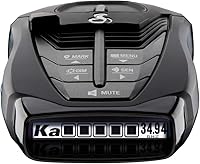
How Do Radar Detectors Work?
Radar detectors work by receiving radio waves used by radar guns and warning you when they recognize a signal. Warning time depends on the signal reaching the detector, so an alert cannot guarantee time to react.
On this page (10 sections)
- How do radar detectors work?
- What do X, K, and Ka bands mean?
- Why do radar detectors give false alerts?
- What affects how early an alert arrives?
- Can a radar detector pick up lidar?
- Do radar detectors measure your speed or stop a ticket?
- Which detector features should you choose?
- How should you set up and care for a radar detector?
- What common mistakes make alerts less useful?
- How do radar detectors work best for your needs?
Radar detectors work by receiving radio waves used by radar guns, then warning you when they recognize a signal. They detect nearby radar activity, not police vehicles, and they cannot guarantee advance warning.
The most useful features depend on your routes: filtering helps manage unwanted alerts, GPS handles familiar signal locations, and arrows add direction. Understanding those differences helps you choose a detector without paying for features you won't use.
How do radar detectors work?
A radar detector listens for radio energy in supported frequency bands and turns recognized signals into alerts. It receives radar rather than transmitting radar to measure your speed.
A radar gun sends waves toward a vehicle and reads the frequency change in the returning signal to calculate speed. Some transmitted or reflected energy may reach your detector before your vehicle reaches the radar source.
That creates the chance of an early warning, but only while a detectable signal is present. A detector cannot hear a radar gun that isn't transmitting.
How do radar detectors turn signals into warnings?
Radar detectors process incoming signals, apply their settings and filters, and issue sound or display alerts. Depending on the model, you may see the band, strength, direction, or several signals at once.
Signal strength is a clue about received energy, not a distance reading. A stronger alert doesn't tell you exactly how far away the source is or which vehicle is being measured.
What do X, K, and Ka bands mean?
X, K, and Ka identify frequency ranges, not different levels of danger. Radar guns and some unrelated devices can transmit within bands a detector monitors.
A band alert alone cannot identify the source. Treat it as information to interpret alongside the road, traffic, and changes in the alert.
For the differences between these bands, read what X, K, and Ka mean on a radar detector. Don't disable a band simply because it produces frequent alerts near home; your next route may use different radar equipment.
Why do radar detectors give false alerts?
Unwanted alerts often come from other radio sources, including automatic doors and vehicle safety systems. The detector receives a real signal, but that signal may have nothing to do with traffic enforcement.
Filtering tries to separate useful warnings from this background activity. GPS mute memory adds location context, helping manage recurring signals near places you pass often.
The Uniden R7 suits drivers who want that route-based quieting plus more detail during an alert. Its dual antennas provide directional arrows, and its OLED screen can show up to 4 signals simultaneously.
Choose the R7 for detailed alert information, especially when several signals need your attention. Skip it if you mainly want audible warnings and have little interest in interpreting arrows or a multi-signal screen.
Review saved mute locations periodically and learn how to remove a mistaken entry. A familiar location doesn't make every new signal there harmless.
What affects how early an alert arrives?
Terrain, traffic, mounting, and transmission timing determine how much warning you get. There is no fixed detection distance that applies to every road.
Hills and curves can block or redirect radio energy, while other vehicles can reflect it. An open road and an obstructed street may produce very different alerts from similar radar equipment.
Instant-on radar adds another limit: an officer can transmit briefly to measure a vehicle. If your car is the first target within reach, an alert may coincide with the measurement.
Directional arrows help interpret where a received signal is coming from, but they aren't a map pin. The Escort MAX 360 MKII pairs this information with filtering designed to reduce alerts from blind spot monitoring and collision avoidance systems.
Choose the Escort for arrows and connected alerts if you want both local signal information and reports from other drivers. It connects to Drive Smarter, with Apple CarPlay and Android Auto compatibility for viewing routes and interacting with alerts.
Skip it if you won't use either direction information or connected features. Shared reports depend on other drivers and connectivity, so they complement reception rather than confirm what is happening ahead.
For placement advice, see where to mount a radar detector.
Can a radar detector pick up lidar?
Laser-capable detectors can alert to lidar, but they may warn after speed has already been measured. Lidar uses a narrow beam of light aimed at a particular vehicle.
Enough light must reach the detector's sensor to trigger an alert. A beam aimed elsewhere on your vehicle may not reach that sensor, so silence doesn't rule out lidar use.
Read whether radar detectors can detect lidar before treating laser detection as a reason to buy. None of these 4 models should be chosen on the assumption that a laser alert guarantees advance notice.
The Uniden R3 suits drivers who want radar and laser alerts, GPS mute memory, and spoken warnings without making directional arrows a priority.
Its programmable voice alerts let you tailor spoken notifications, and its multi-color OLED display provides visual information. Skip the R3 if signal direction is essential to how you want to interpret warnings.
Do radar detectors measure your speed or stop a ticket?
Radar reception neither measures your speed nor prevents enforcement. An officer can use lidar, pacing, or other methods that produce no radar signal for your detector to receive.
GPS camera warnings are separate from live radar detection. The R7 and R3 include preloaded red light and speed camera locations, but a stored-location alert doesn't mean a camera has just emitted radar.
Likewise, GPS position memory and shared driver reports are different tools. One manages known places; the other passes along reports that may change before you arrive.
Use alerts to stay aware while following posted limits and road conditions. Before buying or traveling, check our radar detector legality guide for rules that may affect your route or vehicle.
Which detector features should you choose?
Match features to your daily driving, starting with alert management, direction information, and your willingness to use an app. Don't choose by the longest feature list.
For repeated commuting routes, location-based learning can reduce the effort of managing recurring alerts. The Cobra RAD 700i combines GPS-based AutoLearn with filtering and connects through Bluetooth to Drive Smarter for shared alerts.
Choose the Cobra for a connected daily commute when learned false-alert locations and community reports are your priorities. Its front and rear detection should not be confused with directional arrows.
Skip it if you specifically want arrows pointing toward received signals; the R7 and Escort are the direction-focused choices here. Don't assume that sensing a signal from behind means a detector will display a rear arrow.
For a broader shortlist, compare the best radar detectors for cars. Our radar detector buying tips can help you weigh the features against your routes and preferred controls.
How should you set up and care for a radar detector?
Mount it securely, learn the controls while parked, and start with the manual's recommended settings. A clear, stable position matters more than hiding the device wherever it fits.
Keep the detector level and avoid blocking its receiving areas. Some windshield coatings can affect reception, so consult your vehicle manual if the glass has special coatings or designated areas for electronic devices.
Route the power cable clear of steering controls, pedals, and airbags. Check that the mount holds firmly and that you can hear alerts at a sensible volume.
Use our mounting guide to plan placement before securing the cable. Make changes while parked rather than reaching for controls during an alert.
Wipe the housing and sensor areas with a soft cloth, following the manual for cleaning products. Avoid spraying liquid into openings, and inspect mounts and cables for wear.
Install firmware and camera database updates when available for your model. These serve different purposes; our firmware update guide explains the preparation and update process.
What common mistakes make alerts less useful?
Over-muting and poorly understood settings can hide information you want. Change one setting at a time so you can understand its effect.
Don't mute an unfamiliar alert merely because another signal usually occurs nearby. Learn the difference between saving a false-alert location and marking a place where you want a reminder.
Don't treat arrows as proof of a specific officer's position or a strong alert as a precise distance. Keep your attention on driving instead of searching for the source.
Avoid turning every filter to its strongest setting just to achieve silence. The useful balance is fewer distractions while preserving the warnings relevant to your routes.
How do radar detectors work best for your needs?
Understanding how radar detectors work gives you a clear decision rule: choose the alert information you'll actually use. Pick the R7 for a multi-signal display and arrows, or the R3 for GPS mute memory and spoken alerts.
Choose the Escort when arrows and connected reports both matter. Choose the Cobra when your main priorities are route learning and community alerts without directional arrows.
If you expect guaranteed warning, automatic protection from tickets, or dependable advance notice of lidar, skip the purchase. For help deciding whether the remaining benefits fit your driving, read do radar detectors still work.
Frequently asked questions
How does a radar detector detect police?
A radar detector detects radio signals, not police officers or vehicles. It monitors supported frequency bands and warns when it recognizes a signal.
Warning time depends on whether that signal reaches the receiver, along with terrain, traffic, mounting position, and settings.
An officer using no radar produces no radar alert.
Do radar detectors tell you how fast you are going?
Radar detection does not measure your speed. Some detectors can display a speed reading from GPS, but that is a separate function from receiving radar signals.
Use your vehicle's speedometer to check your speed, and don't assume an alert means the detector knows how fast you or another vehicle are traveling.
Can a radar detector detect lidar?
A detector with laser detection can alert to lidar if enough laser light reaches its sensor. Lidar uses a narrow beam aimed at a vehicle, so an alert may arrive after the speed measurement.
Laser detection is therefore a limited warning feature, not a dependable source of advance notice.
What do X, K, and Ka mean on a radar detector?
X, K, and Ka are radio frequency bands that radar detectors can monitor. A band label tells you which range contains the received signal, not who sent it.
Before disabling any band, consult your detector's manual and reliable guidance about radar equipment used along your routes.