How to Choose a Radar Detector
The most useful radar detector buying tips are to check local laws and match filtering, GPS and controls to your routes. Choose a secure mounting setup and useful alerts before paying for extra connected features.
On this page (12 sections)
- What should radar detector buying tips help you compare?
- Are radar detectors legal where you drive?
- How much range and filtering do you need?
- Is GPS worth paying attention to?
- Which of these detectors fits your driving?
- Should the detector also detect laser?
- What display and alert style works for you?
- How should mounting and power affect your choice?
- How should you set up and care for a detector?
- What common buying mistakes should you avoid?
- What is a sensible budget for a radar detector?
- Which radar detector should you choose?
Choose a radar detector by matching filtering, location features and alert controls to your usual roads. These radar detector buying tips start with legal use and end with a model you can mount, maintain and understand.
For a repeated commute, prioritize ways to manage familiar false alerts. For varied routes, focus on useful warnings, clear controls and a setup you can leave securely in place.
A detector cannot promise a warning before every speed measurement. Keep following speed limits and treat alerts as extra information about your surroundings.
What should radar detector buying tips help you compare?
The most useful radar detector buying tips help you choose features that solve problems on your own routes. Start with your driving pattern before comparing brand names or range claims.
| Buying factor | What to compare | Why it matters |
|---|---|---|
| Legal use | Detector rules and windshield restrictions | Determines whether and how you can use it |
| Filtering | Vehicle-system filtering and sensitivity controls | Helps reduce distracting alerts |
| GPS | Manual memory, automatic learning and camera alerts | Makes repeated routes easier to manage |
| Alert style | Spoken warnings and readable displays | Helps you understand an alert quickly |
| Installation | Mount, cable route and power source | Affects everyday convenience |
| Ongoing use | Updates, phone connections and database access | Adds upkeep beyond the initial setup |
Write down your 2 main needs, such as “less chatter near shops” and “spoken warnings.” A feature that addresses neither need should have less weight in your choice.
Use our best radar detectors for cars guide to build a shortlist once you know those priorities.
Are radar detectors legal where you drive?
Check current official rules for your route and vehicle type before buying. Detector restrictions and windshield-mounting rules are separate checks, so permission to use a detector does not settle where you can place it.
Include places you pass through on occasional trips. Commercial vehicles may also face different restrictions from private passenger cars.
Our guide to whether radar detectors are legal explains what to check. For travel in that region, also review radar detector rules in Virginia and D.C..
A detector senses signals; it does not grant permission to exceed a speed limit. Camera-location warnings and shared alerts also do not establish whether detector use is allowed.
How much range and filtering do you need?
Choose useful sensitivity with manageable alerts, rather than buying on a claimed distance alone. Hills, curves, traffic, signal direction and how an enforcement device is used all affect warning time.
Continuous radar may be detectable before you reach its source. Radar switched on briefly near your vehicle may leave little advance warning, even with a sensitive detector.
False alerts need equal attention because repeated noise can make you ignore a meaningful warning. Automatic doors and some vehicle systems can produce signals that a detector needs to sort from other sources.
Filtering and sensitivity controls serve different jobs. Filtering tries to reject unwanted signals, while sensitivity settings change how readily the detector responds.
Avoid switching off an entire band just to silence one troublesome location. Learn what the band means and confirm that a change suits your area before narrowing coverage.
Our guide to radar detector bands explains X, K and Ka. Start with the recommended settings, then change one control at a time so you understand the result.
Which radar detector buying tips matter for your routes?
Match your feature priorities to the driving you repeat most often. A commute through retail areas creates different needs from occasional travel on unfamiliar roads.
- Repeated urban commute: Prioritize location memory or automatic learning.
- Mixed city and highway travel: Compare adjustable or speed-based sensitivity.
- Frequent unfamiliar routes: Consider shared alerts if you will maintain the connection.
- Low tolerance for screen checks: Favor clear spoken warnings.
- Frequent vehicle changes: Examine attachment, removal and power-cable convenience.
More filtering is not automatically better in every situation. The goal is to reduce nuisance alerts while keeping warnings you need to hear.
Is GPS worth paying attention to?
GPS is especially useful on familiar routes, but compare the exact functions instead of treating GPS as a single feature. Manual mute memory, automatic learning and camera-location warnings solve different problems.
Manual memory lets you identify recurring false-alert locations. Automatic learning reduces that work by recognizing repeated signals and locations over time.
Camera alerts rely on stored locations rather than detecting every camera directly. Their usefulness depends on coverage and keeping the relevant database current.
Location memory also needs judgment. Learn how to review or remove a stored mute, and do not silence an unfamiliar signal simply because it occurs near a known nuisance source.
Shared alerts are separate from satellite positioning. They depend on information sent through a connected service, and a missing report does not mean the road ahead is clear.
If connected alerts are your main reason to buy, our radar detector vs Waze comparison explains how signal detection differs from reports supplied by other drivers.
Which of these detectors fits your driving?
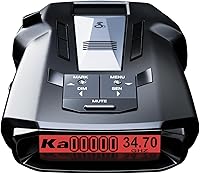
Choose the RAD 390 for manual control, RAD 700i for connected commuting, R3 for location memory and spoken alerts, or MAX 3 for automatic adjustments. Those differences give each model a clearer role than broad range promises.
Cobra RAD 390: for drivers who prefer manual control
The Cobra RAD 390 suits drivers who want adjustable sensitivity and filtering without making connected features the center of their choice. Its updateable IVT filter addresses alerts from blind-spot and other vehicle systems.
Its Extreme Mode favors coverage and range, according to Cobra. Start with a mode suited to your surroundings rather than assuming the most sensitive option will be the most useful everywhere.
The included adhesive windshield mount has a detachable bracket, angle adjustment and static cling film. A USB-C power cord and USB-C to cigarette-lighter adapter give you the supplied parts for that power arrangement.
Choose it if those controls and mounting parts meet your needs. Skip it if automatic location learning or community alerts are must-have features; the RAD 700i is the closer match for those priorities.
Cobra RAD 700i: for connected commuters
The Cobra RAD 700i suits drivers who want automatic route learning and shared alerts in one setup. Built-in GPS and AutoLearn Intelligence help reduce recurring false signals over repeated trips.
Bluetooth connects it to Drive Smarter community alerts. Apple CarPlay and Android Auto compatibility allow supported route and alert interactions through the vehicle display.
Its 5-color OLED display lets you choose a color that works with your cabin lighting. Make that choice while parked, and judge readability from your normal driving position.
Buy it if you will use its location learning and maintain the connection for community information. Skip it if you want to avoid phone pairing and would get little value from shared alerts.
Uniden R3: for spoken warnings and location memory
The Uniden R3 fits drivers who want GPS mute memory, camera-location alerts and programmable voice warnings. It can remember familiar false-alert locations and announce user-marked points as you approach.
That combination suits a regular route where you are willing to manage saved locations. Programmable voice alerts let you tailor spoken information, while the multicolor OLED screen provides visual details.
Uniden provides free firmware and camera-database updates. Make those updates part of your upkeep, especially before relying on stored camera information during a trip.
Choose the R3 if those location tools and spoken warnings cover your needs. Skip it if your main goal is the connected-community workflow described for the RAD 700i.
For other choices built around location tools, see our radar detectors with GPS guide.
Escort MAX 3: for automatic sensitivity changes
The Escort MAX 3 suits drivers who want automatic route learning and sensitivity that changes with speed. GPS-based AutoLearn addresses recurring false-alert locations, while variable speed sensitivity adjusts alert behavior as your speed changes.
That makes it worth considering for journeys that move between slower streets and faster roads. Advanced filtering adds another way to reduce unwanted alerts.
The MAX 3 also supports Drive Smarter shared alerts and access to the Defender camera database. Confirm the access terms for any connected service or database you plan to use.
Choose it if automatic adjustments are a priority. Skip it if you mainly want direct manual control and would leave its learning and connected tools unused.
Should the detector also detect laser?
Laser detection adds awareness, but it may provide little warning before a speed reading. A narrow beam aimed at your vehicle can produce a reading before you have time to respond to an alert.
The RAD 390 includes front and rear LaserEye laser detection. Detection from either direction does not establish that a detector can identify the direction of every alert.
Do not confuse laser detection with blocking a measurement or with stored camera warnings. Read whether radar detectors detect lidar if laser coverage is a major part of your decision.
What display and alert style works for you?
Choose warnings you can understand with minimal attention away from driving. Screen color is secondary to readable information, sensible brightness and an alert sound you can hear.
The RAD 390 uses an LED display, while the other 3 models here use OLED screens. Check how the display will face you once the detector is mounted, rather than judging its appearance alone.
Set volume with your normal cabin noise in mind. A warning that disappears beneath music or road noise is less useful than one you can recognize promptly.
Learn what the sounds and displayed bands mean before driving. If you prefer spoken information, the R3's programmable voice warnings are a clear reason to put it on your shortlist.
How should mounting and power affect your choice?
Choose a secure, legal position with a clear signal path through the windshield. A detector that tilts, slides or blocks your view needs a better installation before regular use.
Some windshield coatings can affect signal reception. Check your vehicle manual and detector instructions for placement guidance, especially if the windshield has special glass or a designated accessory area.
Keep cables away from pedals, steering controls and airbags. Leave enough slack for the mount without allowing a loose cable to pull on the detector.
A USB-C connector does not mean every vehicle USB port will supply the required power. Use the specified cable and power arrangement, and check whether the outlet stays powered after the vehicle is shut off.
For placement details, see where to mount a radar detector. If you want a cleaner permanent cable route, read our guide to hardwiring a radar detector before choosing compatible parts.
How should you set up and care for a detector?
Begin with the manual, current software and a secure mount, then adjust settings gradually. Complete setup while parked so you can learn the controls without road distractions.
- Check the supplied parts and approved power connection.
- Follow the manufacturer's update instructions for your exact model.
- Mount the detector at the angle specified in its instructions.
- Set display brightness, volume and alert preferences.
- Learn how to mute, save and remove locations where supported.
- Review settings after several familiar journeys.
Avoid copying a stranger's full settings profile. Their local signals, roads and preferences may differ from yours.
Firmware and camera databases serve different purposes, so check both where applicable. Our guide to radar detector firmware updates explains the update process and preparation.
Keep the viewing surfaces and mount clean using the care instructions. Inspect the bracket and adhesive periodically, and avoid leaving a loose detector or cable where it can move around the cabin.
Remove the detector from view when leaving the vehicle if practical. Follow its storage guidance rather than assuming it can remain in direct sun indefinitely.
What common buying mistakes should you avoid?
Avoid choosing by range claims alone or silencing alerts without understanding them. Both mistakes overlook how the detector will behave during everyday driving.
Buying the most feature-rich model can also create work you do not want. Phone pairing, saved-location management and updates are useful only if you will keep up with them.
Do not mistake a quiet drive for proof that every threat was covered. No nearby signal, filtering choices and location mutes can all affect what you hear.
Avoid assuming front and rear detection means directional arrows. If knowing where a signal comes from is essential, verify that specific function before choosing a model.
Finally, do not treat a detector as a camera warning system for every road. Stored locations and community reports can be incomplete, and signal detection answers a different question.
What is a sensible budget for a radar detector?
Set your budget around your essential features and the complete installation. Include any separate mount, compatible power parts or service access you decide you need.
A commuter may get more use from location learning than from display customization. An occasional user may prefer understandable controls over a connected system that needs regular attention.
Our guide to cheap radar detectors can help narrow a lower-cost shortlist. If your use would be rare, read are radar detectors worth it? before committing to the setup and upkeep.
Which radar detector should you choose?
Use these radar detector buying tips to choose the smallest feature set that solves your main needs. Make legal use and secure installation the first checks, then choose the alert workflow you will actually maintain.
- Choose the Cobra RAD 390 for adjustable sensitivity and a supplied detachable mounting setup.
- Choose the Cobra RAD 700i for route learning and a connected-community workflow.
- Choose the Uniden R3 for managed location memory, camera alerts and programmable spoken warnings.
- Choose the Escort MAX 3 for automatic location learning and speed-based sensitivity changes.
Before ordering, write down where it will mount, how it will get power and which settings you expect to use. Compare your shortlist in our best radar detectors for cars guide, then choose the model whose everyday routine fits yours.
Frequently asked questions
What should I look for when buying a radar detector?
Start with legal use, useful filtering and a secure mounting setup, then compare GPS memory, spoken alerts and connected features. Choose around the roads you drive most often.
A regular commute favors location memory, while shared alerts suit drivers willing to manage a phone connection.
Is GPS worth getting in a radar detector?
GPS is useful for repeated routes because it can support location-based muting, automatic learning or camera-location warnings, depending on the model. These are separate functions, so check which ones you want.
GPS does not require a community connection to know your location, and it does not improve every radar alert.
Do radar detectors detect laser?
Some radar detectors also detect laser, but an alert may arrive after your speed has already been measured. A laser beam is narrow, so detecting scattered light from a vehicle ahead is uncertain.
Choose laser detection as an awareness feature, rather than a reason to expect time to react.
Where should I mount a radar detector?
Mount it securely with a clear view through the windshield, following local restrictions and the detector's instructions. Keep it clear of your sightline, airbags and vehicle sensors, and route the cable away from controls.
Our guide to where to mount a radar detector explains placement choices.
Are radar detectors legal everywhere?
No. Radar detector rules depend on the jurisdiction and vehicle type, and mounting restrictions can apply separately.
Check current official rules for each place on your route before using one.
Our guide to radar detector laws explains the questions to check before buying or traveling.