7 Best Cheap Radar Detectors (October 2026)
The best cheap radar detectors include the Cobra RAD 700i for regular commuters, the Cobra RAD 480i for flexible placement, and the Cobra RAD 490i for connected road trips.
On this page (9 sections)
- How we chose cheap radar detectors
- Cheap radar detectors compared
- Which cheap radar detector fits your needs?
- What matters when buying a cheap radar detector?
- How should you set up a budget radar detector?
- How do you care for a cheap radar detector?
- Which budget radar detector mistakes should you avoid?
- Are radar detectors legal on your route?
- Which cheap radar detector should you choose?
The Cobra RAD 700i is our top cheap radar detector pick for regular commuters because it combines GPS-based false-alert learning with shared driver alerts. Choose the Cobra RAD 480i for flexible mounting, or the Uniden DFR7 if camera location warnings matter most.
A useful budget detector needs to fit your route, your car and your tolerance for alerts. Features that keep warnings understandable deserve more weight than a long list of detection claims.
For a wider shortlist, see our best radar detectors for cars. Our radar detector buying tips explain the main choices if this is your first detector.
Our picks at a glance
-
1

-
2

-
3

How we chose cheap radar detectors
We favored useful alert controls and practical setup features over broad promises about range. GPS memory, filtering, connected alerts and mounting options help separate these picks for different drivers.
The order follows each model's site-wide score, rather than a claimed detection distance. There are no comparable distance measurements here that support calling one model the longest-range choice.
We also separated features that sound similar but work differently. A filter for signals from nearby vehicles serves a different purpose from memory that quiets a recurring signal beside a store.
A detector provides information about signals it receives. It cannot see every enforcement method, guarantee advance notice or replace attention to posted limits.
Cheap radar detectors compared
Compare how each model handles unwanted alerts first, then check its power and mounting arrangement. That approach narrows the field faster than comparing display colors or general range labels.
| Product | Best for | GPS | Detection | Display | Our score |
|---|---|---|---|---|---|
| Cobra RAD 700i | regular commuters | Built-in with AutoLearn Intelligence | Front and rear | 5-color OLED | 8.6 |
| Cobra RAD 480i | flexible placement | 8.5 | |||
| Cobra RAD 490i | connected road trips | 8.1 | |||
| Uniden DFR7 | camera awareness | Remembers common false-alert locations | OLED | 7.9 | |
| Radenso XP | stop-and-go commutes | User-added lockouts for common false alerts | OLED | 7.6 | |
| Cobra RAD 390 | manual mode control | 7.4 | |||
| Cobra RAD 350 | basic audible alerts | Front and rear signal detection | 7-segment color display | 7.2 |
For repeated local trips, focus on location memory and low-speed controls. For varied routes, consider how easily you can change sensitivity and whether connected driver reports are useful to you.
Accessories also affect value. A detector that includes the mount you need can make more sense than one that requires another accessory before it fits your car.
Which cheap radar detector fits your needs?
Choose the detector whose main strength solves your daily problem. The following picks cover recurring false alerts, connected travel, camera awareness and simpler alert setups.
Is a cheap radar detector with GPS worth it?
A cheap radar detector with GPS is worth considering when you pass the same unwanted signals every day. The Cobra RAD 700i is the strongest fit here for drivers who want location learning to happen over time.
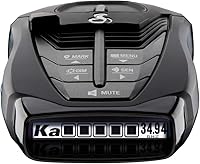
Cobra RAD 700i
- Built-in GPS and AutoLearn Intelligence
- Front and rear detection
- Drive Smarter shared alerts
- 5-color OLED display
GPS-based AutoLearn filtering suits drivers who pass the same false-alert locations each day. Drive Smarter adds shared alerts from other connected drivers.
Pros
- GPS-based AutoLearn filtering
- Drive Smarter shared alerts
- Customizable display colors
Cons
- Location learning takes time
- Shared alerts need a Drive Smarter connection
The RAD 700i uses built-in GPS and AutoLearn Intelligence to recognize recurring false-alert locations. Cobra combines that learning with filtering software, making this a sensible first choice for a familiar commute past stores and busy commercial areas.
Its Drive Smarter connection adds alerts shared by other drivers. Apple CarPlay and Android Auto compatibility let you view your route and interact with those alerts through a compatible vehicle display.
The 5-color OLED screen offers a choice of display colors. Choose one you can read quickly in your car rather than treating a close match to the dashboard lighting as a major buying reason.
Buy it for repeated daily routes where reducing familiar interruptions matters. Skip it if you won't benefit from location learning or use connected alerts, since those are the main reasons to choose it over a simpler model.
Give AutoLearn time to adapt. A new detector's first trip is not the right point to judge how quiet its location learning will make your commute.
Which cheap radar detector includes useful setup gear?
The Cobra RAD 480i suits buyers who want a choice of windshield or dash placement without immediately shopping for a different mount. Its included accessories make it easier to plan a basic installation.
Cobra RAD 480i
- Front and rear LaserEye detection
- Updateable IVT filter
- Drive Smarter shared alerts
- Windshield and dash mounting accessories
Included windshield and dash mounting options let you choose a position that fits your car. Bluetooth supports shared alerts through Drive Smarter.
Pros
- Two included mounting options
- 12V vehicle power cord included
- Connected community alerts
Cons
- Needs a vehicle power connection
- Community alerts need a compatible connection
The RAD 480i includes a suction cup windshield mount, a hook and loop dash fastener and a 12V vehicle power cord. Those choices help if your dashboard shape or windshield position makes one mounting style awkward.
Its updateable IVT filter and anti-falsing circuitry address unwanted signals from systems such as blind spot monitoring. Bluetooth supports Drive Smarter shared alerts, so this is also an option for buyers who want connected reports alongside detector warnings.
Choose it when mounting flexibility comes first. Before ordering, identify a level position with a clear forward view and make sure the power cord can reach without crossing vehicle controls.
Skip it if GPS-based learning of recurring locations is your main requirement. The RAD 700i better matches that need, while this model's strongest practical advantage is its included placement options.
If you're deciding whether to move beyond this setup, our Cobra RAD 700i vs Uniden R3 comparison explains another relevant model choice.
Is the Cobra RAD 490i useful for connected road trips?
The Cobra RAD 490i fits drivers who want adjustable alert modes and shared reports as their routes change. It makes sense for trips that move between commercial streets and more open roads.
Cobra RAD 490i
- Adjustable sensitivity and filtering modes
- Drive Smarter shared alerts
- USB-C power cord and adapter
- Firmware updates
Adjustable modes suit trips that mix busy streets and open roads. Drive Smarter adds community alerts, while the included mount has an adjustable angle.
Pros
- Adjustable sensitivity and filtering
- Shared alerts through Drive Smarter
- Detachable mounting bracket
Cons
- Adhesive mount needs careful placement
- Community alerts depend on a connection
The RAD 490i offers adjustable sensitivity and filtering, including an Extreme Mode that Cobra describes as focused on coverage and range. Use the mode that suits the surroundings rather than assuming the most sensitive setting belongs on every road.
Drive Smarter adds community alerts, with Apple CarPlay and Android Auto compatibility for a compatible vehicle display. Set up the connection before leaving so pairing and permissions don't become tasks while driving.
The box includes a USB-C power cord, a cigarette lighter adapter and an adhesive windshield mount with static cling film. Its detachable bracket and adjustable angle help you set the viewing position and remove the detector separately from the mount.
Buy it for connected travel with manual control over alerts. Skip it if your main goal is automatic memory of familiar false-alert locations, or if you want the simplest possible routine without an app connection.
Firmware update support is useful for ongoing maintenance, so include occasional software checks in your ownership routine.
Which budget detector combines route memory and camera alerts?
The Uniden DFR7 suits drivers who want stored camera warnings alongside GPS mute memory. It is a clear choice when familiar routes and camera awareness matter more than community reports.
Uniden DFR7
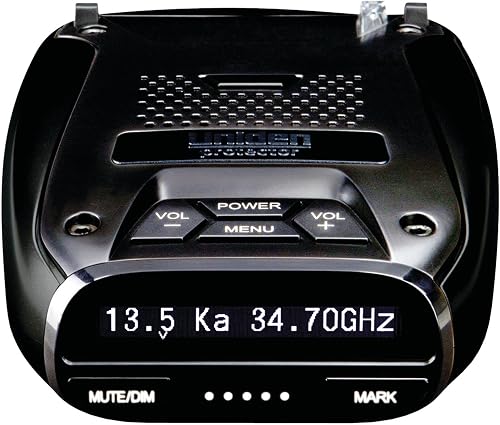
- GPS mute memory
- Preloaded red light and speed camera locations
- Voice alerts
- OLED display
The DFR7 combines route-based false-alert memory with stored camera location warnings. Voice alerts suit drivers who prefer spoken information over checking a display.
Pros
- GPS mute memory
- Free database and firmware updates
- Programmable voice alerts
Cons
- Camera warnings depend on stored locations
- Route memory does not replace vehicle-signal filtering
The DFR7 remembers common false-alert locations and can mute them on later trips. It also includes preloaded red light and speed camera locations, with free database and firmware updates from Uniden.
These are separate tools: mute memory manages repeated interruptions, while the camera database warns about saved locations. Neither should be confused with detecting a live radar signal.
Programmable voice alerts let you choose spoken information that fits your driving preferences. Its OLED display can show band frequency, numeric signal strength, a maximum-speed warning and vehicle battery voltage.
Choose it for route memory and camera location awareness in one detector. Skip it if shared community alerts are your deciding feature, or if you won't keep a camera database current.
Plan to review updates before a long trip. A stored location warning is only as useful as the information available to the detector, and a quiet stretch of road does not establish that no camera is present.
Which detector suits stop-and-go commutes?
The Radenso XP suits drivers who want low-speed muting and direct control over saved locations. That combination is useful on routes with parking lots, slow traffic and repeated stops.
Radenso XP

- User-added GPS lockouts
- Automatic muting below a selected speed
- Speed-based sensitivity adjustment
- Windows and Mac update compatibility
Low-speed muting suits routes with frequent stops and slow traffic. User-added GPS lockouts let you decide which recurring false-alert locations to save.
Pros
- Manual control over GPS lockouts
- Selectable low-speed mute threshold
- Updates from Windows or Mac
Cons
- Saving a lockout requires a button press
- Mute threshold needs a thoughtful choice
The XP lets you save a GPS lockout by pressing and holding a button. You choose which recurring false-alert locations enter its memory, rather than relying on automatic learning.
It also offers automatic muting below a user-selected speed and adjusts sensitivity based on current speed. These controls let you reduce low-speed interruptions without making every route use the same alert behavior.
Buy it if you want to decide what gets muted and when. Skip it if you want location learning with less manual input, since adding lockouts is part of this model's routine.
Choose a low-speed threshold carefully. Setting it too high can quiet information during more of the drive than you intended, while setting it too low may leave the interruptions you wanted to reduce.
Radenso says the XP is ready to use with its default settings. Windows and Mac update compatibility also makes it a practical option if your computer choice limits which maintenance tools you can use.
Which cheap detector suits drivers who prefer manual settings?
The Cobra RAD 390 fits buyers who want adjustable sensitivity and filtering in a corded setup. Choose it when setting alert behavior yourself matters more than connected reports.
Cobra RAD 390

- Adjustable sensitivity and filtering modes
- Front and rear laser detection
- USB-C power cord and adapter
- Firmware updates
The RAD 390 suits drivers who want to choose their own sensitivity and filtering settings. Power accessories and an adjustable adhesive mount are included.
Pros
- Adjustable alert modes
- Included power and mounting accessories
- Firmware update support
Cons
- Adhesive mount needs a planned position
- Requires corded power
The RAD 390 includes adjustable alert modes, front and rear laser detection and firmware update support. Its IVT filtering is designed to reduce unwanted signals from blind spot and other vehicle avoidance systems.
The included USB-C cord and cigarette lighter adapter provide the power setup. An adhesive windshield mount adds static cling film, a detachable bracket and an adjustable angle.
Choose it for control over your alert modes and an included mounting package. Skip it if Drive Smarter shared alerts are central to your plan, since the RAD 490i is the relevant connected alternative in this pair.
Think through placement before applying the mount. Being able to adjust its angle does not remove the need for a clear view or a safe cord route.
Start with a normal sensitivity setting and change it only after you understand the alerts on your route. An aggressive mode can produce more information than you find useful around dense roadside activity.
Is the Cobra RAD 350 enough for basic alerts?
The Cobra RAD 350 fits drivers who want audible band information and signal strength without making extra features the focus. It is the straightforward option for a basic alert routine.
Cobra RAD 350
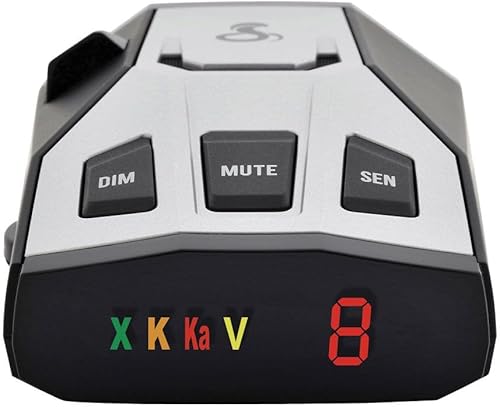
- IVT filtering
- Front and rear detection
- Audible band and signal-strength tones
- 7-segment color display
Distinct tones convey band and signal strength without requiring constant display checks. This is the straightforward choice when basic alert information covers your needs.
Pros
- Audible band identification
- Numeric signal-strength display
- Power cord included
Cons
- Requires a corded 12V connection
- Display uses compact icons and numbers
The RAD 350 uses different tones to convey band and signal strength. Its 7-segment color display adds band icons and a numeric signal-strength meter, so learn those cues while parked.
Its IVT filter and anti-falsing circuitry address unwanted signals from vehicle systems. Filtering can reduce interruptions, but you still need to understand the alerts instead of assuming every sound identifies enforcement.
Buy it when basic tones and display information meet your needs. Skip it if recurring location memory or low-speed muting is a priority, since those needs point toward other picks in this guide.
It uses a corded 12V connection and includes a power cord. Check where that cord will run before choosing a mounting position.
For repeated false-alert locations, compare our best radar detectors with GPS. Location-based controls can be more useful than a simpler detector if your daily route includes the same unwanted signals.
What matters when buying a cheap radar detector?
Spend your attention on alert quality, route fit and installation before extra screen features. A detector that stays understandable in your car is more useful than one whose warnings you habitually ignore.
Match the features to your driving pattern
For a repeated commute, prioritize a way to manage recurring fixed signals. For routes with frequent slow sections, look at low-speed muting and how much control you want over its threshold.
For occasional travel, choose controls you can understand without relearning the menu every trip. Connected reports can add context, but consider whether you want another phone connection in your routine.
Decide which problem you are solving before comparing models. Buying every available feature is poor value if your main need is simply reducing the same interruption beside the same shopping center.
Separate GPS memory from vehicle-signal filtering
GPS memory handles places; signal filtering handles certain unwanted transmissions. Remembering a storefront does not solve every alert caused by a moving vehicle.
Likewise, a filter aimed at vehicle systems does not necessarily quiet a fixed roadside source on your commute. This distinction explains why location memory and filtering can both matter.
Treat a suspected false alert with care before saving a lockout. A familiar location alone is not proof that every signal there should be muted.
Treat range language as a starting point
Terms such as long range do not tell you exactly how much notice you'll receive. Hills, curves, obstructions, the source's direction and whether it is transmitting all affect detection.
Instant-on radar can remain quiet until it is used. A detector cannot warn about a signal it has not received, so a silent detector is not a reason to change how you drive.
Laser presents a different limit because its beam is narrow. Our guide to whether radar detectors pick up lidar explains why laser detection is not the same as dependable advance notice.
Check the full installation before choosing
Identify the power outlet, possible mounting spot and cord route before ordering. Leave room for your phone mount, dash camera, sun visor and any windshield sensors.
An included USB-C cable does not mean every USB port in your car is suitable. Use the supplied power arrangement or one specifically approved for the detector.
If you move equipment between vehicles, consider the mounting method as carefully as the detector. Adhesive placement needs more planning than a setup intended for frequent removal.
How should you set up a budget radar detector?
Set it up while parked, with a clear view and secure power, then learn the default alerts before changing settings. A poor position or confusing configuration can undermine an otherwise suitable choice.
Position the detector and secure the cord
Follow the detector manual and your vehicle's guidance for a clear, level mounting position. Keep it out of your sightline and away from airbags, controls and areas where a loose cord could interfere.
Some windshields have coatings or heated sections that can affect reception. Check the vehicle manual for guidance rather than assuming every spot on the glass works equally well.
Clean the mounting surface as instructed before attaching a suction or adhesive mount. Secure the cord so it cannot swing across the steering area or pull the detector out of position.
Our guide to where to mount a radar detector covers placement in more detail. Recheck clearance with the visor down before calling the installation finished.
Learn the sounds before changing sensitivity
Read the manual's alert guide and set a volume you can hear without being startled. Adjust brightness for a quick glance in daylight and comfortable use after dark.
Begin with the recommended defaults. If you change several filters at once, you won't know which change caused a useful warning to disappear or an unwanted alert to stop.
Never disable a band simply because it seems noisy. Understand its use on your routes before changing coverage, and make adjustments only while parked.
Set up connected features before departure
Pair a supported phone, review app permissions and confirm how audio reaches you before driving. Community reports are an added source of information, not a complete picture of the road.
Keep the phone secured and avoid managing reports on the move. If the connection drops, don't troubleshoot menus while driving; deal with it at the next safe stop.
How do you care for a cheap radar detector?
Keep the mount, power connection and software in good order so the detector remains usable. Most routine care involves preventing movement, protecting the device and maintaining its settings.
Check suction mounts and brackets periodically, especially after major temperature changes. A detector that tilts or drops can become both distracting and poorly positioned.
Keep sensor areas clear and follow the manual's cleaning instructions. Avoid spraying cleaner directly onto the device or leaving liquid near its ports.
Remove the detector from prolonged direct heat when practical, following its storage guidance. When moving it, grip the device or bracket rather than pulling on the cable.
Check for supported firmware and database updates before longer trips. Our radar detector firmware update guide explains the process, but always use the files and instructions for your exact model.
After an update, review important settings before leaving. Keep a short note of preferred modes and mute choices so you can restore your setup without guessing.
Which budget radar detector mistakes should you avoid?
Avoid buying by range claims, muting too much and ignoring installation. These mistakes can leave you with a detector that creates noise without giving you information you understand.
Buying for features you won't use
Shared alerts add little to your routine if you never connect the app. Manual lockouts also lose their value if you don't want to spend time managing recurring locations.
Choose the routine you will follow. Automatic learning, manual controls and basic tones suit different habits, even when all 3 buyers drive similar roads.
Making silence the only goal
A quiet detector is pleasant, but silence alone does not show that its settings are right. Strong filtering, saved lockouts and speed-based muting each change what you hear.
If you find yourself ignoring alerts, review their causes and your settings while parked. Don't respond by turning down the volume until every warning becomes easy to miss.
Confusing coverage with direction
Front and rear detection does not automatically tell you which way a signal is coming from. Do not read a coverage claim as a promise of directional arrows.
Signal strength is also not a precise distance measurement. Use it as alert information rather than a countdown to a source.
Are radar detectors legal on your route?
Check current official rules for your location and vehicle type before buying or mounting a detector. Permission to use one and permission to place equipment on the windshield are separate questions.
Our guide to whether radar detectors are legal explains the checks to make. Drivers passing through Virginia or D.C. should also read the local rules for radar detectors.
If you regularly cross state or district boundaries, plan for those changes before departure. A convenient mounting setup should still let you follow the rules throughout the trip.
Which cheap radar detector should you choose?
Choose a cheap radar detector by the alert problem you need to solve, then confirm its installation will work in your car. Use these decision rules to settle the shortlist:
- Repeated daily commute: Choose the Cobra RAD 700i for automatic learning of recurring false-alert locations and connected reports.
- Flexible placement: Choose the Cobra RAD 480i when included windshield and dash mounting options are the deciding benefit.
- Connected trips with changing conditions: Choose the Cobra RAD 490i for shared alerts and adjustable modes.
- Camera location awareness: Choose the Uniden DFR7 for stored camera warnings, voice alerts and route memory.
- Slow traffic with manual lockouts: Choose the Radenso XP for a selectable mute threshold and control over saved locations.
- Manual settings without prioritizing shared reports: Choose the Cobra RAD 390.
- Basic audible information: Choose the Cobra RAD 350 if band tones and signal strength cover your needs.
Before ordering, settle on the mounting position and power source. Then use our best radar detectors for cars guide if your shortlist still lacks a feature you need.
Our top 3 picks at a glance
-
1
-
2
-
3
Frequently asked questions
What should you expect from a cheap radar detector?
A cheap radar detector should provide understandable alerts and controls that suit your routes; useful extras include GPS memory, filtering for vehicle signals and practical mounting accessories. Choose those features before chasing range claims, since hills, curves, traffic and the signal source all affect the warning you receive.
Is GPS useful on a budget radar detector?
GPS is useful when the same false alerts repeat along your commute; location memory helps manage fixed sources, while filtering addresses unwanted signals such as those from nearby vehicles. Choose automatic learning if you want less manual work, or user-added lockouts if you want to control which locations are saved.
Do cheap radar detectors detect laser?
Yes, every detector in this guide includes laser detection, but an alert does not guarantee advance warning; laser uses a narrow beam, so detection can occur only when your vehicle is already being measured. Treat the alert as information and keep following posted limits rather than relying on it to change speed.
Are radar detectors legal everywhere?
No, permission to use a radar detector depends on location and vehicle type; check current official rules for your route before buying or mounting one, including restrictions that may apply to your windshield. Our guide to radar detector laws and safe use explains which questions to check.
Can a budget radar detector reduce false alerts?
Yes, filtering can reduce unwanted alerts, and GPS memory can manage recurring signals at familiar locations; these functions solve different problems, so a detector may benefit from both. Start with the recommended settings and change one control at a time instead of silencing an entire band after one annoying drive.