7 Best Radar Detectors With GPS (October 2026)
The best radar detectors with GPS include the Uniden R7 for frequent highway drivers, the Uniden R3 for everyday commuters, and the Cobra RAD 700i for connected road trips.
On this page (11 sections)
- Which radar detector with GPS is the best fit?
- How we chose radar detectors with GPS
- Which GPS radar detector fits your driving?
- What can GPS improve, and what stays the same?
- Which GPS controls matter on your routes?
- Should you choose arrows, shared alerts or neither?
- How should you set up a GPS radar detector?
- How do you keep location features useful?
- What mistakes make GPS muting less useful?
- Are radar detectors with GPS legal where you drive?
- Which radar detector with GPS should you choose?
Which radar detector with GPS is the best fit?
The Uniden R7 is the best radar detector with GPS here for drivers who want false alert memory, camera warnings and directional arrows together. The R3 suits a simpler commute-focused setup, while the Cobra RAD 700i fits drivers who want automatic learning and community reports.
The useful difference is how each detector handles your daily drive. A repeated alert beside the same shopping center calls for location memory; an unfamiliar alert on a highway makes signal direction more useful.
Start with the feature that solves your most common problem. For options beyond GPS-equipped models, compare our best radar detectors for cars.
Our picks at a glance
-
1

-
2

-
3

How we chose radar detectors with GPS
We prioritized useful location controls and clear alerts, then compared camera warnings, directional information and connected tools. Automatic learning and manual lockouts both have a place, but they suit different levels of driver involvement.
We also separated features that can sound alike. Front and rear detection does not necessarily mean directional arrows, and Bluetooth support does not establish that a detector offers community reports.
Manufacturer range claims do not provide a common measured basis for ranking these 7 models. The recommendations instead focus on the supplied features and which combination makes sense for each buyer.
| Product | Best for | GPS | Direction | Display | Our score |
|---|---|---|---|---|---|
| Uniden R7 | frequent highway drivers | Mute memory and camera alerts | Dual antennas with directional arrows | Multi-color OLED | 9.1 |
| Uniden R3 | everyday commuters | Mute memory and camera alerts | Multi-color OLED | 8.9 | |
| Cobra RAD 700i | connected road trips | AutoLearn false alert filtering | Customizable 5-color OLED | 8.6 | |
| Uniden R4W | app-minded drivers | Auto mute memory and camera database | Color OLED | 8.4 | |
| Uniden DFR7 | familiar local routes | Mute memory and camera alerts | OLED | 7.9 | |
| Escort MAX 360 MKII | connected daily driving | AutoLearn false alert filtering | 360° directional arrows | 7.8 | |
| Radenso XP | manual setup control | Manual lockouts for common false alerts | 7.6 |
Which GPS radar detector fits your driving?
Choose by route pattern and preferred controls, rather than buying every available feature. These picks range from manual location memory to automatic learning with connected alerts.
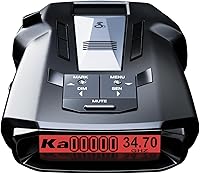
Uniden R7
- GPS mute memory
- Directional arrows
- Red light and speed camera alerts
- Multi-signal OLED display
A strong fit for drivers who want familiar-route muting and signal direction in one detector. Its display can show up to 4 signals at once.
Pros
- Directional arrows
- Preloaded camera locations
- Free database and firmware updates
Cons
- Multi-signal display takes time to learn
The R7 suits frequent highway drivers who also encounter familiar nuisance alerts near home. Its dual antennas and directional arrows help you understand where a detected signal is coming from, while GPS memory handles recurring false alert locations.
Its multi-color OLED can show up to 4 signals simultaneously, including band and strength information. That extra context matters when several sources appear together, but spend time learning the display before relying on quick glances.
Preloaded red light and speed camera locations come with free database and firmware updates. You can also save geographical points for a spoken reminder as you approach.
Choose it when you want both route memory and directional context. Skip it if you mainly want a quieter commute and have little interest in interpreting several signals.
Before fitting it, read our guide on where to mount a radar detector so the placement supports a clear view and safe driving.
Uniden R3
- GPS mute memory
- Camera alerts
- Programmable voice alerts
- User location marks
Choose the R3 when recurring false alerts and stored camera warnings are your main concerns. User marks let you add reminders for selected locations.
Pros
- GPS mute memory
- Programmable voice alerts
- Free database and firmware updates
Cons
- User marks require choosing locations to save
The R3 is a good match for a commuter who wants location features without making connected services the center of the setup. It combines GPS mute memory, preloaded camera warnings and programmable voice alerts.
Its user marks are useful for places where you want a reminder, such as a school zone or a location where you regularly encounter radar transmissions. A reminder marks a place; it does not confirm that a live signal is present.
The multi-color OLED provides visual information alongside spoken warnings. Uniden includes free database and firmware updates, so camera coverage and software maintenance belong in your ownership routine.
Choose the R3 if familiar-route muting and location reminders cover your needs. Skip it if directional arrows or shared community reports are central to your decision.
For a closer look at its controls and feature mix, read our Uniden R3 review.
Cobra RAD 700i
- GPS based AutoLearn
- Drive Smarter shared alerts
- Front and rear detection
- Customizable OLED display
Automatic route learning suits repeat drives, while Drive Smarter adds community reports for connected trips. Vehicle display compatibility helps keep that information together.
Pros
- Automatic false alert learning
- Shared community alerts
- Apple CarPlay and Android Auto compatibility
Cons
- Shared alerts require a Drive Smarter connection
The Cobra RAD 700i suits drivers who want a detector that learns repeated routes and can join a connected alert service. Its GPS-based AutoLearn recognizes recurring false alert locations over time.
Drive Smarter adds reports from other connected drivers. Apple CarPlay and Android Auto compatibility lets you view your route and interact with alerts through a compatible vehicle display.
Cobra includes front and rear detection and a 5-color OLED with selectable colors. Choose a readable display setting first; matching the cabin lighting is secondary to seeing the alert clearly.
This is a useful fit if you already use a phone-based driving setup and will maintain the connection. Skip it if you want to avoid apps, since shared reports are a major reason to choose this model.
For the choice between connected features and core GPS functions, compare the Cobra RAD 700i with the Uniden R3.
Uniden R4W
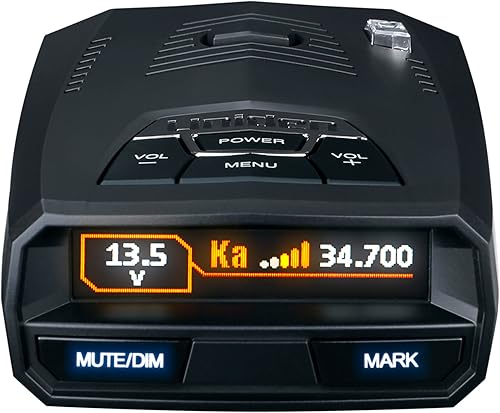
- GPS auto mute memory
- Wi-Fi and Bluetooth
- R/TACH app support
- Speed and red light camera database
The R4W suits drivers who want automatic false alert memory alongside wireless connections and R/TACH app support. It also includes a speed and red light camera database.
Pros
- Automatic GPS muting
- Wi-Fi and Bluetooth
- K/Ka filtering for vehicle-generated false alerts
Cons
- Learning recurring false alerts takes repeat trips
The R4W suits drivers who want automatic location memory with wireless connections and app support. It includes Wi-Fi, Bluetooth and R/TACH compatibility, plus a speed and red light camera database.
Its automatic memory addresses recurring false alert locations. Uniden also says its K/Ka filtering reduces alerts caused by blind spot monitoring and collision avoidance systems, which create a different challenge from a fixed roadside source.
Programmable voice alerts and a color OLED let you choose how to receive information. Set those preferences while parked so you aren't sorting through controls during a drive.
Choose the R4W when you intend to use its wireless tools alongside GPS learning. Skip it if a manual memory control or directional arrows better matches your priorities.
Our Uniden R3 vs R4W comparison helps narrow the choice between core location features and the R4W's connected setup.
Uniden DFR7
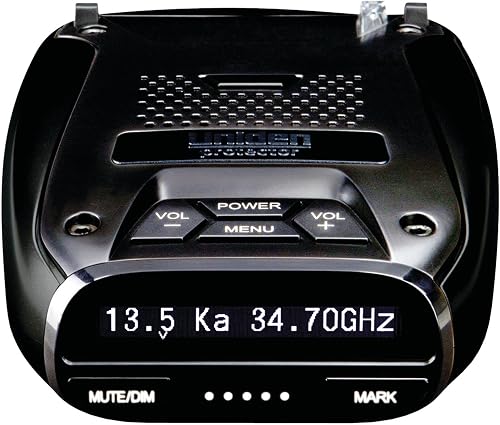
- GPS mute memory
- Camera alerts
- Voice alerts
- Vehicle voltage display
The DFR7 fits drivers whose main needs are recurring-location muting and camera warnings. Its display also shows signal details and vehicle battery voltage.
Pros
- GPS mute memory
- Free database and firmware updates
- Spoken warnings
Cons
- Location memory cannot address every moving false source
The DFR7 suits drivers who spend much of their time on familiar local routes and want the core location features. Its GPS memory handles recurring false alerts, and its preloaded database provides red light and speed camera warnings.
The OLED shows band frequency, numeric signal strength and vehicle battery voltage, along with a maximum speed warning. Those readouts suit a driver who wants clear status information without building the decision around an app.
Uniden includes programmable voice warnings and free database and firmware updates. It also says the K/Ka filtering helps reduce false alerts from other vehicles' driver-assistance systems.
Choose it if location memory and spoken warnings cover your daily needs. Skip it if automatic route learning, shared reports or directional information are the main reasons you're shopping.
Compare the feature tradeoffs in our guide to best cheap radar detectors, rather than assuming the longest feature list is always the right buy.
Escort MAX 360 MKII

- GPS based AutoLearn
- Directional arrows
- Drive Smarter shared alerts
- Vehicle display compatibility
This model combines automatic learning for repeat routes with arrows and connected community reports. It suits drivers who plan to use both the detector and Drive Smarter.
Pros
- Automatic route learning
- Directional arrows
- Apple CarPlay and Android Auto compatibility
Cons
- Route learning needs repeat trips
- Community reports require a connection
The Escort MAX 360 MKII suits drivers who want automatic learning, directional arrows and connected reports in one setup. Its GPS-based AutoLearn learns repeated routes and rejects false alerts from specific locations.
The arrows help locate a detected signal, while Drive Smarter supplies community information. Apple CarPlay and Android Auto compatibility gives connected drivers another way to view routes and interact with alerts.
Escort says its filtering reduces nuisance signals from collision avoidance and blind spot monitoring systems. That filtering complements location learning because nearby vehicles can move with you instead of remaining at one saved point.
Choose it if you'll use both arrows and the connected service. Skip it if you want fewer setup tasks or rarely repeat a route, since familiar-location learning needs repeat trips.
If signal direction is your main priority, our Uniden R7 vs R8 comparison provides another useful branch of the decision.
Radenso XP

- Manual GPS lockouts
- Low speed muting
- Speed based sensitivity adjustment
- Windows and Mac updates
The XP lets you choose which recurring false alerts to save with a button hold. Selectable low speed muting adds control for slow local driving.
Pros
- Manual lockout control
- Selectable low speed muting
- Updates through Windows or Mac
Cons
- Saving a GPS lockout requires your input
The Radenso XP suits drivers who want to decide which nuisance locations enter memory. Press and hold a button to save a GPS lockout after identifying a recurring false alert.
It also offers automatic muting below a speed you select and sensitivity adjustment based on current speed. Those controls are useful if slow local driving creates more noise than you want to hear.
Radenso describes the XP as ready to mount and plug in without changing settings. You can start with that approach, then adjust the speed-related controls once you understand how they affect alerts.
Updates work through either a Windows or Mac computer. Choose it if deliberate lockout control appeals to you; skip it if you expect familiar locations to be learned without your input.
For help deciding which controls you'll actually use, read our guide to choosing a radar detector.
What can GPS improve, and what stays the same?
GPS improves location-based alert handling, not the detector's ability to receive every threat. Its main value is connecting an alert or reminder to a place.
A stationary door sensor may create a nuisance alert on the same block each day. Saving that location can reduce repeated noise, helping you pay attention when something unfamiliar occurs.
A moving vehicle's radar-based assistance system presents a different problem. Location memory alone cannot solve every alert from a source that changes position, so signal filtering still matters.
Does a radar detector with GPS replace live detection?
No, a GPS radar detector uses location information alongside its signal receiver. A saved camera warning can sound because you're approaching a stored point, even when the detector receives no radar.
Conversely, a new radar source can appear where nothing has been saved. Learn the difference between a location reminder, a live detection alert and a community report before deciding what an alert means.
Will GPS provide earlier laser warnings?
GPS does not make laser reception more likely or turn a laser alert into a reliable advance warning. Laser uses a narrow beam, so an alert may arrive only when your vehicle is being measured.
For the limits of that feature, read whether radar detectors can pick up lidar. Treat every alert as information, rather than permission to drive faster between warnings.
Which GPS controls matter on your routes?
Prioritize memory behavior, camera coverage or speed-based muting according to the driving you actually do. A repeated commute and an unfamiliar road trip place different demands on location features.
Automatic learning suits repeat commutes
Automatic learning makes sense when you pass the same fixed sources regularly and prefer less manual input. It needs repeat exposure, so don't expect a fully quiet route on the first drive.
Manual lockouts suit drivers who want to approve saved locations themselves. The tradeoff is attention and restraint: save a source only after you understand why it keeps appearing.
Avoid treating every inconvenient alert as a false one. A familiar location can still contain a new signal, and muting controls should be used with care.
Camera warnings need database upkeep
Choose stored camera warnings if those reminders are a main reason you're buying. Confirm that the model includes them rather than assuming every built-in GPS feature comes with a camera database.
A database is a record of locations, not a live inventory of every camera. Road changes and new installations make ongoing maintenance part of using this feature.
Speed muting trades sound for quiet
Speed-based muting suits drivers who want fewer audible alerts during slow travel. Before setting a threshold, understand exactly which alerts the model suppresses and whether visual information remains available.
Choose the threshold deliberately instead of raising it until the detector goes silent. Silence caused by a setting is different from an absence of detected signals.
Should you choose arrows, shared alerts or neither?
Choose arrows for signal direction and shared alerts for reports beyond your detector's own reception. Neither feature replaces location memory, and neither is essential for every buyer.
Arrows are useful if you want context as you pass a source or encounter several signals. They indicate relative direction, rather than identifying the exact vehicle or object producing the signal.
Community reports are useful when you want information from other connected drivers. Their value depends on available reports and an active connection, so keep them separate from the detector's own alerts in your mind.
You can also choose a simpler setup. If your main complaint is the same nuisance alert every morning, reliable memory controls may matter more than another stream of information.
How should you set up a GPS radar detector?
Start with legal placement, stable power and clear alerts, then adjust settings gradually. Configure the detector while parked and follow its model-specific instructions.
Fit the mount and route the cable first
Keep the unit secure, level as directed and clear of your view of the road. Avoid placing it where trim, wipers or other objects block the receiving area.
Check your vehicle manual for windshield coatings or designated areas that may affect electronic devices. Give the detector time to acquire a GPS position in an open location before judging its location features.
Route the power cable away from pedals, steering controls and airbag areas. Confirm that the plug stays seated and that normal vehicle movement does not pull on the mount.
Learn the alerts before changing filters
Begin with the recommended settings and learn the sounds, display labels and mute control. Use voice alerts at a level you can hear over ordinary cabin noise.
Change one setting at a time. If you alter several filters together, it becomes difficult to work out why an alert changed or disappeared.
Don't disable a band simply because it is noisy. Understand the band and your intended settings before making a change that removes alerts.
Build location memory patiently
On familiar routes, notice whether an alert repeats at the same place with a consistent pattern. Pull over safely before making any adjustment that needs more than a simple familiar control.
Keep user reminders separate from false alert lockouts. A reminder asks the detector to warn you about a place; a lockout asks it to suppress a recognized nuisance source.
How do you keep location features useful?
Keep software, databases and physical connections in good condition. GPS features need both accurate location information and a detector that remains securely powered and mounted.
Follow the model's instructions for firmware and camera database maintenance. Our guide to updating radar detector firmware explains the preparation and update process.
After an update, check saved preferences before your next trip. Avoid assuming that a completed software update also refreshed every separate database.
Inspect the mount and cable regularly, especially after moving the detector between vehicles. Clean mounting surfaces and the detector as directed, and remove it from prolonged parked-car heat when the manual recommends doing so.
What mistakes make GPS muting less useful?
The biggest mistakes are saving uncertain alerts and expecting silence immediately. Location memory works best when you understand what it is suppressing.
- Locking out an unfamiliar source: Wait until you can recognize a recurring nuisance pattern.
- Expecting instant route learning: Automatic systems need repeat trips before familiar sources can be recognized.
- Confusing a camera reminder with live radar: Stored locations and received signals are different alert types.
- Ignoring a changed pattern: A new band, strength pattern or additional signal deserves attention even on a familiar road.
- Overusing mute settings: A quiet detector can reflect your settings rather than a clear road.
- Adjusting menus while moving: Make configuration changes while parked.
If alerts become unusually sparse after a change, review that change first. Check power, mounting, GPS status and enabled alerts before assuming the surrounding roads have become quieter.
Are radar detectors with GPS legal where you drive?
Check current location, vehicle and mounting rules before using one. GPS functions do not change the need to confirm whether the detector itself is permitted.
Our guide to whether radar detectors are legal covers the questions to check before mounting one. Include every part of a planned trip, rather than checking only your home state.
For routes through Virginia or Washington, D.C., read the state and district rules and confirm current requirements with local authorities. Follow posted limits regardless of what the detector reports.
Which radar detector with GPS should you choose?
Choose your radar detector with GPS around the control you'll use most often. Start with the nuisance you want to reduce, then add direction or connected reports only if they help your driving.
- Choose the Uniden R7 if highway signal direction matters alongside familiar-route memory and camera reminders.
- Choose the Uniden R3 if core location features cover your commute.
- Choose the Cobra RAD 700i if automatic learning and Drive Smarter fit your connected driving routine.
- Choose the Uniden R4W if wireless connections and R/TACH support are priorities.
- Choose the Uniden DFR7 if familiar-route muting, spoken alerts and camera warnings cover your needs.
- Choose the Escort MAX 360 MKII if you want arrows, automatic learning and community reports together.
- Choose the Radenso XP if you prefer approving lockouts yourself and setting low speed muting.
For the most complete combination of location memory and directional context among our picks, start with the full Uniden R7 review before deciding.
Our top 3 picks at a glance
-
1
-
2
-
3
Frequently asked questions
What does GPS do on a radar detector?
GPS adds location awareness, which can support false alert memory, saved-location reminders and camera warnings; the available functions depend on the model. It does not increase radar sensitivity by itself, and a stored camera warning is different from receiving a live radar signal.
Can GPS radar detectors mute false alerts automatically?
Some can learn recurring false alert locations automatically, including the Cobra RAD 700i, Uniden R4W and Escort MAX 360 MKII; others provide manual controls, such as the Radenso XP's button-operated lockouts. Check how locations are saved before buying, since automatic learning and manual memory suit different drivers.
Do GPS radar detectors show speed cameras?
Some provide warnings for stored speed camera locations, including the Uniden R7, R3, R4W and DFR7; these warnings depend on database coverage and maintenance. They do not mean the detector has received a radar signal, and silence does not establish that a road has no cameras.
Do I need directional arrows with GPS?
No, arrows and GPS solve different problems: arrows indicate the direction of a detected signal, while GPS supports location-based functions such as false alert memory. Choose arrows if signal direction matters on your routes; choose your GPS controls first if reducing familiar nuisance alerts is the main goal.
Are radar detectors with GPS legal everywhere?
Check current rules for your location, vehicle type and mounting position before using one; GPS does not create a separate exemption for a radar detector. Our guide to radar detector laws explains which questions to check before buying and before a trip across state lines.