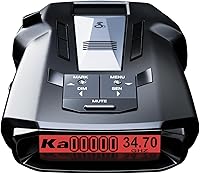
Uniden R3 Radar Detector Review: Worth It? (October 2026)
The Uniden R3 suits regular commuters who want GPS mute memory, camera alerts and saved location warnings. Choose the R4W for wireless features or the Cobra RAD 700i for shared driver alerts.
On this page (8 sections)
- What does the Uniden R3 offer on familiar routes?
- Who should buy the R3, and who should skip it?
- Which alternative fits a different driving routine?
- How should you set up the R3 before your first trip?
- Which common mistakes make a detector less useful?
- How do you care for the detector and its saved locations?
- How should you choose between the R3 and R4W?
- Should you choose the Uniden R3?
The Uniden R3 is a good fit for regular commuters who want to quiet familiar false alerts and save useful location reminders. Its appeal is a detector you can tailor to roads you drive often, without making shared driver alerts the center of your setup.
Buy around your routine rather than range slogans. If wireless connections matter more, start with the Uniden R4W review; if you want reports from other drivers, the Cobra RAD 700i has a different reason to be on your shortlist.
What does the Uniden R3 offer on familiar routes?
The R3 combines GPS mute memory and saved user marks to make repeated trips easier to manage. One reduces familiar nuisance alerts, while the other reminds you about places you choose to save.
Uniden R3

- Built-in GPS with mute memory
- Red light and speed camera alerts
- Multi-color OLED display
- Programmable voice alerts
A good fit for drivers who repeat the same routes and want to manage familiar false alerts. User marks also let you save places where an approaching-location warning would help.
Pros
- GPS mute memory for recurring false alert locations
- Saved user marks with approach warnings
- Programmable voice alerts
- Free database and firmware updates
Cons
- Saved false alert locations offer less help on unfamiliar routes
- Camera location information needs database updates
Uniden describes the R3 as a long-range radar and laser detector with advanced false alert filtering. That describes its intended role, but it doesn't establish a measured range advantage over the alternatives here.
Road shape, surrounding traffic and the way a signal is used affect warning time. Don't choose a detector based on a promised distance or assume an empty screen means the road ahead is clear.
How does Uniden R3 mute memory help a commute?
GPS mute memory helps with repeat false alerts at fixed locations, such as automatic doors near your regular route. Its value grows when the same nuisance source interrupts the same trip day after day.
Confirm a source before saving a mute location, following the manual's procedure. An alert happening near a familiar store does not prove that the store caused it.
Location memory and signal filtering also solve different problems. A saved place can help with a fixed source, while a moving source does not stay at one geographic point.
When should you use a saved user mark?
Use a user mark when you want an approaching-location reminder, rather than silence. The R3 can announce “User mark ahead” as you near a saved point.
A school zone or a place where you regularly encounter radar transmissions may be worth marking. Keep the list selective so reminders stay useful instead of becoming another sound you learn to ignore.
How should you use the screen and voice warnings?
Use voice warnings for information you need while driving, and make screen adjustments while parked. The R3 has a multi-color OLED display and programmable voice alerts, including Ka frequency announcements.
Choose a volume you can hear over normal cabin noise without making every alert startling. Keep the display readable from your seated position, with brightness that doesn't pull your eyes away from the road at night.
Who should buy the R3, and who should skip it?
Buy the R3 if familiar-route control matters more than a connected app routine. It suits someone willing to learn alert types, manage saved locations and keep the detector's software current.
It makes the most sense for these drivers:
- Daily commuters: You pass the same fixed sources and can make informed choices about recurring alerts.
- Drivers who want location reminders: You have a few places where an approach warning would be useful.
- Drivers who prefer spoken information: You want to hear the alert type rather than keep checking a screen.
Skip it if your main goal is community reports or wireless features. Choose an alternative built around those needs instead of buying the R3 and hoping it will fill the same role.
Drivers who take mostly unfamiliar routes can still use it, but saved locations will help less on those trips. Think about how much of your driving repeats before making route memory your deciding feature.
If you're still choosing a brand or model family, our guide to the best Uniden radar detectors puts the R3 alongside other Uniden options.
Which alternative fits a different driving routine?
Choose the RAD 700i for shared alerts, the R4W for wireless Uniden features, or the DFR7 for detailed screen information. These are practical differences you can choose around without assuming one model always gives earlier warnings.
| Detector | Buyer who should consider it | Reason to choose it | Reason to skip it |
|---|---|---|---|
| Uniden R3 | Regular commuter | Familiar-route muting and saved reminders | Connected features drive your choice |
| Cobra RAD 700i | Driver who wants shared reports | Drive Smarter community connection | You don't want to maintain an app connection |
| Uniden R4W | Uniden buyer who uses apps | Wireless support and automatic location learning | You won't use its connected features |
| Uniden DFR7 | Driver who values screen details | Signal information and battery voltage | Those readouts won't affect your routine |
Cobra RAD 700i: choose it for shared reports
The RAD 700i suits drivers who want community alerts through Drive Smarter. Bluetooth links it to the service, with Apple CarPlay and Android Auto compatibility for supported vehicle display use.
Its GPS AutoLearn recognizes recurring false signal locations over time. Cobra also includes front and rear detection, though detecting a signal from either direction is different from showing a directional arrow.
Skip this model if you want to avoid app connections. Shared reports depend on other drivers and a connection, so they add information rather than provide a complete picture of the road.
Uniden R4W: choose it for wireless support
The R4W is the better fit if Wi-Fi, Bluetooth and R/TACH app support are features you'll use. It also has GPS auto mute memory and K/Ka filtering that Uniden says reduces alerts from vehicle driver-assistance systems.
That gives it a clear purpose for someone who wants automatic location learning alongside a connected Uniden setup. It isn't a reason to replace an R3 whose features already meet your needs.
Our Uniden R3 vs R4W comparison helps you weigh that choice. Skip the R4W if its extra connections would sit unused.
Uniden DFR7: choose it for visible signal details
The DFR7 suits drivers who want frequency, numeric signal strength and vehicle battery voltage on an OLED screen. It also supports a maximum speed warning.
Its core features include GPS mute memory, camera location warnings and voice alerts. Consider it when those functions cover your needs and the extra readouts have a clear use for you.
Skip it if you want the connected features described above. More screen information also isn't a reason to watch the detector while driving.
How should you set up the R3 before your first trip?
Start with a secure mount, current software and settings you understand. Complete the setup while parked, then use familiar roads to learn how alerts fit your surroundings.
Place the detector before routing the cable
Choose a position with a clear view ahead that follows the manual and local mounting rules. Keep it out of your driving sight line and away from controls, airbags and anything that could block its view.
Our guide to where to mount a radar detector explains placement choices in more detail. Check the mount from your normal seated position before deciding where the cable should run.
The R3 uses 12-volt DC power. Secure the cable so it can't hang near pedals or interfere with steering, and confirm that starting the vehicle doesn't loosen the connection.
Update before changing alert settings
Uniden provides free firmware and camera database updates for the R3. Follow its instructions for the exact model, and keep power stable throughout the process.
Firmware and a camera database do different jobs: one controls detector behavior, while the other supplies stored camera locations. Keeping one current does not replace maintaining the other.
Learn the defaults before reducing alerts
Read the manual's alert explanations and start with settings you can understand. If you change several filters or bands at once, you won't know which change caused a quieter drive.
Avoid copying a stranger's full settings profile. A setup chosen for another location may suppress a signal type that matters where you drive.
Make one change at a time while parked, and keep a short note of what you changed. That makes it easier to reverse a choice if alerts stop making sense.
Which common mistakes make a detector less useful?
The biggest mistake is treating silence as proof that no enforcement is present. A detector responds to signals it receives; it doesn't confirm that every stretch of road is free of speed measurement.
Other mistakes can reduce its value or make alerts harder to interpret:
- Muting an unfamiliar alert too soon: Learn the location and likely source before saving it.
- Disabling a band just to stop noise: Understand its use in your area before changing band settings.
- Expecting camera warnings to cover every location: Stored databases need upkeep and may be incomplete.
- Treating a laser alert like a long countdown: A narrow beam may reach your vehicle only when it's being measured.
- Adding too many user marks: Frequent low-value reminders can make useful ones easier to dismiss.
- Making menu changes in traffic: Pull over safely before adjusting settings.
Radar warning time also varies with terrain and how radar is operated. A brief transmission aimed at your vehicle may give little useful notice, even with a sensitive detector.
For the underlying limits, read how radar detectors work. Understanding the difference between receiving a signal and knowing what lies ahead helps you interpret alerts more calmly.
Check our guide to radar detector laws and confirm the rules for your vehicle and location before use. Mounting permission and detector permission are separate things to check.
How do you care for the detector and its saved locations?
Keep the mount secure, the viewing surfaces clear and saved locations relevant. A small amount of upkeep helps prevent loose connections and a growing collection of unhelpful reminders.
Inspect the cable and plug for damage, especially where they bend or rub against trim. Clean the housing with a soft cloth according to the manual, and avoid spraying cleaner into openings.
Check the mount after large temperature changes or if the detector begins to sag. Follow the manual's storage guidance, and remove visible equipment when leaving the vehicle if theft is a concern.
Review user marks when your routes change. Remove reminders that no longer help, and reassess saved mute locations if nearby businesses or road layouts change.
Before a longer trip, check for updates and confirm that alerts are audible. Do this before leaving, rather than trying to fix the setup on the road.
How should you choose between the R3 and R4W?
Choose the R3 for a familiar-route routine you manage yourself, or the R4W when automatic location learning and wireless support are part of your plan. Don't pay for a workflow you won't use.
If you already have an R3, name the missing function before replacing it. Wanting a quieter commute is worth investigating through your current settings and saved locations before assuming a different detector is necessary.
The Uniden R3 vs R4W guide covers the feature differences. For options beyond those two, compare the best radar detectors for cars around your driving habits.
Should you choose the Uniden R3?
Choose the Uniden R3 for regular routes, selective muting and saved location reminders. Choose the RAD 700i if shared reports matter most, the R4W if you want connected Uniden features, or the DFR7 if its detailed readouts suit your routine.
Before ordering, decide where the detector will sit and whether you'll maintain its settings and updates. Those choices will affect daily use more than another range slogan.
If familiar-route muting is your deciding feature, the next useful step is our guide to radar detectors with GPS, which explains the choices within that group.
Frequently asked questions
Does the Uniden R3 have GPS?
Yes, the Uniden R3 has built-in GPS with mute memory for common false alert locations on familiar routes. It also supports user marks, which announce saved places as you approach them, so you can separate locations you want quieted from points where you want a reminder.
Does the Uniden R3 alert for red light cameras?
Yes, the Uniden R3 includes preloaded red light and speed camera locations, with free database and firmware updates from Uniden. Those warnings depend on stored location information, so keep the database current and follow posted signs rather than assuming every camera will produce an alert.
What is the difference between the Uniden R3 and R4W?
Choose the R3 for familiar-route mute memory and saved user marks, or the R4W for Wi-Fi, Bluetooth, R/TACH app support and automatic mute memory. Both include camera location warnings and programmable voice alerts, so the useful distinction is how much connectivity and automatic location learning you want.
Can the Uniden R3 detect laser?
Yes, the Uniden R3 supports laser detection as well as radar detection. A laser alert does not promise useful advance warning, since a narrow laser beam may reach your vehicle only when it is being measured, so treat the warning as information rather than time to react.