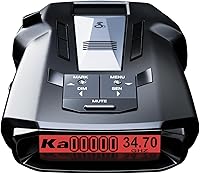
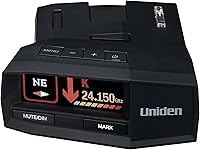
Uniden R4W Radar Detector Review: Worth It? (October 2026)
The Uniden R4W suits drivers who want repeat-route false alert muting and wireless app support. Choose the R7 for signal-direction arrows, the R3 for core GPS and camera alerts, or the Escort MAX 360 MKII for Drive Smarter shared alerts.
On this page (8 sections)
- What does the Uniden R4W offer?
- How does GPS muting help on a daily commute?
- How should you set up the R4W before driving?
- Which alternative fits better than the R4W?
- What should you check before choosing a detector?
- Which common mistakes should R4W buyers avoid?
- How do you care for the R4W and keep alerts useful?
- Should you choose the Uniden R4W?
The Uniden R4W is a good fit for drivers who want automatic false alert muting and wireless app support. If you searched for the Uniden R4, note that this review covers the R4W model, so check the exact model name before ordering.
Its strongest buying case is a regular commute where recurring alerts become noise and you also want phone connections. Choose by those needs rather than long-range claims alone, since they don't establish how these detectors compare on your roads.
What does the Uniden R4W offer?
The R4W combines GPS auto mute memory with Wi-Fi, Bluetooth and R/TACH app support. It detects X, K and Ka radar bands and laser, and includes a speed and red-light camera database.
Uniden R4W
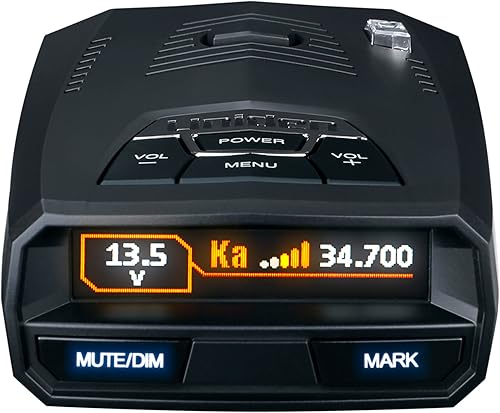
- Built-in GPS with auto mute memory
- Wi-Fi and Bluetooth
- R/TACH app support
- Multi-color OLED display
- Voice alerts
The R4W suits commuters who want automatic muting at familiar false alert locations and R/TACH app support. Choose it when you'll use the connection features alongside its display and spoken warnings.
Pros
- GPS auto mute memory
- Wi-Fi, Bluetooth and R/TACH app support
- Speed and red-light camera database
- Programmable voice alerts
Cons
- Requires a corded power connection
- Connected features add phone and app setup
Uniden says its Blackfin digital signal processor supports long-range performance, while advanced K/Ka filtering reduces false alerts from blind-spot monitoring and collision avoidance systems. Those claims don't provide a measured distance advantage over the alternatives here.
The practical appeal is having several tools for different jobs: filtering addresses unwanted signals, location memory handles familiar false alerts, and the camera database provides location-based warnings. You should understand those jobs before deciding which settings to change.
Who should buy the Uniden R4W?
Buy the R4W if you drive repeat routes and will use its connected features. A commuter who wants fewer recurring store-door alerts and plans to use R/TACH has a clear reason to choose it.
Skip it if signal-direction arrows are your main requirement, or if you have no interest in phone setup. The R7 addresses the first need, while the R3 deserves a closer look for core alerts without choosing around the R4W's connections.
How does GPS muting help on a daily commute?
GPS mute memory reduces repeated alerts at familiar false alert locations. A retail entrance along your daily route is a useful example: its automatic door signal can become a recurring distraction without adding useful road information.
Uniden calls the R4W's learning feature Auto Learn and says it reduces false alerts over time. This makes repeat journeys its clearest use case, since familiar locations give the feature something to learn.
A new route is different because the detector has less location history to draw on. Don't expect your first drive through an unfamiliar shopping area to sound like a route the detector already knows.
Location learning also differs from filtering signals produced by nearby vehicles. A moving blind-spot monitor won't remain at one map point, which is why signal filtering and GPS memory solve separate problems.
Avoid muting an unfamiliar warning just because it sounds near a known nuisance spot. A familiar location isn't proof that every signal there is harmless.
Camera warnings serve another purpose: they refer to stored locations rather than proving that a radar signal is active. Keep the database current, and don't assume silence means the road has no camera enforcement.
How should you set up the R4W before driving?
Mount it securely, confirm power and configure alerts while parked. A clear view of the road and a readable display matter more than placing the detector where it looks tidy.
The R4W measures 4.5 x 2.8 x 1.1 inches and uses a corded 12-volt DC connection. Check the space for the device, plug and cable before settling on a position.
Get the mount and cable right
Follow the device instructions for orientation and keep its sensing area clear of obstructions. Some windshield materials and coatings can affect reception, so consult your vehicle manual if the glass has special treatment.
Sit in your normal driving position and confirm that the detector doesn't block your view. Check that the cable stays clear of pedals, steering controls and airbag deployment areas.
Our guide to where to mount a radar detector explains placement choices. For a concealed power route, read how to hardwire a radar detector and confirm the kit's electrical and connector compatibility.
Configure the Uniden R4W while parked
Set the display and programmable voice alerts so you can understand warnings without leaning toward the device. Speech can reduce the need to read the screen, but it still needs a volume you can hear over normal cabin noise.
Before relying on R/TACH, confirm that it supports your phone and the functions you want. Pair and configure it while parked, then decide which information you need from the phone and which you can receive from the detector.
Check the current manual and firmware instructions before changing detection settings. Our guide to updating radar detector firmware explains the process, but use the files and steps intended for your exact model.
Which alternative fits better than the R4W?
Choose the R3 for core alerts, the R7 for direction information or the Escort for community alerts. None of these priorities requires you to chase the longest feature list.
| Detector | Main buying reason | Who should skip it |
|---|---|---|
| Uniden R4W | Connected features for repeat-route driving | Drivers buying mainly for directional arrows |
| Uniden R3 | GPS muting and camera warnings cover your needs | Buyers specifically seeking R/TACH support |
| Uniden R7 | Direction information helps sort nearby signals | Drivers who won't use the added visual information |
| Escort MAX 360 MKII | Drive Smarter community and vehicle-display features | Drivers who don't want a connected shared-alert service |
Uniden R3: for drivers with core alert needs
The R3 makes sense when location memory, spoken warnings and camera alerts cover your requirements. It also lets you mark locations for a future “user mark ahead” announcement.
A custom mark is useful for a place you want to remember, but it isn't evidence that radar is active there on every visit. Keep a distinction between your saved reminders and alerts triggered by detected signals.
Uniden provides free database and firmware updates for the R3. Read Uniden R3 vs R4W if you're deciding whether the R4W's wireless functions justify choosing it for your routine.
Skip the R3 if those connections are a firm requirement. Don't choose it solely because its site score is higher if it leaves out the feature you actually want.
Uniden R7: for drivers who want signal direction
The R7 is the clearer choice if you want arrows showing where a signal comes from. Its dual antennas support direction information, and its large color OLED can show up to 4 signals with band and strength details.
That information suits busy highway routes where several alerts may need sorting. Arrows add context, though reflections can make a signal's apparent direction change.
Skip the R7 if you prefer brief spoken warnings and have little use for a busier display. Read our Uniden R7 review for more detail, or the Uniden R7 and R8 comparison if you're expanding your shortlist.
Escort MAX 360 MKII: for drivers using shared alerts
The Escort fits drivers who want Drive Smarter community alerts alongside directional arrows. Through Apple CarPlay and Android Auto compatibility, you can view routes and interact with alerts on your vehicle display.
Its GPS AutoLearn feature learns recurring false alert locations after repeat trips. Escort also says its filtering reduces alerts caused by collision avoidance and blind-spot monitoring systems.
Skip it if you won't maintain a Drive Smarter connection, since shared alerts are a major reason to choose this model. Community reports can add context, but their usefulness depends on where and when other drivers report events.
What should you check before choosing a detector?
Start with your roads, your preferred alert style and your willingness to manage connections. These factors are more useful than choosing by model number or broad sensitivity claims.
For a regular urban commute, recurring false alerts may matter more than extra display detail. For busy highways, direction information may be the feature you'll use most.
Next, decide whether your phone is part of the plan. A connection feature has little value if you don't want to pair devices, manage app permissions or check that the connection is working.
Think about the installation too, especially if you move the detector between vehicles. A suitable power outlet, secure mounting position and manageable cable route are everyday needs.
Use our radar detector buying tips to turn those choices into a shortlist. If you're staying with the brand, our best Uniden radar detectors guide puts the options together.
Which common mistakes should R4W buyers avoid?
Don't confuse a detected signal, a saved location and a community report. Each tells you something different, and none is a complete account of the road ahead.
Turning off a radar band just to quiet the cabin is another poor shortcut. Learn what X, K and Ka bands mean and follow model-specific guidance before disabling coverage.
Avoid assuming that “360-degree awareness” means directional arrows. Detection around a vehicle and a display that identifies signal direction are separate features; choose the R7 or Escort here when arrows are essential.
Don't interpret a quiet detector as permission to drive faster. Hills, curves, obstructions and radar used only briefly can limit warning time, while laser's narrow beam can leave little advance notice.
Check the rules for your route and vehicle before use, especially when crossing jurisdiction boundaries. Our guide to whether radar detectors are legal gives you a starting point for that check.
How do you care for the R4W and keep alerts useful?
Keep the mount stable, the device clean and its software current. A detector that shifts position or loses power needs attention before you depend on its alerts.
Check the mount and cable after moving the device or driving on rough roads. Inspect the connector for strain, and replace damaged accessories with compatible parts.
Use a soft, dry cloth for routine cleaning and follow the manual for anything more involved. Avoid spraying cleaner into openings or onto connectors.
Follow the storage temperature guidance, particularly in a parked vehicle exposed to strong sun. Remove the detector when needed and store it where the lens and display won't be scratched.
Review saved locations if a recurring alert changes or a familiar site is rebuilt. After a reset or firmware change, check your preferences while parked rather than assuming every setting stayed the same.
Should you choose the Uniden R4W?
Choose the Uniden R4W when automatic location muting and connected features both solve a need for you. Before ordering, identify the app function you'll use and confirm a safe mount and power route in your car.
Choose the R3 when core warnings are enough, the R7 when direction information matters most, or the Escort when Drive Smarter is part of your driving routine. Those are practical reasons to favor one model over another, regardless of their scores.
For options beyond this shortlist, use our best radar detectors for cars guide and compare each model against the same needs.
Frequently asked questions
Does the Uniden R4W have GPS?
Yes, the R4W has built-in GPS with auto mute memory to remember recurring false alert locations along your routes; it also includes a speed and red-light camera database. Location-based muting reduces repeat noise, while camera alerts warn about stored camera locations; neither feature identifies every live speed check.
Does the Uniden R4W have directional arrows?
Choose the R7 if directional arrows are essential; the R4W's 360-degree awareness wording doesn't establish that it has arrows. The R7 explicitly pairs dual antennas with direction indicators and can display up to 4 signals; decide whether you need signal direction before choosing between these models.
How is the Uniden R4W different from the R3?
The R4W adds Wi-Fi, Bluetooth and R/TACH app support to the features driving this comparison; both models offer GPS mute memory, camera alerts, color OLED displays and voice alerts. Choose the R4W if you have a clear use for its connections; the R3 suits core alert needs.
Can the Uniden R4W detect laser?
Yes, the R4W detects radar and laser, but a laser alert may arrive only when your vehicle is already being measured; a detector doesn't block the beam or prevent a speed reading. Our guide to radar detectors and lidar explains why laser detection offers limited advance warning.