Uniden R7 vs R8: Which Is Better? (October 2026)
For Uniden R7 vs R8, choose the R7 if you want several signals visible together, or the R8 if you'll use spoken direction alerts and phone-based controls. Your preferred way to receive and manage alerts should decide the choice.
On this page (10 sections)
- Uniden R7 vs R8: what actually separates them?
- What useful features do both detectors share?
- Who should buy the Uniden R7?
- Who should buy the Uniden R8?
- How should commuters and highway drivers choose?
- How should you set up either detector?
- How do you reduce false alerts without missing useful information?
- What common buying and driving mistakes should you avoid?
- What care and upkeep do these detectors need?
- Uniden R7 vs R8: which should you choose?
In the Uniden R7 vs R8 comparison, choose the R7 if you prefer reading several alerts together, or the R8 if you'll use spoken direction alerts and phone-based controls. The right choice depends on how you want information delivered during a drive.
Both cover the main features many drivers want from this category. The useful question is which one fits your routine without adding controls or screen time you won't use.

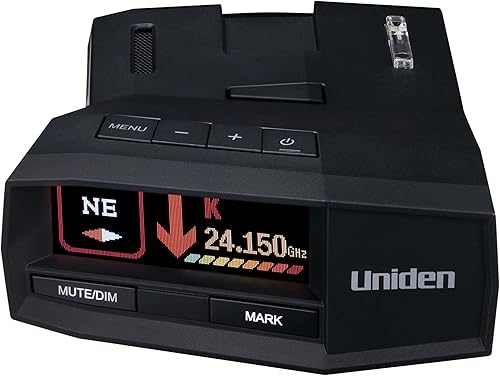
Uniden R7 vs R8: what actually separates them?
The clearest buying differences are the R7's multi-signal display and the R8's directional voice alerts and app support. Shared features alone won't settle this decision.
The R7's multi-color OLED screen can show up to 4 signals simultaneously. That suits drivers who want several sources visible together rather than focusing only on a single alert.
The R8 also has a multi-color OLED screen, plus programmable voice alerts that can announce direction. Its free R/TACH app supports settings changes, real-time alerts and controls for mute and mute memory on a compatible device.
Those differences don't establish a measured detection-range advantage. Uniden promotes both for long-range sensitivity, but that doesn't tell you how much warning either will provide on a particular road.
Hills, curves, traffic and the way radar is used all affect warning opportunities. Choose between these models for their supported features, without assuming the higher model number guarantees earlier notice in every encounter.
Uniden R7 vs R8: which alert style fits you?
Choose visual detail with the R7 or spoken direction with the R8 according to how you process alerts. A screen full of information only helps if you can understand it with a brief glance.
If you already find spoken directions easier to follow than small icons, the R8's approach makes sense. If you prefer reviewing several signals visually, the R7 gives you a clear reason to choose it.
For more context, our guide to radar detectors with directional arrows explains what direction information adds. Arrows indicate a signal's direction; they don't identify its exact source.
What useful features do both detectors share?
Both models provide front and rear antennas, directional arrows, GPS false-alert memory and camera-location alerts. Each also displays the detected band and signal strength.
These details answer different questions: direction indicates where a signal is coming from, while band identifies its frequency category. Signal strength helps describe the alert, but it isn't a distance measurement.
Both include preloaded red-light and speed-camera locations, with free database and firmware updates. A stored camera warning comes from location information, so it isn't proof that the detector has received radar from that camera.
GPS memory serves another purpose by remembering common false-alert locations, such as retail doors along a regular route. It can reduce repeated noise without making every alert source predictable.
Read how radar detectors work if these functions are new to you. Understanding the difference between a received signal and a location warning makes either model easier to use.
Who should buy the Uniden R7?
The R7 suits drivers who prefer information on the detector itself and want to see several active signals together. It's a sensible choice when that display approach meets your needs without making phone controls a priority.
Consider a commute that passes shopping areas, busy intersections and stretches of highway. Your task is to recognize recurring locations while staying alert to changes, rather than inspect every detail whenever the detector sounds.
A useful screen supports that process, but don't treat several displayed signals as an invitation to study them while moving. Learn the layout while parked so a glance has a clear purpose.
The R7 also lets you mark geographical points and receive a “user mark ahead” announcement when approaching them. This can help you remember a location you want called out, separate from a live radar alert.
Be selective with saved points. Marking every notable place can create so many reminders that the useful ones lose their value.
Skip the R7 if spoken direction or phone-based settings are central to your decision. Those are clear reasons to consider the R8 rather than buy around a feature preference you already know.
If you're choosing your first detector, don't buy for screen capacity alone. You still need to learn what the information means and decide which alerts deserve attention.
Who should buy the Uniden R8?
The R8 suits drivers who want spoken direction and prefer configuring settings through a phone. Its extra controls are useful when they match a habit you'll keep.
Programmable voice alerts let you tailor spoken information to your preferences. Set the volume and alert choices while parked, then check that you can understand them over normal cabin noise.
R/TACH gives you another way to manage the detector. Before buying for that feature, confirm that your device is compatible and that you're comfortable adding an app to your setup.
Plan where the phone will stay, too. A real-time alert on a device screen isn't a reason to hold the phone or move it around during a drive.
Uniden also describes the R8's filtering as targeting unwanted alerts from vehicle blind-spot monitoring and collision-avoidance systems. That is relevant if nearby traffic creates frequent noise, though it doesn't promise silence or establish a quantified advantage over the R7.
Skip the R8 if you'll ignore the app and don't want spoken direction. A feature you won't use shouldn't carry much weight in your choice.
How should commuters and highway drivers choose?
Choose around your normal routes and alert habits, rather than occasional trips you might take. The features you use each week should decide the purchase.
For a regular commute, recurring alert locations are especially relevant. Both models offer GPS memory, so compare how you want to manage and interpret alerts rather than treating location memory as an R8-only benefit.
For frequent highway travel, consider how you'll receive information with music, road noise or passengers in the cabin. Spoken direction may suit you better than another visual cue, but an alert must still be understandable at a comfortable volume.
If you move the detector between cars, think about setup time and storage. The R8 includes single and double window mount brackets, zippered and neoprene carrying cases, Velcro tape, a power cord, a data cable and a manual.
Don't assume accessories fit every windshield or installation plan. Check mounting space and power routing in each vehicle before deciding that frequent transfers will be convenient.
Drivers who dislike any audible interruptions should pause before buying either model. Filtering and memory reduce certain unwanted alerts, but a radar detector still requires your attention and judgment.
How should you set up either detector?
Start with secure placement, a safe cord route and familiar controls. Good installation makes daily use easier than changing lots of settings before the first drive.
Check the rules for your route. Review radar detector laws before use, especially for trips across state lines or a different vehicle class.
Choose the mounting position before attaching anything. Check the driver's view, the detector's orientation and access to its controls.
Route the power cord away from driving controls. Keep it clear of pedals, the steering wheel and airbag areas, and avoid loose loops that could snag.
Learn the basic controls while parked. Find mute, volume, brightness and the settings menu before alerts begin competing with traffic for your attention.
Set a readable display and clear audio level. Check both from your normal seating position, then avoid making adjustments while moving.
Our guide to where to mount a radar detector covers placement in more detail. Recheck the mount after installation so the detector stays level and doesn't shift on uneven roads.
If you use R/TACH, complete the connection and learn its controls before leaving. Keep your initial setup simple so you can tell which setting caused a change later.
How do you reduce false alerts without missing useful information?
Use location memory carefully and change one setting at a time. Making the detector quiet isn't the same as making its alerts useful.
GPS memory works around repeat locations, while filtering addresses characteristics of received signals. A stationary door opener and a moving vehicle's assistance system present different problems.
Don't save or dismiss an unfamiliar alert merely because it is inconvenient. First learn where it occurs and whether the pattern repeats under similar conditions.
Avoid switching off an entire radar band simply to silence one noisy stretch. Before changing detection settings, understand what each option does and why you need it.
Keep a short note of changes while parked, especially during initial setup. If alert behavior becomes confusing, you'll have a record of what you changed rather than relying on memory.
Also distinguish muting from dismissing the situation. Silencing sound doesn't establish that every signal at that location is harmless or that a new alert source cannot appear there.
What common buying and driving mistakes should you avoid?
Avoid buying for the model number, overreading arrows and expecting guaranteed warning. These mistakes can undermine the value of either detector.
A newer-sounding name doesn't automatically make a product the better fit. If the R8's controls don't solve a problem for you, return to the features you will use on an ordinary trip.
Don't read a rear arrow as proof that you can stop paying attention. Radar can reflect, and direction information doesn't reveal a source's exact position or purpose.
Likewise, a quiet detector doesn't establish that the road is clear. A detector can only respond to signals it receives, and some enforcement methods provide little useful advance notice.
Don't react to an alert with sudden braking or a search of nearby vehicles. Maintain control, observe the road and use the information without letting it pull attention from driving.
Finally, avoid copying another driver's settings without understanding them. Their route, traffic and tolerance for alerts may differ from yours, so start with the manual and make deliberate adjustments.
What care and upkeep do these detectors need?
Keep the mount secure, the equipment clean and the software current. Neither model should become a fit-and-forget device once the first installation is done.
Check the mount and cable during normal vehicle cleaning. Look for looseness, cord strain and a shifting viewing angle, then correct the issue while parked.
Use a soft cloth for the screen and exterior, following the manual's cleaning guidance. Avoid spraying cleaner directly onto the detector or letting moisture reach openings and connections.
Store the unit securely when removed from the car. Follow Uniden's storage guidance, and avoid leaving loose equipment where it could slide, fall or become a distraction.
Review firmware and camera-database updates periodically. Free updates still need to be applied; their availability doesn't mean an unchanged device contains every later revision.
Our radar detector firmware update guide explains the update process. Allow time to read the instructions and complete an update before you need the detector for a trip.
Uniden R7 vs R8: which should you choose?
For Uniden R7 vs R8, pick the model whose alert style fits your routine after you account for setup, placement and upkeep. Use these decision rules to make the final choice.
- Choose the R7 if you want several signals visible together and prefer reading alert details on the detector.
- Choose the R8 if spoken direction is a priority or you expect to use R/TACH for settings and mute controls.
- Keep a working R7 if it already meets your needs and the R8's added controls don't solve a specific problem.
- Skip both for now if you expect guaranteed warning, won't learn the controls or can't use a detector legally on your route.
If you're leaning toward the R7, our Uniden R7 review gives that model a closer look. If neither alert style fits, compare other approaches in the best radar detectors guide.
Frequently asked questions
What is the main difference between the Uniden R7 and R8?
The main buying difference is how you receive and manage alerts; the R7 displays up to 4 signals simultaneously, while the R8 adds programmable directional voice alerts and R/TACH app controls. Both include front and rear antennas, directional arrows, GPS false-alert memory and camera-location alerts.
Do the Uniden R7 and R8 both have directional arrows?
Yes, both models have directional arrows and dual antennas for front and rear detection; arrows help you understand where a detected signal is coming from, but they don't identify a particular vehicle or prove a road is clear. The R8 can also announce the direction through voice alerts.
Can the Uniden R7 and R8 mute false alerts?
Yes, both use GPS memory to remember and mute common false-alert locations along familiar routes; this is useful for recurring sources such as automatic doors near your commute. Location memory serves a different purpose from filtering, so don't expect it to silence every unwanted signal from moving traffic.
Does the Uniden R8 work with the R/TACH app?
Yes, the R8 supports the free Uniden R/TACH app for settings, real-time alerts and mute controls on a compatible device screen; check device compatibility before making the app your reason to choose it. Complete pairing and adjustments while parked, and keep the phone out of your driving sightline.
Should you choose the Uniden R7 or R8?
Choose the R7 for several visible signals together, or the R8 for spoken direction and phone-based controls; start with the alert style you'll actually use rather than the model number. The Uniden R7 review and directional-arrow detector guide provide more context for that decision.


