5 Best Radar Detectors With Directional Arrows (October 2026)
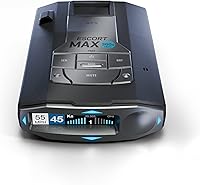
The best radar detectors with directional arrows include the Uniden R7 for screen-focused drivers, the Uniden R8W for spoken direction alerts, and the Escort MAX 360c MKII for connected commuters.
On this page (9 sections)
- How we chose radar detectors with directional arrows
- The best radar detector with directional arrows for each driver
- What should you compare before buying an arrow detector?
- When do directional arrows help most?
- How should you mount and set up an arrow detector?
- What mistakes make directional arrows less useful?
- How do you care for an arrow detector?
- Are directional arrows worth choosing?
- Which radar detector with directional arrows should you choose?
The Uniden R7 is the best radar detector with directional arrows for most drivers because it puts direction, band and signal strength together on a multi-signal display. Choose another model here when spoken direction alerts, connected updates or shared alerts better fit your driving routine.
Arrows answer a useful question: is the detected signal generally ahead, beside you or behind? They add context to an alert, but they don't identify a police vehicle, measure its distance or guarantee time to react.
If you are comparing detectors more broadly, start with our guide to the best radar detectors for cars. For a wider look at features across brands, see our radar detector buying tips.
Our picks at a glance
-
1

-
2

-
3
How we chose radar detectors with directional arrows
We put clear direction information and useful alert controls first. The R7 leads because its screen supports several signals, while the other picks serve drivers who place more weight on spoken alerts, phone connections or travel accessories.
The comparison focuses on features you can use during ordinary driving: readable alerts, management of recurring false alarms and an update routine you will maintain. We also considered whether each model's extra features solve a clear need.
CannyCabin's scores reflect those feature and buyer-fit differences. They do not establish a measured range ranking, and a higher score does not mean one detector will warn first in every road setting.
Manufacturer range claims also need a named reference point. An improvement over an older model cannot establish which of these 5 detectors has the longest useful warning distance.
| Product | Best for | Threat direction | Alert management | Display | Our score |
|---|---|---|---|---|---|
| Uniden R7 | screen-focused drivers | Front and rear antennas with directional arrows | GPS memory for common false alerts | Multi-color OLED; up to 4 signals at once | 9.1 |
| Uniden R8W | spoken direction alerts | Dual antennas with visual arrows and voice alerts | GPS auto-mute memory and Auto Learn | 8.3 | |
| Escort MAX 360c MKII | connected commuters | Dual antennas with arrows for threats from 4 directions | GPS AutoLearn and false-alert filtering | 8.0 | |
| Escort MAX 360 MKII | Bluetooth commuters | Arrows show threats from 4 directions | GPS AutoLearn and false-alert filtering | 7.8 | |
| Escort Redline 360c | frequent road travelers | 360-degree directional awareness | GPS Autolearn and updateable IVT Filter | 7.0 |
The best radar detector with directional arrows for each driver
Choose the R7 for screen information, the R8W for spoken direction alerts, or an Escort for Drive Smarter shared alerts. Within the Escort group, your update preferences and travel habits narrow the choice.
Uniden R7
- Dual antennas with directional arrows
- GPS mute memory
- Preloaded red-light and speed-camera locations
- OLED display can show up to 4 signals
Choose the R7 when you want direction, band and signal strength together on screen. Its GPS memory helps manage familiar false alerts on regular routes.
Pros
- Shows direction, band and signal strength
- GPS can mute remembered alerts
- Displays up to 4 signals together
Cons
- Several signals take practice to interpret
- Location memory cannot silence every moving false-alert source
The Uniden R7 suits drivers who want the detector itself to provide the key information. Its dual antennas feed a multi-color OLED that shows arrows, band and signal strength for up to 4 signals at once.
That layout is useful when alerts overlap near a shopping area or a busy road. You can see that more than one signal is present instead of assuming every sound belongs to the same source.
GPS mute memory helps with recurring false alerts on familiar routes. Preloaded red-light and speed-camera locations, free database and firmware updates, and user-marked points also support regular travel.
Buy the R7 if you prefer visual detail and will learn what its screen is showing. Skip it if you mainly want spoken direction information and plan to build your routine around an app.
Several signals on screen still require judgment, so learn the display while parked. Our Uniden R7 review explains its features in more detail.
Uniden R8W
- Dual antennas and visual arrows
- GPS auto-mute memory
- Wi-Fi, Bluetooth and R/TACH app support
- Programmable voice alerts
The R8W suits drivers who want spoken direction information and phone-connected features. Programmable voice alerts let you tailor the notifications you hear.
Pros
- Voice alerts report direction, band and strength
- Auto Learn reduces repeat false alerts over time
- Wi-Fi, Bluetooth and R/TACH app support
Cons
- More connection settings to manage
- App features add little if you prefer standalone use
The Uniden R8W is the better match for drivers who want direction spoken aloud. Its programmable voice alerts can report direction, band type and signal strength, giving you information without making the screen your first reference.
Wi-Fi, Bluetooth and R/TACH app support suit buyers who want phone-connected features alongside the detector. GPS auto-mute memory and Auto Learn address recurring false alerts as you repeat routes.
The R8W also includes preloaded red-light and speed-camera locations with free database and firmware updates. Those location alerts serve a different purpose from live radar detection, so learn how the notifications differ.
Choose it if you will configure the voice alerts and use its connections regularly. Skip it if you want a simpler routine and expect to leave the app features unused.
Before your first trip, set the voice volume with normal cabin noise in mind. A long spoken alert is less useful if music or road noise covers its most useful words.
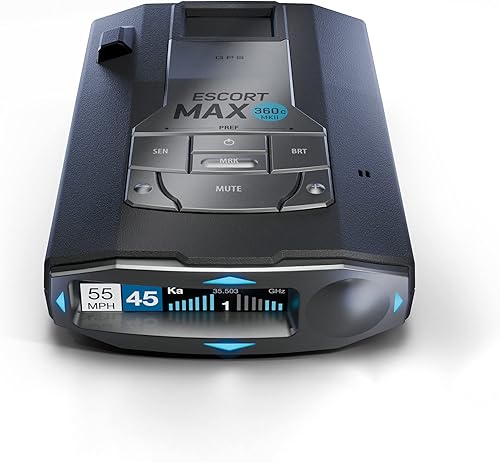
Escort MAX 360c MKII
- Dual antennas with 360-degree directional arrows
- GPS AutoLearn
- Drive Smarter shared alerts
- Dual-band Wi-Fi with over-the-air updates
The MAX 360c MKII fits regular commuters who want route learning, shared alerts and wireless software updates. Drive Smarter supports a compatible vehicle-display setup.
Pros
- GPS AutoLearn learns recurring false-alert locations
- Filtering addresses collision-avoidance and blind-spot signals
- Dual-band Wi-Fi enables over-the-air updates
Cons
- AutoLearn needs repeat trips
- Connected features require additional setup
The Escort MAX 360c MKII fits drivers who want shared alerts and wireless software updates in the same setup. Dual-band Wi-Fi enables over-the-air updates, while Drive Smarter adds reports from other drivers.
Its dual antennas provide directional arrows, and GPS AutoLearn learns recurring false-alert locations over repeat trips. Filtering also addresses signals from collision-avoidance and blind-spot systems, which location memory alone cannot handle when the source is moving.
Apple CarPlay and Android Auto compatibility lets you view routes and interact with alerts through a compatible vehicle display. Set this up before driving so you know which notifications come from the detector and which come through the app.
Buy this model if connected features will be part of your commute. Skip it if you prefer standalone alerts and would rarely use wireless updates or shared reports.
The similarly named version below serves a different connection priority. Our Escort MAX 360 MKII comparison helps you avoid choosing the wrong model.
Escort MAX 360 MKII

- Dual antennas and 360-degree directional arrows
- GPS AutoLearn
- Drive Smarter shared alerts
- Bluetooth enabled
Choose the MAX 360 MKII if Bluetooth shared alerts and automatic route learning cover your needs. The MAX 360c MKII is the choice here for dual-band Wi-Fi updates.
Pros
- Directional arrows with GPS AutoLearn
- Filtering addresses common vehicle radar interference
- Bluetooth and Drive Smarter shared alerts
Cons
- AutoLearn needs repeat trips
- Choose the 360c version if wireless updates are a priority
The Escort MAX 360 MKII suits commuters who want Bluetooth shared alerts and automatic route learning. It combines directional arrows with GPS AutoLearn and filtering aimed at unwanted vehicle radar signals.
Drive Smarter support provides community alerts, with Apple CarPlay and Android Auto compatibility for a suitable vehicle-display setup. This makes it worth considering if you already use your phone for route information and want shared reports alongside it.
Choose this model when those functions cover your routine. Move to the MAX 360c MKII if dual-band Wi-Fi and over-the-air software updates are features you specifically want.
Skip the MAX 360 MKII if your main goal is to avoid app setup altogether. Shared alerts only add value when you are willing to manage the connection and understand the notifications.
Allow time for AutoLearn to learn familiar locations over repeated trips. A busy first commute is not a reason to start disabling whole radar bands.
Escort Redline 360c

- 360-degree directional awareness
- GPS Autolearn and updateable IVT Filter
- Built-in Wi-Fi and Drive Smarter shared alerts
- Travel case, EZ Mag Mount and SmartCord USB included
The Redline 360c suits travelers who want connected alerts and a supplied case, mount and power cord. GPS Autolearn and an updateable IVT Filter help manage unwanted alerts.
Pros
- Directional awareness with GPS Autolearn
- Built-in Wi-Fi and Drive Smarter support
- Travel case, mount and power cord included
Cons
- More features to configure than a basic detector
- Suction-cup placement must suit your windshield
The Escort Redline 360c suits frequent travelers who want a case, mount and power cord included with their detector. It comes with a premium travel case, an EZ Mag Mount suction cup and a SmartCord USB with AutoMute.
Its alert features include 360-degree directional awareness, GPS Autolearn and an updateable IVT Filter. Built-in Wi-Fi and Drive Smarter support add connected functions, including shared alerts and compatible Apple CarPlay or Android Auto use.
Buy it if you expect to remove and store the detector often and want those supplied accessories. Check your planned windshield position before deciding that the suction-cup mount is the right fit.
Skip it if the travel accessories would sit unused and another model's display or spoken direction alerts better match your needs. The included equipment should solve a practical problem, rather than decide the purchase by itself.
When moving between vehicles, repeat the placement and cable checks each time. A position that works in one cabin may leave a poor sightline in another.
What should you compare before buying an arrow detector?
Compare alert clarity, false-alert control and daily setup effort before focusing on extra connections. The best choice gives you information you understand without creating a routine you will neglect.
How does a radar detector with directional arrows report direction?
An arrow represents the direction associated with a received signal. Read it together with the band and signal strength, because direction by itself tells you little about the source.
A forward arrow that later moves behind can help you understand how your position has changed relative to a signal. It does not prove that every radar source is now behind you or that the road ahead is clear.
Reflections from buildings, barriers and other vehicles can complicate the picture. Avoid treating a brief side arrow as a precise bearing to a particular car.
Which display and voice style fits your driving?
Choose visual detail if you prefer a quick screen reference, and spoken information if audio is easier to follow in your cabin. Neither approach should require long glances or changes to settings while moving.
Check that the screen is readable from your normal seated position without leaning forward. A display can offer plenty of information yet still be a poor match for a mount hidden behind the mirror.
Voice alerts also need a sensible balance. Keep useful information audible, but avoid a setup so busy that you start ignoring every announcement.
Can GPS reduce repeat false alerts?
GPS memory helps with recurring signals at familiar places. It is most useful when your routine takes you past the same automatic doors and other fixed radar sources.
Location memory cannot solve every unwanted alert. A vehicle with a radar-based safety system moves with traffic, so filtering has a separate job from remembering a roadside location.
Don't rush to save every alert as a false alarm. Learn the route and follow the detector's instructions before adding or removing remembered locations.
Our guide to radar detectors with GPS explains when location-based features matter most. They are especially useful for buyers whose main complaint is repeated noise on a regular commute.
Will you use the connected features?
Choose an app because its functions fit your routine, rather than because a connection logo appears on the box. Check phone compatibility, required permissions and any account or service terms before committing to a connected setup.
Shared reports and the detector's own alerts are different kinds of information. A community report may be old or imprecise, while a detector alert means a signal has reached the unit.
Also consider your update habits. Wireless updates can make maintenance easier, but only if you connect the detector and complete the process as instructed.
When do directional arrows help most?
Directional arrows help most when you want context as an alert develops. They are useful on mixed routes where signals may come from ahead, behind or beside the road.
On a highway, direction changes can help you follow an ongoing signal without searching for its source. In a town, arrows can help distinguish the direction of a recurring roadside alert from another signal.
Busy urban driving also shows the limits of arrows. Several sources and reflected signals can produce more information than you can safely study while moving.
If you mainly want fewer interruptions, prioritize GPS memory and filtering before paying extra for connected functions. Arrows explain an alert, while good alert management reduces how often you need that explanation.
For occasional driving, a simpler detector may be enough if you do not want to learn a richer display. Arrow models make the most sense when you will take time to understand what the extra information means.
How should you mount and set up an arrow detector?
Mount it securely, level and with clear signal paths, then configure it while parked. Follow the model's instructions and keep the unit and cable away from your view and vehicle controls.
Start by checking your windshield and intended mounting area. Metallic coatings, certain tint materials and obstructions can affect signal reception, so consult your vehicle and detector instructions if the glass needs special placement.
Front and rear reception both matter for directional information. Avoid blocking the unit with nearby objects, and don't assume a convenient hidden position will work well.
Our guide on where to mount a radar detector covers placement considerations. Choose a position that allows a brief glance without making the screen the center of your attention.
Set the alerts before connecting every extra
Begin with the manufacturer's recommended settings and learn the basic band, strength and direction indicators. Then adjust brightness, volume and voice preferences to suit your cabin.
Configure one group of settings at a time so you understand the effect of each change. A fully customized setup is hard to troubleshoot if you changed filtering, audio and app notifications together.
Read our guide to what radar detector bands mean before altering band settings. Silencing a whole band to stop one nuisance alert can remove information you still need.
Plan the power cable before regular use
Route the cord where it cannot catch a hand, gear selector or steering control. Keep it clear of airbag areas and follow the power requirements for the exact model.
If a loose cord makes daily use awkward, consider a compatible hardwire arrangement. Our guide to how to hardwire a radar detector explains the planning involved before changing the power setup.
Finish by checking that the detector starts as expected and that the mount stays secure. Make your first familiarization drive on a known route, with all settings already chosen.
What mistakes make directional arrows less useful?
The biggest mistake is treating an arrow as a precise location or an all-clear signal. Arrows add context, but they do not remove the need for careful driving or judgment.
Following the arrow instead of watching traffic
Don't scan nearby vehicles to match each alert to a source. That can pull your attention from changing traffic, pedestrians and road signs.
A detector cannot tell you that every hazard is covered. Instant-on radar may provide little advance notice when no earlier signal reaches your unit, and laser alerts can arrive after a vehicle has already been measured.
Confusing stored locations with live radar
A camera-location warning comes from a database or saved point, rather than proof of a radar transmission at that moment. Likewise, a shared app report is not the same as a live signal received by your detector.
Learn each notification type while parked. Knowing the difference prevents you from reading an arrow or signal-strength display into an alert that works by location.
Chasing silence with aggressive settings
A quieter detector is useful only if the settings still suit your driving area. Avoid copying another person's configuration without understanding which alerts it suppresses.
Use the manual to understand each filter and mute option. If you make a change, note it so you can reverse it when the result is unclear.
Assuming every strong signal is close
Signal strength reflects what reaches the detector, not a measured distance to the source. Terrain, transmission direction and reflections can change the strength you see.
A weak alert is not automatically unimportant, either. Read the changing pattern without turning it into a distance estimate the detector does not provide.
How do you care for an arrow detector?
Keep the mount secure, reception areas clear and software maintained. A few routine checks help prevent avoidable problems with power, placement and alerts.
Inspect the suction cup and mounting surface when the unit begins to shift or after large temperature changes. Clean them according to the mount instructions, then check that the detector remains level.
Wipe the housing and display with a soft cloth using the maker's care guidance. Avoid spraying cleaner into openings or using harsh chemicals on the screen.
Check the cord and connector for wear, especially if you unplug the unit often. Pull from the connector rather than tugging the cable.
Before a long trip, review firmware and database update instructions and complete any changes while parked. After an update, confirm your preferred settings rather than assuming every option stayed the same.
Store the detector securely when removing it from the vehicle. Don't leave a loose unit or cord where it can slide into the driver's footwell.
Are directional arrows worth choosing?
Arrows are worth choosing when knowing signal direction improves how you understand alerts. They add less value if your real priority is a quieter commute and you have not yet compared GPS memory or filtering.
Buy with realistic expectations: a radar detector provides information, not permission to speed or a promise of advance warning. Road shape, signal use and reception conditions affect what any unit can tell you.
Check the rules that apply to your location and vehicle before use. Our guide to radar detector laws covers the considerations to review.
Which radar detector with directional arrows should you choose?
Choose the Uniden R7 if you want a radar detector with directional arrows centered on clear screen information. Choose the R8W if spoken direction alerts and R/TACH app support will earn a place in your daily routine.
Pick the Escort MAX 360c MKII when wireless updates and shared alerts are priorities. Choose the MAX 360 MKII when Bluetooth and route learning cover your connected needs.
Consider the Redline 360c if frequent removal and storage make its included travel equipment useful. Before ordering, settle your mount position, preferred alert style and willingness to maintain phone connections.
For a broader comparison across detector types, see our guide to the best radar detectors.
Our top 3 picks at a glance
-
1
-
2
-
3
Frequently asked questions
What do directional arrows on a radar detector show?
Directional arrows show the direction associated with a detected radar signal, such as ahead, beside or behind your vehicle. They add context to the band and signal-strength information, but they do not identify a particular car or give its exact distance.
Reflected signals can also affect the direction shown.
Are radar detectors with arrows better than detectors without them?
Arrows are better for drivers who want more context during an alert, especially as a signal changes from ahead to behind. They do not establish detection range or guarantee earlier warning.
Compare false-alert filtering, GPS memory and clear notifications before deciding how much directional information matters to you.
Do directional arrows detect laser?
No, directional arrows describe how a detector presents direction information; laser detection is a separate capability. All 5 models here detect radar and laser, but that does not mean their arrows identify laser direction.
Read our guide to radar detectors and lidar to understand why a laser alert may leave little warning time.
Should I choose the Uniden R7 or R8W?
Choose the Uniden R7 if you want a display for several signals and GPS mute memory without making app features your priority. Choose the R8W if spoken direction information, programmable voice alerts and R/TACH app support will be part of your daily use.
Decide which alert style you prefer before comparing connections.
Do radar detector arrows point to a police car?
No, arrows point toward the direction associated with a radar signal, which may come from traffic enforcement or another source. Automatic doors and vehicle safety systems can also cause alerts.
Read the arrow alongside the band and changing signal strength, and keep your attention on the road.