Escort MAX 360c MKII vs MAX 360 MKII: Which Is Better? (October 2026)
For the Escort MAX 360c MKII vs MAX 360 MKII, choose the 360c MKII for Wi-Fi software updates. Choose the 360 MKII if Bluetooth meets your needs, since both provide directional arrows, GPS AutoLearn and Drive Smarter shared alerts.
On this page (10 sections)
- Escort MAX 360c MKII vs MAX 360 MKII: what is different?
- What do both detectors help you do?
- Who should buy the MAX 360c MKII?
- Who should buy the MAX 360 MKII?
- Do you need a phone or a connected car display?
- How should you set up either detector?
- How should you handle alerts on a daily commute?
- What mistakes should you avoid with these models?
- How do you care for the detector and keep it ready?
- Which model should you choose before your next trip?
Choose the Escort MAX 360c MKII for Wi-Fi software updates, or the MAX 360 MKII if Bluetooth meets your needs. The Escort MAX 360c MKII vs MAX 360 MKII decision comes down to how you'll use and maintain the detector.
Both provide the main tools buyers want from this pair: directional alerts, help with recurring false alerts and access to community reports. The connected model makes sense when its extra connection serves a real purpose in your routine.
CannyCabin's recommendation is to choose around that routine, rather than assume the extra letter means better detection. Neither model has an established head-to-head range advantage from the specifications available here.

Escort MAX 360c MKII vs MAX 360 MKII: what is different?
The MAX 360c MKII adds dual-band Wi-Fi for over-the-air software updates. Both models have Bluetooth, so the MAX 360 MKII remains an option for drivers who want phone-connected features.
Wi-Fi matters most if you'll actually connect the detector and use its update feature. Think about where you park, which network you can use and whether its signal reaches that spot.
Don't assume a network name on your phone proves the detector will connect there. Check the required network setup and complete the connection while parked before relying on it for future updates.
For the MAX 360 MKII, read Escort's update instructions before buying so you understand the maintenance steps. Bluetooth support by itself doesn't establish how every software update is delivered.
Escort MAX 360c MKII vs MAX 360 MKII: is range different?
There is no established range winner between these 2 MKII models. Escort claims a 50% range improvement for each against its own original model.
That means the 360c MKII is compared with the original MAX 360c, while the 360 MKII is compared with the original MAX 360. Those separate baselines don't support ranking one MKII above the other.
Both use dual antennas, the M13 platform and a Blackfin DSP chip. These shared components don't prove identical performance in every situation, but they also don't justify inventing a detection advantage.
For the background needed to judge range claims, read how radar detectors work. Roads, terrain, signal direction and the way radar is used all affect when a detector can receive a signal.
What do both detectors help you do?
Both help you understand signal direction and recurring alerts, which are useful on busy roads and familiar commutes. Their shared features deserve more attention than minor wording differences between their descriptions.
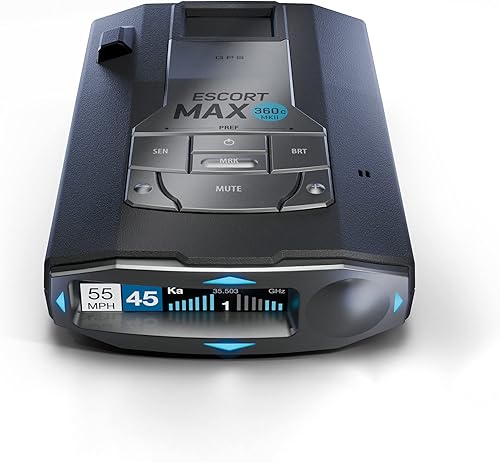
Directional arrows show where a detected signal is coming from across all 4 directions. They provide context, but an arrow doesn't identify a specific vehicle or measure the distance to a signal source.
GPS AutoLearn learns after repeated trips and can reject false alerts from specific locations. Its clearest use is a regular route where the same fixed sources would otherwise interrupt each drive.
Escort says the false-alert filtering also helps reduce signals from collision-avoidance and blind-spot monitoring systems. A quieter drive is the goal, but filtering shouldn't train you to dismiss every alert that seems familiar.
Both have OLED displays and detect radar and laser signals. X, K and Ka are radar bands; our guide to what radar detector bands mean explains why understanding an alert matters more than reacting to every sound alike.
Who should buy the MAX 360c MKII?
Buy the MAX 360c MKII if easier software upkeep is part of your buying goal. It fits drivers who already keep connected car accessories configured and want Wi-Fi updates in that routine.
This can be a sensible choice for a commuter who plans to keep the detector in one vehicle. Set aside time to establish the connection, learn the menus and check that updates complete successfully.
It also suits someone who dislikes leaving maintenance until a long trip. The benefit is having an update option that fits your habits, rather than discovering another task while packing the car.
Skip this model's extra connectivity if you won't configure it or rarely have access to a suitable network. An unused Wi-Fi feature doesn't improve the information you get from an alert.
Don't choose it solely because you expect a longer warning distance than the other MKII. Its stronger case in this comparison is the way you maintain it.
Who should buy the MAX 360 MKII?
Buy the MAX 360 MKII if Bluetooth covers your connection needs and you're comfortable following its software-maintenance process. It fits drivers who want the shared alert tools without making Wi-Fi a requirement.
This is the clearer choice if your main priorities are understanding signal direction and reducing recurring interruptions on your commute. Neither priority requires choosing the 360c version.
It also suits a buyer who has already decided how to handle updates and sees no practical use for another network connection. Make that decision before ordering, rather than assuming maintenance will take care of itself.
Skip it if Wi-Fi updates are a firm requirement. Buying around a feature you already know you'll miss is unlikely to feel like a good compromise later.
If neither model fits your routine, compare the best Escort radar detectors. Focus on which features you'll use during an ordinary week, rather than the longest feature list.
Do you need a phone or a connected car display?
Use the phone connection if you want Drive Smarter community reports, and check compatibility before making vehicle-display integration a deciding factor. Both models support this connected alert system.
Through Drive Smarter, Apple CarPlay and Android Auto compatibility lets you view your route and interact with alerts on a compatible vehicle display. That feature isn't exclusive to the 360c MKII.
Before a trip, configure the app's permissions and confirm that your phone, app and vehicle display work together. Do this while parked so you aren't solving a pairing problem at an intersection.
Treat community reports as another source of information. A report can be old, incomplete or absent, and another driver's experience doesn't tell you exactly what is happening ahead of your car.
If you prefer using a detector without community features, think carefully about how much connected convenience you need. Our radar detector vs Waze comparison explains the difference between receiving a signal and receiving someone else's report.
How should you set up either detector?
Start with a secure mount, clear placement and safe cable routing. A feature-rich detector becomes less useful if it shifts position, blocks your view or distracts you with a loose power cord.
Read the mounting instructions for the exact model and check your vehicle's windshield guidance. Choose a position that gives the detector the required view while keeping your own view of the road clear.
Check the mount with the vehicle parked before your first drive. It should hold the detector steadily without requiring you to reach across the windshield to correct it.
Route the power cable away from pedals, steering controls and airbag deployment areas. Both models use 12-volt power, so confirm the power connection follows Escort's instructions rather than improvising with an unsuitable supply.
Next, set display brightness and alert volume while parked. You should be able to understand an alert without a bright display dominating your view at night.
Learn the main controls before entering traffic, including how to mute an alert safely. Our guide to where to mount a radar detector covers placement choices in more detail.
How should you handle alerts on a daily commute?
Use early trips to learn the alert language and your route, rather than changing settings after every beep. Understand the band, direction and signal behavior before deciding what deserves a settings change.
Keep a simple note after parking if a recurring alert needs attention. Record the location and what the detector displayed, rather than handling your phone or menus while driving.
Give location learning repeated trips to work as intended. Don't assume the detector should recognize every fixed source on the first pass through a neighborhood.
Leave band settings alone until you understand their purpose and the guidance for your area. Turning off a band to silence an annoyance also removes information you may need.
If an alert seems unusual, respond by checking your speed and road conditions calmly. Sudden braking, searching nearby cars or staring at the arrows creates a more immediate problem than an unexplained sound.
What mistakes should you avoid with these models?
Avoid confusing convenience with protection: a connected feature can make the detector easier to use, but it can't promise a warning before every speed measurement. Both models are detection-only devices.
A quiet detector doesn't prove that the road ahead is clear. Some situations provide little advance signal to receive, and an alert can't undo a measurement already taken.
Laser needs particular care in your expectations. A narrow beam aimed at your vehicle may provide little useful advance warning, so read whether radar detectors can pick up lidar before treating laser detection as a safety net.
Don't judge a detector only by how often it sounds. Constant alerts can be distracting, while aggressive changes made just to create silence can remove useful warnings.
Avoid buying either model before checking where radar detectors are legal. Check the rules for your vehicle and route, especially when a trip crosses state lines.
How do you care for the detector and keep it ready?
Keep the mount, power connection and software in good order so the detector is ready when you need it. A short check before a long drive is easier than fixing a loose connection on the road.
Clean the housing and display according to Escort's instructions. Avoid abrasive materials, and don't spray cleaner directly into openings or connectors.
Inspect the mount for slipping and the cable for wear. When removing the detector, support it with your hand and release the mount as directed rather than pulling on the cable.
Follow the storage guidance for temperature and direct sunlight. If you move the detector between vehicles, check its position and cable routing each time instead of assuming the previous arrangement transfers safely.
Complete software maintenance before departure, then confirm the detector starts normally. For the connected setup, also check the app connection while parked so a phone change or altered permission doesn't become a roadside distraction.
Which model should you choose before your next trip?
For the Escort MAX 360c MKII vs MAX 360 MKII decision, choose the 360c when Wi-Fi updates solve a real maintenance need. Choose the 360 MKII when Bluetooth covers your connected features and you're satisfied with its upkeep process.
Before ordering, name the feature that makes your choice worthwhile. If your answer is simply “better range,” reconsider, because neither model's comparison with its predecessor settles that question.
Skip both if you want a device that guarantees protection from tickets or requires no attention after installation. A good fit still depends on proper placement, sensible settings and understanding what an alert can tell you.
If you're still unsure that this pair matches your driving, compare the best radar detectors for cars by the features you'll use and the maintenance you'll actually do.
Frequently asked questions
What is the difference between the Escort MAX 360c MKII and MAX 360 MKII?
The main difference is the MAX 360c MKII's dual-band Wi-Fi for over-the-air software updates. Both models include Bluetooth, directional arrows, GPS AutoLearn and Drive Smarter shared alerts; choose around your update routine rather than assuming the connected model has better detection range.
Do both Escort MAX 360 MKII models have directional arrows?
Yes, both use arrows to show the direction of detected signals from all 4 directions. Arrows help you understand an alert, but they don't identify its source or tell you its exact distance; use them alongside the alert information while keeping your attention on the road.
Do the MAX 360c MKII and MAX 360 MKII both use GPS?
Yes, both have GPS AutoLearn, which learns repeated routes and can reject false alerts from specific locations; this is useful for commuters who pass the same recurring signal sources. It doesn't make every quiet stretch clear of enforcement, and a new alert still deserves attention.
Can either detector stop a speeding ticket?
No, neither detector can guarantee that you'll avoid a ticket. Both detect radar and laser signals rather than block them, and an alert may arrive after your speed has been measured; follow posted limits and treat alerts as extra information about your surroundings.
Which Escort MAX 360 MKII should I choose?
Choose the MAX 360c MKII if you have a practical way to use Wi-Fi updates and want that convenience; choose the MAX 360 MKII if Bluetooth meets your needs. Neither model earns the choice on a proven head-to-head range advantage from the available specifications.