What Do the X, K and Ka Bands Mean?
Radar detector K and Ka labels identify frequency bands, not the source or distance of a signal. Choose supported bands first, then filtering, GPS features, and alert displays that fit your routes.
On this page (10 sections)
- What do X, K, and Ka mean on a radar detector?
- How should you interpret radar detector K and Ka alerts?
- Which detector suits drivers who want clearer alert information?
- Who should choose the Cobra RAD 480i?
- Who should choose the Escort MAX 3?
- Which features matter most when choosing K and Ka coverage?
- Which bands should you enable?
- How should you mount and care for a detector?
- What mistakes make K and Ka alerts harder to use?
- Which radar detector K and Ka features should you choose?
Radar detector K and Ka labels tell you which frequency band triggered an alert. They don't tell you whether police radar caused it or how far away the source is.
For buying, the useful questions are which bands a detector covers, how it handles unwanted alerts, and how clearly it explains a signal. Those differences matter more than choosing a model simply because its name promises long range.
What do X, K, and Ka mean on a radar detector?
X, K, and Ka are microwave frequency bands, and police radar can operate within all 3. The detector receives a signal and identifies its band on the display or through an audible alert.
Common police radar frequencies are near 10.525 GHz for X, 24.125 GHz for K, and within roughly 33.4 to 36 GHz for Ka. A detector's supported frequencies determine what it can receive.
| Band | What the label means | What to remember |
|---|---|---|
| X | A lower frequency band than K or Ka | Don't switch it off solely because alerts seem uncommon |
| K | A band also used by some door sensors and vehicle systems | Filtering and careful location muting can help |
| Ka | A higher frequency band associated with police radar | The label alone doesn't establish source or distance |
The letters are not strength levels. A weak Ka alert isn't automatically closer than a strong K alert, and neither band name measures speed.
See how radar detectors work for the basic process behind receiving and displaying these signals.
How should you interpret radar detector K and Ka alerts?
Read the band together with signal strength and any direction information your detector provides. Each adds context, but none gives an exact distance to the source.
A signal can strengthen as you approach it, yet hills, curves, traffic, and reflections can change reception. Don't turn the strength meter into a countdown or assume a fading signal means the source has gone.
Does a radar detector K or Ka alert always mean police?
Neither alert proves the source, though Ka is more closely associated with police radar than common K band door-sensor alerts. K also deserves attention because both enforcement equipment and unrelated devices can use it.
Instant-on radar creates another limit: a detector cannot receive a transmission before it exists. A quiet detector is therefore no assurance that no enforcement is nearby.
Keep your eyes on the road when an alert sounds. Learn the controls while parked so interpreting the display doesn't become a distraction.
Which detector suits drivers who want clearer alert information?
The Uniden R7 suits drivers who want direction information alongside band and signal strength. Its dual antennas and directional arrows help distinguish where detected signals are coming from.
The multicolor OLED display can show up to 4 signals at once. That makes it a useful choice for drivers who want to understand several alerts rather than hear a single tone and guess what it means.
Built-in GPS lets the R7 remember and mute common false alerts along regular routes. It also includes preloaded red-light and speed-camera locations, with free database and firmware updates.
Choose it if you want directional context and repeat-route muting in one detector. Those features address different needs: arrows help explain a current signal, while GPS helps manage familiar fixed sources.
Skip it if a simple band alert meets your needs and you don't want to interpret a display with several signals. Arrows also don't identify the exact vehicle or device responsible for an alert.
Who should choose the Cobra RAD 480i?
The Cobra RAD 480i suits drivers who want shared alerts through a phone connection and included mounting options. It supports Bluetooth and the Drive Smarter community, with Apple CarPlay and Android Auto compatibility.
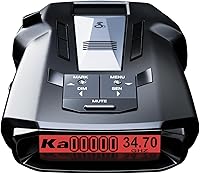
Its supported frequencies include 10.525, 24.125, and 34.7 GHz, within the X, K, and Ka ranges. Cobra says its updateable IVT filter and anti-falsing circuitry reduce unwanted alerts from blind spot monitoring and other vehicle systems.
The included 12V power cord, suction-cup windshield mount, and hook-and-loop dash fastener provide options for setting it up. Pick a secure position before driving, with a clear view for the detector and no blocked view for you.
Choose this model if you expect to use connected community alerts and are comfortable managing the phone connection while parked. Shared reports add information from other drivers; they don't confirm what the detector itself is receiving.
Skip it if your priority is the R7's directional arrows or the MAX 3's automatic route learning. Also, a named Ka frequency doesn't establish coverage across the entire Ka range, so check coverage carefully before buying.
Who should choose the Escort MAX 3?
The Escort MAX 3 suits drivers who repeatedly pass the same unwanted alert locations. Its GPS-based AutoLearn learns repeated routes and rejects false alerts from specific locations.
It also adjusts sensitivity based on speed. For a driver moving between store-lined streets and faster roads, those controls offer a way to manage alert noise without repeatedly changing settings by hand.
The MAX 3 supports K, Ka, X, M, and POP, and offers Bluetooth connectivity and Drive Smarter shared alerts. Choose it for automatic route learning if recurring fixed-location alerts are your main concern.
Skip it if your main reason for upgrading is directional information; the R7 is the fit here for that need. Route learning and signal direction answer different questions, so decide which problem bothers you most.
For a closer look at alert processing, read how radar detectors work. If recurring alerts are the problem, radar detectors with GPS explains how location features can help manage them.
Which features matter most when choosing K and Ka coverage?
Start with band coverage, then choose controls that address the alerts you encounter. A long feature list is less useful than the right combination for your daily routes.
Check these points before choosing:
- Supported frequencies: Confirm the coverage you need, especially when specifications name individual frequencies rather than a whole band.
- Signal filtering: Useful when nearby vehicle systems trigger unwanted alerts.
- GPS muting or learning: Useful for recurring signals at fixed places, such as automatic doors.
- Directional information: Useful when you want more context about a detected signal.
- Display and controls: Choose information you can understand with a brief glance.
A commuter passing the same shops each day has different needs from someone driving unfamiliar routes. For broader model comparisons, use the best radar detectors for cars guide.
Which bands should you enable?
Keep relevant bands enabled and follow the manual before changing filtering or sensitivity. Disable a band only when you understand both local radar use and the alerts that setting removes.
Don't disable K simply because it produces unwanted alerts near stores. That silences the entire band, including signals you may want to receive.
Make one change at a time, while parked, and keep a note of the original setting. This makes it easier to undo a change that creates confusion or removes useful information.
Review your choices before a road trip. Settings based on a familiar commute may not suit the places you'll visit.
How should you mount and care for a detector?
Mount it securely, keep its receiving area clear, and follow the model's placement instructions. Poor placement can reduce reception even when the detector supports the right bands.
Avoid leaving it loose on the dashboard or behind objects that block its view. Windshield coatings and vehicle design can also affect placement, so consult both the detector manual and your vehicle information.
Use where to mount a radar detector to plan a position that preserves your view and access to controls. Secure the power cable away from pedals, steering controls, and airbags.
Keep the mount and glass clean so the detector stays level and attached. Check suction cups and cable connections regularly, and follow the manual's storage and cleaning guidance.
Install available firmware and database updates as directed by the brand. Camera-location information needs maintenance, and an update may also change controls or filtering behavior.
What mistakes make K and Ka alerts harder to use?
Over-muting alerts and assuming every signal has the same cause are the main mistakes. A detector is useful only when you understand what information your settings allow through.
Don't save a location mute just because an alert happens once near a shop. First understand the manual's lockout process and the risk of suppressing another signal near that location.
Don't confuse camera warnings with received radar. A GPS database can announce a stored location without the detector receiving a radar signal there.
Don't assume laser behaves like K or Ka radar, either. The guide to radar detectors and lidar explains why a laser alert has different limits.
Finally, don't treat shared app reports as complete coverage. They depend on reports from other drivers and should support your awareness rather than decide how you drive.
Which radar detector K and Ka features should you choose?
Choose the R7 for directional context, the MAX 3 for automatic route learning, or the RAD 480i for phone-connected shared alerts. Match the feature to the problem you want to solve.
For radar detector K and Ka use, reliable habits matter too: keep relevant bands enabled, mount the unit correctly, and understand muting before relying on it.
If you're still deciding how much these alerts will help on your routes, read whether radar detectors still work before choosing.
Frequently asked questions
What do K and Ka mean on a radar detector?
K and Ka identify microwave frequency bands that radar detectors monitor; police K band radar commonly operates near 24.125 GHz, while police Ka radar commonly falls around 33.4 to 36 GHz. The displayed band helps you interpret an alert, but it cannot establish the source, distance, or urgency by itself.
Is Ka band more likely to be police radar?
Ka is more closely associated with police radar than the K band alerts commonly triggered by automatic doors and vehicle safety systems; still, a Ka alert does not prove its source. Pay attention to the road and interpret the band alongside signal strength and any direction information your detector provides.
Should I turn off X band on my radar detector?
Keep X band enabled unless you have reliable information that it is not used along your routes and understand your detector's controls; turning it off removes all alerts in that band. Revisit that choice before traveling, because settings suited to a familiar commute may not suit another area.
Why does my radar detector alert to K band near stores?
Some automatic door sensors operate in the K band and can trigger nearby detectors; GPS lockouts or route learning can reduce repeated alerts from fixed locations, while signal filtering addresses other unwanted sources. A familiar location does not prove every alert there is harmless, so use muting controls with care.