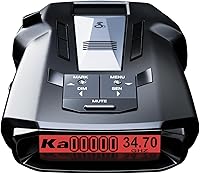
Cobra RAD 700i vs Uniden R3: Which Is Better? (October 2026)
In the Cobra RAD 700i vs Uniden R3 comparison, choose the R3 for camera-location and voice alerts or the RAD 700i for connected driving. Your choice depends on whether you want stored location warnings or shared alerts through Drive Smarter.
On this page (10 sections)
- Cobra RAD 700i vs Uniden R3: what changes your choice?
- Who should buy the Uniden R3, and who should skip it?
- Who should buy the Cobra RAD 700i, and who should skip it?
- Which detector makes repeated false alerts easier to manage?
- Are shared reports, camera warnings and signal alerts interchangeable?
- How should you compare range and everyday usability?
- How should you set up either detector before the first drive?
- What care and update habits keep the setup useful?
- Which common buying mistakes should you avoid?
- Cobra RAD 700i vs Uniden R3: which should you choose?
In the Cobra RAD 700i vs Uniden R3 comparison, choose the R3 for stored camera-location warnings and programmable voice alerts, or the RAD 700i for connected driving through Drive Smarter.
The best choice comes down to your routine: the roads you repeat, the alerts you want and how much phone setup you are willing to maintain. Neither model’s feature list establishes a measured detection-range advantage over the other.
Cobra RAD 700i vs Uniden R3: what changes your choice?
The R3 centers on location and spoken warnings, while the RAD 700i adds community alerts and vehicle-display compatibility. Both have built-in GPS, false-alert controls and OLED displays, so those shared features do not settle the choice.
Think about the information you want before reaching a junction or an unfamiliar stretch of road. Stored locations, nearby signal detection and reports from other drivers each answer a different question.
The R3 makes sense if you want the detector itself to deliver the location warnings that matter to you. The Cobra makes sense if you already use a connected driving setup and want shared reports alongside detection.
If the difference between a signal warning and a location warning is unclear, start with how radar detectors work. That distinction matters more than display color or the number of features on a box.


Cobra RAD 700i vs Uniden R3: match the extras to your drive
Choose around one recurring need, rather than trying to collect every feature. A useful extra solves something you encounter often enough to justify its setup and upkeep.
For a repeated commute, consider which fixed locations you want announced and which recurring signals you need to quiet. For unfamiliar routes, consider whether you will keep a community connection active and use the information it supplies.
Drivers replacing an existing detector should name what they want to improve first. If the problem is mounting, alert volume or neglected updates, changing models may leave the same problem in place.
Who should buy the Uniden R3, and who should skip it?
Buy the Uniden R3 if camera-location warnings and spoken information are your priorities. Its preloaded red-light and speed-camera locations, programmable voice alerts and user marks suit drivers who want reminders tied to the roads they travel.
A user mark lets you identify a place you want announced on a later approach. That can be useful for a school zone or another location that deserves extra attention, but the mark describes a place you saved.
It does not confirm that a temporary hazard or enforcement activity is still present. Keep that difference clear so a reminder remains useful instead of becoming a source of false certainty.
Voice warnings suit drivers who would rather hear the alert type than keep looking at a display. Set the voice preferences before a trip and choose a volume you can hear over normal cabin noise.
The R3 also fits buyers willing to keep its camera database current. Uniden provides free database and firmware updates, making update time part of the ownership routine.
Skip it if your main reason for buying is shared reports on your vehicle’s screen. Choose the RAD 700i for that connected workflow, and read our Uniden R3 review if the R3’s location tools better match your needs.
Who should buy the Cobra RAD 700i, and who should skip it?
Buy the Cobra RAD 700i if you want community reports alongside signal detection. Its Bluetooth connection links to Drive Smarter, with Apple CarPlay and Android Auto compatibility for route and alert information on a compatible vehicle display.
This suits someone who already connects a phone before driving and wants alert information within that routine. It is a weaker fit if pairing devices and maintaining an app connection are chores you tend to avoid.
Treat community reports as added context. A report can become old, and the absence of reports does not establish that the road ahead is clear.
Cobra’s GPS-based AutoLearn Intelligence learns false-alert locations over time. Give that learning process time on familiar routes before deciding how much additional filtering you need.
Cobra also describes front and rear radar detection through its LaserEye technology. Detecting signals from those areas does not, by itself, mean an alert tells you which direction a source is coming from.
Skip the RAD 700i if you would leave its connected features unused and specifically want the R3’s stored camera warnings. Our Cobra RAD 700i review takes a closer look at its feature set.
Which detector makes repeated false alerts easier to manage?
Both offer location-based ways to reduce familiar false alerts, but there is no supported basis here to name a filtering winner. The useful distinction is the R3’s GPS mute memory versus the Cobra’s learning approach.
The R3 can remember and mute common false-alert locations, such as retail automatic doors. That helps on repeated routes where the same fixed source otherwise interrupts every drive.
AutoLearn aims to reduce that repetition as the Cobra adapts to familiar locations. Cobra does not provide a learning timetable here, so do not assume a certain number of trips will finish the process.
A quiet detector is useful only when you still pay attention to meaningful alerts. Do not mute an unfamiliar warning simply because it occurs near a place that has produced false alerts before.
For either model, learn the basic alert types before making broad changes to sensitivity or band settings. Disabling a whole band to silence one source can also remove warnings you intended to receive.
Keep brief notes after familiar drives if you are unsure what needs adjustment. Record the location and alert type once parked, then change one setting at a time so you can understand its effect.
Are shared reports, camera warnings and signal alerts interchangeable?
No, each alert source tells you something different. Signal detection responds to a transmission, a camera warning points to a stored location, and a shared report passes along information from another driver.
A stored camera warning can remain useful even when there is no radar signal for a detector to receive. Its usefulness depends on the location record being current and relevant to your route.
A shared report can describe a situation beyond the detector’s immediate surroundings. Its value depends on where and when the report was made, so use it as a reason to pay attention.
A signal alert does not guarantee that a speed measurement is aimed at your car. Conversely, silence does not mean there is no speed monitoring ahead.
Instant-on radar may transmit only when an operator takes a reading. Laser uses a narrow beam, which can leave little opportunity for advance warning even when a detector supports laser detection.
These limits apply to the buying decision: do not choose either model expecting immunity from a ticket. Our radar detector vs Waze guide explains how detector warnings and shared road reports can complement each other.
How should you compare range and everyday usability?
Do not declare a range winner from brand descriptions alone. Uniden emphasizes long-range sensitivity, while Cobra promotes its antenna platform and digital signal processing; neither description gives a controlled comparison between these 2 models.
Road shape, traffic, obstacles, mounting and the signal source all affect warning opportunities. A promise of a fixed warning distance would hide those differences.
Instead, separate detection expectations from features you can evaluate before buying. Your preferred alert method, available mounting space and willingness to use a phone connection are clear decision points.
The R3 measures 4.5 x 2.81 x 1.25 inches, while the RAD 700i measures 5.13 x 3.13 x 1.25 inches. The R3 has a smaller footprint, which may help where windshield space is tight.
Both use 12-volt power and have multi-color OLED displays; the Cobra offers 5 customizable display colors. Choose a readable color for daytime and night driving before matching it to cabin lighting.
If neither model’s extra features address your needs, broaden the shortlist instead of forcing a choice. Our radar detector picks cover other options, while the Uniden R3 vs R4 comparison explores a nearby alternative.
How should you set up either detector before the first drive?
Check legality, choose a clear mounting position and finish the controls while parked. A detector that blocks your view or requires frequent adjustment creates a poor daily setup regardless of its features.
Start with our guide to where radar detectors are legal, especially before crossing state lines or using a different vehicle class. Check windshield-mounting rules as well as rules about the device itself.
Place the detector according to its manual, with a clear view through the windshield. Avoid a position where trim, wipers or other objects obstruct it, and keep it outside airbag deployment areas.
Our guide to where to mount a radar detector explains the placement tradeoffs. Make sure you can see necessary information without the unit blocking your view of traffic.
Route the power cable away from steering, pedals and other controls. Turn the steering wheel and check normal movement before setting off, then confirm the mount stays secure.
For the R3, review the voice preferences and available updates before adding personal location marks. Add only places that deserve a useful reminder, rather than filling a regular route with announcements.
For the Cobra, complete the Drive Smarter connection and confirm the intended vehicle-display features work while parked. Check this before a long trip, when fixing a connection would be more disruptive.
What care and update habits keep the setup useful?
Keep the detector secure, its viewing area clean and its software current where updates are available. These small habits protect the usefulness of the setup without adding much work.
Inspect the mount and cable periodically, particularly after moving the unit between cars. A loose mount can change its position, and a damaged cable can interrupt power.
Use a soft cloth for the housing and display, following the manual’s cleaning directions. Avoid spraying cleaner directly into openings or using harsh products that could damage the surface.
Follow the storage temperature guidance and avoid leaving the unit exposed to unnecessary heat in a parked car. Remove a portable unit when appropriate, and handle its cable by the connector rather than pulling the wire.
For the R3, treat camera database updates separately from learning your own routes. Saved personal marks and a current camera database serve different purposes.
Use the correct model instructions whenever updating firmware. Our radar detector firmware update guide covers preparation, but the required files and steps must match your specific detector.
For the Cobra’s connected features, confirm the phone connection again after changing phones or connection settings. Make that check before departure so shared alerts are available when you intend to use them.
Which common buying mistakes should you avoid?
Avoid buying for a feature you will not use or assuming quiet means complete coverage. The right detector fits your routine without encouraging you to ignore road signs or spend time managing alerts while moving.
One common mistake is choosing the Cobra for its connected features without checking the phone and vehicle setup. Compatibility should be a buying check, not a surprise after installation.
Another is choosing the R3 for camera warnings and then ignoring database maintenance. Stored information can only reflect changes once the relevant database is refreshed.
Do not confuse front and rear detection with source-direction guidance. If you need a device to point toward an alert, make that a separate requirement rather than inferring it from reception coverage.
Avoid saving every interesting place as a user mark. Too many reminders can become background noise, so reserve them for locations where an announcement changes what you need to notice.
Finally, leave menu changes for a stop. If an alert is unclear, keep driving safely and review the settings later instead of reaching for controls in traffic.
Cobra RAD 700i vs Uniden R3: which should you choose?
Choose the R3 for a detector-centered routine built around camera locations, voice warnings and saved places. Choose the RAD 700i for a connected routine that includes community reports and a compatible vehicle display.
For the Cobra RAD 700i vs Uniden R3 decision, identify which extra you would use on an ordinary weekday. A feature that helps on your regular drive deserves more weight than one you might open once.
If both still seem equally suitable, check mounting clearance and decide whether you will maintain the phone connection or camera updates each choice calls for. Then use our radar detector picks if your priorities extend beyond these 2 models.
Frequently asked questions
Is the Cobra RAD 700i better than the Uniden R3?
The Cobra RAD 700i is the better fit for connected driving, while the Uniden R3 suits drivers who prioritize camera-location and programmable voice warnings. Choose around the alerts you will use each week; the available features do not establish a detection-range winner between these models.
Do the Cobra RAD 700i and Uniden R3 have GPS?
Yes, both have built-in GPS to help manage recurring false alerts; the R3 uses mute memory for familiar signal locations, while Cobra’s AutoLearn Intelligence learns false-alert locations over time. GPS filtering helps with repeated sources, but it cannot make every unfamiliar or unwanted alert disappear.
Which detector has CarPlay or Android Auto?
The Cobra RAD 700i supports Apple CarPlay and Android Auto through its Drive Smarter connection; you can view route information and interact with alerts on a compatible vehicle display. Check your phone and vehicle compatibility before buying, then complete the connection and display setup while parked.
Which detector has speed-camera alerts?
The Uniden R3 includes preloaded red-light and speed-camera locations, with free database and firmware updates; these are location-based warnings, so keep the database current and watch road signs. A stored camera location does not establish whether a camera is operating or whether a temporary camera is present.
Can either detector identify laser signals?
Both detectors support laser detection, but a warning does not guarantee time to react before a speed reading; laser targets a narrow area, which limits advance warning opportunities. Our guide to radar detector laser detection explains the limits and why detection should never replace following posted speed limits.