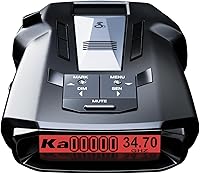
Cobra RAD 700i Radar Detector Review: Worth It? (October 2026)
The Cobra RAD 700i suits commuters who want automatic GPS learning and shared alerts. Choose it for familiar routes with repeat false alerts; consider the RAD 490i if you prefer adjustable sensitivity and a smaller body.
On this page (8 sections)
- What does the Cobra RAD 700i offer?
- What does GPS AutoLearn change in daily driving?
- What can Drive Smarter and phone compatibility do?
- Is the display and size a good fit for your car?
- How does the RAD 700i compare with other detectors?
- How should you set up the RAD 700i?
- Which mistakes reduce a detector's usefulness?
- Should you buy the Cobra RAD 700i?
The Cobra RAD 700i is a strong choice for commuters who want automatic GPS learning and connected alerts in one detector. Pick it when you regularly pass the same false-alert locations and also want reports from other drivers.
Its main buying advantage is that combination, rather than display customization alone. Drivers who prefer changing sensitivity themselves, want stored camera alerts or need low-speed muting have useful alternatives below.
We compared the RAD 700i with the Cobra RAD 490i, Uniden DFR7 and Radenso XP. CannyCabin gives it an 8.6 score for its combination of location learning, filtering and connected features.
What does the Cobra RAD 700i offer?
The Cobra RAD 700i combines radar and laser detection with GPS AutoLearn and community alerts. It supports X, K and Ka radar bands, while Cobra's LaserEye technology provides front and rear detection.
Cobra RAD 700i

- Built-in GPS with AutoLearn Intelligence
- Drive Smarter shared alerts
- Apple CarPlay and Android Auto compatibility
- OLED display with 5 colors
- Front and rear detection
Choose the RAD 700i for a regular commute where automatic location learning and community alerts can serve different needs. Its GPS filtering addresses familiar false-alert locations, while Drive Smarter adds reports from other drivers.
Pros
- Automatic GPS learning for repeat false-alert locations
- Drive Smarter community alerts
- Apple CarPlay and Android Auto compatibility
- Front and rear detection
- Choice of 5 OLED display colors
Cons
- Shared alerts need a Drive Smarter connection
- AutoLearn needs time to learn familiar locations
- Body and power cable need a clear mounting area
Cobra says its antenna platform and Digital Signal Processing support faster signal processing and longer detection range. Those claims don't establish a measured warning-distance advantage over the alternatives here, so choose around the functions that match your driving.
Radar warning distance varies with terrain, curves, traffic and how a signal is used. A detector can only alert to a signal it receives, and a signal switched on close to your car may leave little warning time.
Front and rear detection also doesn't automatically mean directional arrows. Receiving a signal and showing precisely which direction it comes from are separate functions.
Who is the Cobra RAD 700i best for?
The RAD 700i best suits a regular commuter who will use both location learning and shared reports. A familiar route gives AutoLearn recurring locations to recognize, while connected reports can add information beyond the signals reaching the detector.
Skip it if your main goal is direct control over sensitivity or if stored camera-location alerts lead your wish list. The alternatives below address those needs more directly.
Occasional drivers should also consider how much value they'll get from route learning. If nearly every trip follows a different road, familiar-location filtering has fewer chances to help.
What does GPS AutoLearn change in daily driving?
AutoLearn helps with false alerts that recur at familiar places, such as locations near automatic door sensors. Cobra says the RAD 700i learns those locations over time and reduces unwanted alerts there.
That is different from filtering signals associated with moving vehicles. A fixed-location memory feature and signal-filtering software solve related problems, but they don't do the same job.
Think about the alerts you want to reduce before choosing a detector. Repeated noise near the same shopping center points toward location memory; alerts that travel with nearby traffic call for attention to signal filtering.
Allow the learning process to develop across normal trips. Don't judge its value from the first drive through a route, and don't assume every alert at a familiar location is harmless.
Treat a new or changed alert as information worth noticing. Our guide to radar detectors with GPS explains the difference between location memory, lockouts and other GPS functions.
What can Drive Smarter and phone compatibility do?
Drive Smarter adds shared alerts from other connected drivers, while Apple CarPlay and Android Auto compatibility lets you view your route and interact with alerts on a compatible vehicle display. These connected functions need a working phone connection and compatible equipment.
Shared reports and direct detection offer different kinds of information. A report can describe something beyond your detector's immediate reach, but its usefulness depends on its location, age and whether conditions have changed.
No report should be read as an all-clear message. An empty map can simply mean no connected driver has reported anything there.
Before buying, check your phone and vehicle support through Cobra's setup guidance. During setup, review the permissions Drive Smarter requests and confirm that alerts appear where you expect.
Complete pairing while parked, then use normal trips to assess whether shared alerts add useful information. Our radar detector vs Waze comparison explains how driver reports differ from signals detected at your car.
Is the display and size a good fit for your car?
The RAD 700i fits best where you have a clear mounting area and an easy glance at the screen. Its body measures 5.13 x 3.13 x 1.25 in, so measure the available space before choosing a position.
The 5-color OLED display lets you match the screen color to your interior lighting. Choose the color you can read most easily without drawing attention away from the road.
It uses corded 12-volt power, which means cable routing belongs in your fit check. Allow enough slack for adjustment without leaving a loose loop across controls or near the steering wheel.
A low-profile placement is only useful if the detector still has the view required by its installation instructions. Avoid hiding it behind objects just to make the cabin look cleaner.
Our guide to where to mount a radar detector helps you plan around visibility, windshield features and access to controls. Check local mounting rules before attaching anything to the glass.
How does the RAD 700i compare with other detectors?
Choose between these detectors by how you want to manage alerts, rather than treating them as interchangeable range upgrades. Each offers a different reason to buy.
| Detector | Main reason to choose it | Best driving pattern | Main tradeoff |
|---|---|---|---|
| Cobra RAD 700i | Automatic location learning plus shared reports | Familiar commutes with phone connectivity | Learning develops over time |
| Cobra RAD 490i | Direct sensitivity and filtering controls | Drivers who want to adjust notifications | Settings require judgment |
| Uniden DFR7 | Camera-location alerts and spoken warnings | Routes where stored camera information matters | Database upkeep |
| Radenso XP | Manual location lockouts and speed-based muting | Trips with frequent slow sections | Muting threshold needs care |
For a closer comparison with another popular option, see Cobra RAD 700i vs Uniden R3. Our guide to the best Cobra radar detectors covers more choices within the brand.
Choose the RAD 490i if you want direct control
The Cobra RAD 490i suits drivers who want to adjust sensitivity and filtering to their preferences. Its IVT filter targets false alerts from systems such as blind spot monitoring, and Cobra provides firmware updates.
Its 4.25 x 2.75 x 1.25 in body takes less mounting space than the RAD 700i. The included USB-C power cord, cigarette lighter adapter and adhesive mount with a detachable bracket give you a defined installation starting point.
Choose it if you want connected functions but prefer active control over notifications. Skip it as your first choice if automatic learning of familiar locations is the feature you came here to get.
Choose the DFR7 for camera locations and voice alerts
The Uniden DFR7 suits drivers who prioritize stored camera locations and spoken warnings. It includes preloaded red light and speed camera locations, programmable voice alerts and GPS mute memory.
Its OLED screen can show radar frequency, numeric signal strength and vehicle battery voltage. Those details suit someone who wants more information than a basic alert sound.
Choose it if those specific functions matter more than the RAD 700i's connected approach. Skip it if you won't keep its camera database current, since stored location information needs upkeep.
Choose the XP for slow sections and manual lockouts
The Radenso XP suits drivers who want control over familiar locations and low-speed audio. Pressing and holding a button saves a GPS lockout, and you can choose the speed below which alerts are automatically muted.
Automatic sensitivity adjustment based on speed also addresses trips that move between slower streets and faster roads. Updates can be performed using Windows or Mac OS.
Choose it if you're willing to manage lockouts and select a sensible muting threshold. Skip it if you want the detector to learn recurring locations automatically without that manual step.
How should you set up the RAD 700i?
Start with secure placement, reliable power and clear alerts before adding phone features. A detector that shifts on its mount or has an unreadable screen is harder to use well.
- Read the installation instructions. Check the required orientation and keep the detector's sensing areas clear.
- Choose the position before attaching the mount. Sit normally and confirm that the detector doesn't block your view or interfere with mirrors and controls.
- Route the power cable safely. Keep it away from pedals, steering movement and airbag deployment areas.
- Set readable display and audio preferences. Make these changes while parked, including a volume you can hear over normal cabin noise.
- Connect Drive Smarter. Pair your phone and confirm the compatible vehicle display shows the expected information.
- Learn the alert types. Understand the difference between a received signal and a shared report before relying on either during a trip.
Use the first few drives to learn the detector's normal behavior on your route. Make adjustments after parking, rather than reaching for controls each time an unfamiliar alert sounds.
If you move the detector between cars, repeat the placement and cable checks. A position that works in one vehicle may be blocked or awkward in another.
Which mistakes reduce a detector's usefulness?
The biggest mistakes are muting too broadly, blocking the detector and treating silence as certainty. These can make a feature-rich detector less useful than a simpler one used carefully.
Turning down alerts before understanding them
Start by learning why an alert happens. Reducing sensitivity simply because the detector makes noise can also reduce useful warnings.
For models with manual location lockouts, save only locations you understand. A familiar address alone doesn't prove that every signal received there has the same source.
Expecting laser alerts to provide a long warning
Laser uses a narrow beam aimed at a vehicle, so detection may occur when that vehicle is already being measured. A laser alert shouldn't be treated as a dependable early-warning system.
Read whether radar detectors can pick up lidar if laser detection is a major buying reason. The RAD 700i is a detection-only device and doesn't interfere with radar or laser equipment.
Ignoring the mount and cable after installation
Check that the mount remains secure and the detector stays in its intended position. Clean the mounting surface as directed, and inspect the cable for wear or strain at its connectors.
Use a soft cloth for routine cleaning and follow the manufacturer's care instructions. Avoid spraying cleaner directly into openings, and follow storage guidance when leaving the car in extreme cabin heat.
For any model with database or firmware support, make updates part of routine upkeep. Update while parked using the correct instructions for that exact model.
Should you buy the Cobra RAD 700i?
Buy the Cobra RAD 700i if automatic location learning and connected reports both solve a need on your regular drive. Before ordering, confirm the mounting space, phone compatibility and whether you'll actually keep the shared-alert connection active.
Pick the RAD 490i if you want a smaller detector with direct sensitivity controls. Choose the DFR7 for stored camera locations and voice alerts, or the XP when manual lockouts and low-speed muting fit your route.
Let your most common trip decide, rather than a feature you'll rarely use. For a broader shortlist, compare the best radar detectors for cars by the alert controls and daily-use features you need.
Frequently asked questions
Does the Cobra RAD 700i have GPS?
Yes, the Cobra RAD 700i has built-in GPS with AutoLearn Intelligence; Cobra says it learns repeat false-alert locations and reduces alerts there over time, making it useful for familiar commutes. Allow time for that learning, and don't assume that a quiet detector means there are no radar signals nearby.
Can the Cobra RAD 700i connect to Apple CarPlay?
Yes, the Cobra RAD 700i supports Apple CarPlay and Android Auto through Drive Smarter; you can view your route and interact with shared alerts on a compatible vehicle display. Confirm phone and vehicle compatibility before buying, then complete pairing and check the connection while your car is parked.
Does the RAD 700i detect laser?
Yes, the Cobra RAD 700i detects laser as well as radar signals; Cobra's LaserEye technology provides front and rear detection, but this remains a detection-only device. Laser uses a narrow beam, so an alert may arrive only when your vehicle is being measured; it does not guarantee advance warning.
How does the RAD 700i compare with the RAD 490i?
Choose the RAD 700i for automatic GPS learning, or the RAD 490i for adjustable sensitivity and a smaller body. Both offer Drive Smarter shared alerts and compatibility with Apple CarPlay and Android Auto; the better choice depends on whether familiar false-alert locations or direct control over notifications matters more.