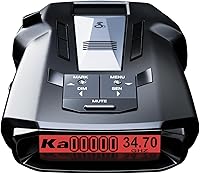
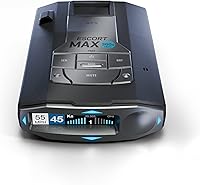
5 Best Cobra Radar Detectors (October 2026)
The best Best Cobra radar detectors include the Cobra RAD 700i for daily commuters, the Cobra RAD 480i for flexible installation, and the Cobra RAD 490i for changing driving routes.
On this page (9 sections)
- Which is the best Cobra radar detector for your driving?
- Why do these Cobra detectors rank in this order?
- How do the Cobra models compare?
- How should you choose the best Cobra radar detector?
- How should you set up a Cobra detector?
- What can a Cobra detector tell you on the road?
- Which mistakes make a radar detector less useful?
- How do you care for a Cobra radar detector?
- Which Cobra radar detector should you buy?
The Cobra RAD 700i is the best Cobra radar detector for most drivers, especially those who repeat the same commute. Its GPS-based learning targets recurring false alerts, a useful advantage when you pass the same shops and roadside equipment every day.
Choose a different model when installation, manual controls or audible cues matter more. The RAD 480i, RAD 490i, RAD 390 and RAD 350 each serve a distinct buying need.
For options beyond Cobra, see the best radar detectors for cars. You can also compare radar detector brands before committing to one range.
Our picks at a glance
-
1

-
2

-
3

Which is the best Cobra radar detector for your driving?
The RAD 700i is the strongest fit for a repeat commute, while the other picks favor mounting flexibility, adjustable controls or listening to alerts. Choose around your usual route and willingness to use a connected phone.
Cobra RAD 700i: best for a familiar commute
Cobra RAD 700i
- Built-in GPS and AutoLearn Intelligence
- Drive Smarter shared alerts
- Front and rear detection
- 5-color OLED display
GPS-based AutoLearn suits drivers who pass the same false-alert locations each day. Shared alerts add information from connected drivers beyond the signals the detector receives.
Pros
- Learns repeat false-alert locations
- Drive Smarter shared alerts
- Customizable display colors
Cons
- Shared alerts depend on a phone connection
- GPS learning needs repeated travel to familiar locations
The RAD 700i earns first place because it addresses a daily nuisance: hearing the same unwanted alert at the same location. Cobra says its built-in GPS and AutoLearn Intelligence recognize recurring false-alert locations and reduce those signals over time.
That makes it a sensible choice for drivers who want less manual management on familiar roads. Its location learning is more useful on a repeated commute than on a trip through places you rarely revisit.
Bluetooth connects it to Drive Smarter for shared alerts. Apple CarPlay and Android Auto compatibility lets you view route information and interact with alerts on a compatible vehicle display.
The 5-color OLED display also gives you a choice of colors for your cabin. Pick a readable setting rather than matching the interior at the expense of clear alerts.
Skip this model if your main goal is manual sensitivity adjustment or a particular included mounting setup. Our Cobra RAD 700i review explains its fit in more detail.
Cobra RAD 480i: best for installation choices
Cobra RAD 480i
- Front and rear detection
- Bluetooth and shared alerts
- DSP and updateable IVT filtering
- Windshield and dash mounting hardware included
Included windshield and dash mounting options give you more freedom to fit your vehicle. Bluetooth adds shared alerts for drivers willing to connect a phone.
Pros
- Two mounting options included
- Shared alerts through Drive Smarter
- Apple CarPlay and Android Auto compatibility
Cons
- Shared alerts depend on a phone connection
- Choose the RAD 700i if GPS-based learning is essential
The RAD 480i suits drivers who need flexibility in where the detector sits. It includes a suction cup windshield mount, a hook-and-loop dash fastener and a 12V vehicle power cord.
Those choices help when a windshield position interferes with your view or a dash surface offers a better fit. Either position still needs a clear signal path, secure attachment and compliance with local mounting rules.
Its updateable IVT filter and anti-falsing circuitry target unwanted alerts from blind spot monitoring and other vehicle systems. Cobra's DSP processes incoming signals, while LaserEye supports detection from the front and rear.
Shared alerts remain part of the package, so choosing this model does not mean giving up connected information. It works with Drive Smarter and supports compatible Apple CarPlay and Android Auto displays.
Choose it for installation flexibility, rather than assuming it matches the RAD 700i's location learning. If GPS-based filtering leads your shortlist, Cobra RAD 700i vs Uniden R3 offers another useful comparison.
Cobra RAD 490i: best for changing routes
Cobra RAD 490i
- Adjustable sensitivity and filtering modes
- Front and rear laser detection
- Drive Smarter shared alerts
- Firmware updates
Adjustable settings suit drivers who move between busy streets and open roads. Its connected alerts and detachable mounting bracket add useful choices for regular use.
Pros
- Adjustable sensitivity and filtering
- Firmware updates
- USB-C power cord and vehicle adapter included
Cons
- Shared alerts depend on a phone connection
- Adhesive mounting position needs planning
The RAD 490i is a good fit for drivers who want control over sensitivity and filtering as their surroundings change. A busy commercial route and an open highway can call for different alert settings.
It includes Extreme Mode, which Cobra positions for range and coverage. Use that choice deliberately, since greater sensitivity can also mean more notifications to assess.
Drive Smarter adds shared alerts, with Apple CarPlay and Android Auto support for compatible vehicle displays. This combination suits buyers who want both adjustable direct detection and connected information.
The included installation kit contains a USB-C power cord, vehicle adapter and adhesive windshield mount with static cling film. A detachable bracket and adjustable angle help you position the detector and remove it from the bracket.
Firmware updates provide a way to keep its software current. Choose this model if you will use those controls and maintain the software; choose the RAD 700i if learning familiar false-alert locations is the bigger priority.
Cobra RAD 390: best for detector-focused use
Cobra RAD 390

- Adjustable sensitivity and filtering modes
- Front and rear laser detection
- Firmware updates
- USB-C power cord and adapter included
The RAD 390 suits buyers focused on direct radar and laser alerts with adjustable controls. Its included adhesive mount has an adjustable angle and detachable bracket.
Pros
- Adjustable sensitivity and filtering
- Firmware updates
- USB-C power cord and vehicle adapter included
Cons
- Choose the RAD 490i for shared alerts
- Adhesive mounting position needs planning
The RAD 390 suits buyers whose main goal is direct radar and laser alerts with adjustable controls. Its sensitivity and filtering modes give you choices without making connected community information the reason to buy.
Cobra includes an updateable IVT filter, anti-falsing circuitry, DSP and front and rear laser detection. Extreme Mode is available here too, so the RAD 490i is not the only option for buyers who want that setting.
Its USB-C cord, vehicle adapter and adhesive windshield mount cover the basic installation pieces. The bracket detaches, and its angle adjusts to suit the chosen position.
Plan that adhesive placement before attaching anything. A position that looks tidy while parked may put the display outside a comfortable glance or send the power cord across a control.
Skip the RAD 390 if shared driver reports are central to your decision. The RAD 490i is the clearer choice for that buyer, while this model fits someone focused on the detector's own alerts and settings.
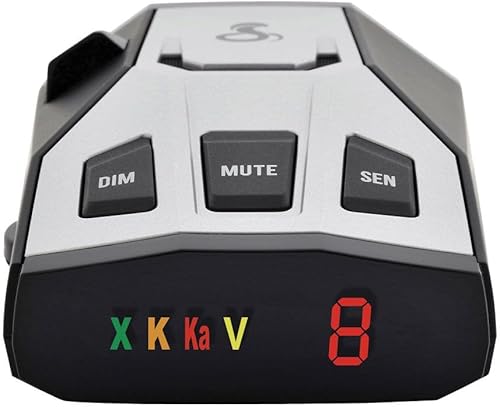
Cobra RAD 350: best for audible cues
Cobra RAD 350
- IVT Filter and anti-falsing circuitry
- Radar and laser detection
- Audible band and signal-strength cues
- 7-segment color display
Distinct tones identify the band and signal strength, helping drivers follow alerts without reading text. The display uses band icons and a numeric signal-strength meter.
Pros
- Audible band and signal-strength cues
- Numeric signal-strength display
- IVT filtering
Cons
- 7-segment display offers less text detail
- Choose another pick for connected alerts
The RAD 350 suits drivers who want band and signal-strength information through sound. Its distinct tones let you recognize alert changes without relying on a text screen.
A 7-segment color display shows band icons and a numeric strength meter. Learn those cues while parked so you can understand them without studying the detector on the road.
It detects X, K and Ka radar bands, laser and VG-2 signals. Cobra's IVT Filter and anti-falsing circuitry are designed to reduce unwanted alerts from sources such as collision-avoidance systems.
Choose it because you prefer this style of feedback, rather than expecting a connected alert system. It uses corded 12V power, so a tidy cable route remains part of the setup.
Skip it if you want shared alerts, GPS learning or the adjustable controls that lead the other picks. Its instant-on readiness also does not promise advance notice when a radar source begins transmitting only as your vehicle approaches.
Why do these Cobra detectors rank in this order?
The ranking favors repeat-alert management and useful everyday features, followed by installation choices and manual controls. It does not rank the models by measured detection distance.
The RAD 700i leads because location learning can reduce the work of managing a familiar route. The RAD 480i follows for its connected alerts and included mounting choices.
The RAD 490i serves buyers who want more control, while the RAD 390 fits a direct-alert approach. The RAD 350 has a narrower role for drivers who prefer its audible cues and numeric display.
Cobra uses range claims across these models, but those claims do not establish a reliable distance comparison between all 5. Choose by the features that solve your driving needs rather than treating model numbers as a performance ladder.
How do the Cobra models compare?
The most useful differences are location learning, shared alerts and installation hardware. Use the table to identify those differences, then weigh how often you will use each feature.
| Product | Best for | Filtering | Shared alerts | Mounting | Our score |
|---|---|---|---|---|---|
| Cobra RAD 700i | daily commuters | GPS-based AutoLearn and advanced filtering software | Drive Smarter | Check mounting fit for your vehicle | 8.6 |
| Cobra RAD 480i | flexible installation | Updateable IVT filter and anti-falsing circuitry | Drive Smarter | Suction cup windshield mount and hook-and-loop dash fastener | 8.5 |
| Cobra RAD 490i | changing driving routes | Updateable IVT filter and adjustable modes | Drive Smarter | Adhesive windshield mount with detachable bracket | 8.1 |
| Cobra RAD 390 | direct signal alerts | Updateable IVT filter and adjustable modes | Choose another pick for Drive Smarter | Adhesive windshield mount with detachable bracket | 7.4 |
| Cobra RAD 350 | listening to alerts | IVT Filter and anti-falsing circuitry | Choose another pick for Drive Smarter | Plan placement and power-cord routing | 7.2 |
A smaller feature set can still be the better fit if you will not connect a phone or change modes. A feature matters when it improves your routine, rather than simply adding another item to the box.
How should you choose the best Cobra radar detector?
Choose by route, alert tolerance and setup needs, in that order. These factors will shape everyday use more than a long list of detection terms.
Which Cobra radar detector fits repeat city driving?
The RAD 700i is the first choice for routes with recurring unwanted alerts at fixed locations. GPS-based learning addresses that pattern, while ordinary signal filtering addresses a different problem.
Vehicle safety systems can move alongside you, so their signals are not tied to a single location. Fixed-location learning and IVT filtering serve different purposes; neither makes every alert easy to classify.
If you regularly change routes, think about whether you prefer to adjust settings yourself. The RAD 490i and RAD 390 are worth considering for that approach.
Do you want information from other drivers?
Choose a Drive Smarter model if shared reports are part of your plan. A community report and a direct detector alert are different sources of information.
A report depends on someone sharing information and the connection delivering it. Direct detection depends on a signal reaching your detector, so neither source guarantees awareness of everything ahead.
Check that you are willing to keep the phone connected and provide the app permissions needed for its features. CarPlay or Android Auto compatibility does not remove the need to set up the connected service.
For a clearer comparison of those information sources, read radar detector vs Waze.
How much alert management will you do?
Choose automatic learning for repeated locations or manual controls if you want to tune settings yourself. Decide this before buying, because an alert system you constantly silence is unlikely to stay useful.
Start with the recommended settings for your model. If you change several options at once, you may not know which change caused a quieter or busier ride.
Learn the meaning of X, K and Ka alerts before switching bands off. Our guide to radar detector bands explains the terms so you can make more informed choices.
Will the detector fit your vehicle?
Choose a mounting position before choosing accessories. Your windshield angle, dash shape, sightline and access to power all affect the result.
Check whether the windshield has coatings or areas that could interfere with signals, using your vehicle's guidance. A clear-looking patch of glass is not always the best location for every device.
Our radar detector mounting options guide can help you compare attachment methods. Use the supplied hardware as intended rather than balancing the detector loosely on the dash.
Are detectors allowed on your route?
Check location and vehicle restrictions before using a detector, including places you will pass through on a trip. Permission to own a device and permission to use or mount it are separate questions to check.
Our guide to where radar detectors are legal explains the restrictions to review. Include rental or work-vehicle policies in that check when they apply.
How should you set up a Cobra detector?
Set it up while parked, beginning with secure placement and power before changing alert settings. A careful installation makes the display easier to read and the controls easier to use.
Choose the position before attaching the mount
Hold the detector near the proposed location and sit in your normal driving position. Check the road view, display angle and reach to nearby controls.
Follow the model's mounting instructions for orientation and clearance. Keep the detector and cord away from airbag areas, and do not let the mount block a camera or sensor used by the vehicle.
An adjustable bracket helps with the angle, but it cannot fix an obstructed location. Our radar detector mounting guide covers placement in more detail.
Clean and secure the attachment point
Prepare the glass or dash according to the mount's instructions. Dirt, residue and an unsuitable surface can weaken the attachment.
For adhesive hardware, check the position carefully before committing. Follow any instructions for pressing or allowing the attachment to settle before adding the detector's weight.
A detachable bracket is useful for removal, but it does not mean the adhesive base should be moved repeatedly. Check the base and bracket separately when assessing how secure the setup feels.
Route power away from controls
Use the correct cord and adapter for the detector. A USB-C connector by itself does not establish that another cable or vehicle port supplies what the device needs.
Keep the cord clear of pedals, the steering wheel, gear controls and passenger movement. Leave enough slack for adjustment without allowing a loop to hang into the driver's space.
Check whether your vehicle's outlet remains powered after shutdown. That tells you whether unplugging the detector needs to become part of your parking routine.
Set the display, audio and connected features
Adjust brightness and volume while parked so alerts are noticeable without becoming distracting. Confirm you understand the symbols or tones before relying on them during a drive.
For a connected model, complete pairing and app setup before departure. Open the app again after a phone change or major software change to confirm that the connection still works.
Consult the model's instructions for firmware maintenance. Our guide to radar detector firmware updates explains the general process, but use Cobra's model-specific files and directions.
What can a Cobra detector tell you on the road?
A detector can tell you that it has received a supported signal, but it cannot promise advance warning or a clear road ahead. Treat alerts as information rather than instructions to make a sudden maneuver.
Radar warning distance changes with terrain, curves, traffic, signal direction and how the radar is being used. A quiet detector can mean no signal reached it, rather than no enforcement being present.
Laser is especially limited as an early-warning tool because its beam is narrow. Detection capability does not mean a nearby beam will strike the sensor or arrive before a speed measurement.
Front and rear detection also does not automatically mean directional arrows. Receiving a signal and showing where it came from are separate features, so do not expect an alert to identify direction without that specific capability.
Signal strength is not a distance meter. A stronger alert may deserve attention, but reflections and changing road geometry can affect what reaches the detector.
Keep a steady, lawful driving routine when an alert sounds. Avoid abrupt braking, searching the screen or changing settings while moving.
Which mistakes make a radar detector less useful?
The biggest mistakes are poor placement, excessive silencing and misplaced trust. Each can reduce the value of a detector even when you have chosen the right features.
Turning off bands just to stop noise
Do not disable a radar band simply because it has produced unwanted alerts on one route. A source that is irrelevant in one place does not make that entire band irrelevant everywhere.
Use the model's filtering guidance and change one setting at a time. Review settings before a trip if you previously tuned the detector around a familiar local route.
Treating every repeated alert as harmless
A familiar alert location deserves understanding, rather than automatic dismissal. A new signal can occur near a place where unwanted signals are common.
GPS learning helps manage repetition, but it is not a substitute for attention. Follow the device's guidance on reviewing or managing learned locations.
Leaving the phone connection unchecked
Do not assume shared alerts remain active because the detector still powers on. The direct detection hardware can be operating while a phone connection or app feature needs attention.
Confirm the connection while parked, particularly after changing phones or permissions. Avoid trying to repair pairing while driving.
Assuming maximum sensitivity is always best
Use a more sensitive mode when it suits the surroundings and your model's guidance. More notifications can become counterproductive if they lead you to ignore the device.
The right balance is one you understand and can maintain. Change settings for a reason, then assess whether the alert pattern remains useful on your route.
How do you care for a Cobra radar detector?
Keep the sensors, mount and power connection clean and secure. Small maintenance checks help prevent an attachment problem or blocked sensor from becoming a road distraction.
Use the cleaning method in the manual, and avoid spraying cleaner directly into openings. Check that dust, dash items or a shifted mount are not covering the sensor areas.
Inspect the power cord for wear and confirm that the plug stays seated. Replace damaged accessories with suitable parts rather than bending a loose connector into place.
Check mounting security after temperature changes or a rough journey. Remove and store the detector as its instructions recommend, keeping it away from damaging heat, moisture and loose items that could scratch it.
For models that support updates, check Cobra's support guidance periodically and before a long trip. Keep your preferred settings noted so you can review them after maintenance.
Which Cobra radar detector should you buy?
The best Cobra radar detector is the one that solves your main daily need. Start with the recurring problem you want to address, then choose the matching model.
Pick the RAD 700i if repeated false-alert locations make your commute noisy. Pick the RAD 480i if windshield and dash mounting choices are the deciding factor.
Choose the RAD 490i if you want adjustable sensitivity with shared alerts, or the RAD 390 if direct detection and manual controls are enough. Choose the RAD 350 when audible band and signal-strength cues are your priority.
Before ordering, settle on a lawful mounting position and confirm how you will power the detector. If none of these fits your needs, compare the wider field in our best radar detectors for cars guide.
Our top 3 picks at a glance
-
1
-
2
-
3
Frequently asked questions
Which Cobra radar detector is best for most drivers?
The Cobra RAD 700i is the best choice for most drivers who repeat the same commute; its GPS-based AutoLearn is designed to reduce recurring false alerts, while shared alerts add information from other drivers. Choose the RAD 490i instead if manual sensitivity and filtering controls are your main priority.
What is the difference between the Cobra RAD 700i and RAD 480i?
The main buying difference is GPS-based learning versus mounting flexibility; the RAD 700i has built-in GPS and AutoLearn Intelligence, while the RAD 480i includes windshield and dash mounting hardware. Both support Drive Smarter shared alerts, so choose based on repeat-alert management and where the detector fits your car.
Does a Cobra radar detector detect laser?
All 5 Cobra models in this guide include laser detection, but an alert may arrive after a vehicle's speed has already been measured; a narrow laser beam can also miss the detector's sensor. Read our guide to radar detectors and lidar to understand why laser alerts have limits.
Where should you mount a Cobra radar detector?
Mount it securely with a clear view through the glass, following the detector's instructions and local windshield rules; keep it out of your road sightline and away from airbag deployment areas. Our guide to where to mount a radar detector explains placement choices and common obstructions to avoid.