7 Best Radar and Laser Detectors (October 2026)
The best radar and laser detectors include the Uniden R7 for mixed-route drivers, the Uniden R3 for familiar commutes, and the Cobra RAD 700i for connected commuters.
On this page (8 sections)
- Which radar and laser detector fits your driving?
- The best radar and laser detectors by use
- What should you compare before choosing a detector?
- How should you choose between radar and laser detection?
- How do you set up a detector for useful alerts?
- How do you keep alerts useful over time?
- Which mistakes make a detector less useful?
- Which radar and laser detector should you pick?
The Uniden R7 is the best radar and laser detector here for drivers who want signal direction, GPS mute memory and camera alerts together. Choose the Uniden R3 for familiar commutes, or the Cobra RAD 700i if shared driver reports are central to your setup.
Your route matters more than the longest feature list. A detector that repeats the same nuisance alert every morning needs different tools from one used mainly on unfamiliar highways.
Our guide to the best radar detectors for cars covers the broader category. Here, the focus is choosing a combined radar and laser unit you can understand, set up and use with little distraction.
Our picks at a glance
-
1

-
2

-
3

Which radar and laser detector fits your driving?
Choose around your routes and preferred alert style: location memory for repeat commutes, direction cues for extra context, and connected reports if you already use a phone while traveling. Those differences are more useful than comparing range slogans.
The scores reflect the features and buyer fit in this comparison. They are editorial scores, separate from customer feedback scores.
No fixed detection distance applies to every road. Hills, curves, traffic, signal direction and when speed equipment transmits can all change how much warning reaches a detector.
Use the table to narrow your choice to 2 models. Then check whether their extra features solve a problem you actually have, rather than adding another screen or connection to manage.
| Product | Best for | Direction cues | Location memory | Phone connection | Our score |
|---|---|---|---|---|---|
| Uniden R7 | mixed-route drivers | Directional arrows with dual antennas | GPS mute memory | Built-in display and voice alerts | 9.1 |
| Uniden R3 | familiar commutes | Band information through display and voice alerts | GPS mute memory and user marks | Built-in display and voice alerts | 8.9 |
| Cobra RAD 700i | connected commuters | Front and rear detection | GPS-based AutoLearn | Bluetooth and Drive Smarter | 8.6 |
| Uniden R4W | phone-connected drivers | Visual and voice alerts | GPS auto mute memory | Wi-Fi, Bluetooth and R/TACH support | 8.4 |
| Escort MAX 360 MKII | connected road trips | Directional arrows with dual antennas | GPS AutoLearn | Bluetooth and Drive Smarter | 7.8 |
| Radenso XP | stop-and-go commuters | OLED alert display | Manually added GPS lockouts | Computer updates through Windows or Mac | 7.6 |
| Valentine One Gen 2 | detail-focused enthusiasts | Directional indicator and rear radar antenna | K-Verifier filtering for common false signals | Bluetooth 5.0 and V1Connection | 6.6 |
The best radar and laser detectors by use
The R7 leads for mixed driving, but each pick below serves a different buyer. Choose the model whose controls and alert tools fit your routine, even if it sits lower in the order.
Uniden R7
- Dual antennas and directional arrows
- GPS mute memory
- Red light and speed camera alerts
- Multi-color OLED display
A strong fit for drivers who split their time between familiar roads and new routes. Direction cues add context away from home, while location memory helps manage repeat alerts.
Pros
- Shows signal direction, band and strength
- Displays up to 4 signals at once
- Free database and firmware updates
Cons
- Busy signal display may overwhelm drivers who prefer brief alerts
The Uniden R7 suits drivers who want to understand an alert rather than simply hear it. Dual antennas and directional arrows show where a detected signal is coming from, along with its band and strength.
Its screen can show up to 4 signals at once, which is useful when several sources overlap. You can distinguish a changing alert from other activity without assuming every sound comes from the same source.
GPS mute memory helps with recurring false signals on familiar roads. Preloaded red light and speed camera locations provide separate location warnings, supported by free database and firmware updates.
Buy it if your week mixes regular commuting with trips through unfamiliar areas. The combination addresses both repeated nuisance locations and the need for direction information away from home.
Skip it if you want only brief spoken warnings and have little interest in reading signal details. The Uniden R3 review covers a better match for that buyer.
Uniden R3
- GPS mute memory
- Programmable voice alerts
- Red light and speed camera alerts
- Multi-color OLED display
Choose it for a regular commute where remembered false alerts and spoken warnings matter most. User marks also let you flag locations for future reminders.
Pros
- Remembers recurring false alert locations
- Programmable spoken warnings
- Free database and firmware updates
Cons
- Choose another pick if directional arrows are essential
The Uniden R3 is a good choice for a repeat commute where the main goal is useful warnings with less screen watching. Programmable voice alerts let you choose spoken information that fits your preferences.
Its GPS memory can quiet common false alerts at familiar locations. You can also add user marks for places where you want a reminder, which is different from detecting a live radar signal.
Preloaded camera locations and free database and firmware updates support ongoing use. Set aside time for those updates instead of assuming a location database stays current on its own.
Choose the R3 if your needs center on the same roads each week and you don't want your choice driven by app features. Keep voice volume clear enough to hear without making every alert jarring.
Skip it if signal direction is a must. If phone connections also interest you, the Uniden R3 vs Uniden R4W comparison explains the next choice.
Cobra RAD 700i
- GPS-based AutoLearn
- Drive Smarter shared alerts
- Apple CarPlay and Android Auto compatibility
- Front and rear detection
A good match for drivers who already connect a phone for each trip and want community reports alongside detector alerts. Its connected features support compatible vehicle displays.
Pros
- Shared alerts through Drive Smarter
- Learns recurring false alert locations
- Customizable 5-color OLED
Cons
- Shared alerts require a Drive Smarter connection
The Cobra RAD 700i fits drivers who already connect a phone for maps and want community reports in the same routine. Bluetooth links it to Drive Smarter, with Apple CarPlay and Android Auto compatibility for supported vehicle displays.
Those shared reports add information from other connected drivers. They remain separate from signals the detector receives near your own vehicle, so learn how each type of alert appears.
Cobra's GPS-based AutoLearn reduces recurring false signals as it learns familiar locations. Its front and rear detection is useful coverage, but detecting from both directions should not be confused with displaying a directional arrow.
The customizable 5-color OLED lets you select a display color that suits your cabin. Check readability in daylight as well as how it looks after dark.
Buy it if you'll keep the community connection active. Skip it if phone pairing feels like a chore and shared reports would go unused.
Uniden R4W
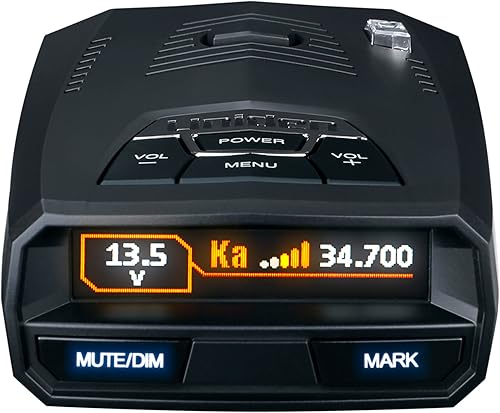
- GPS auto mute memory
- Wi-Fi and Bluetooth
- R/TACH app support
- Programmable voice alerts
Fits drivers who want Uniden's GPS alert tools with phone connectivity. Uniden says its K/Ka filtering reduces false alerts from nearby vehicle safety systems.
Pros
- Wi-Fi and Bluetooth connections
- Automatic false alert memory
- Speed and red light camera database
Cons
- App functions add a connected device to manage
The Uniden R4W suits drivers who want a connected Uniden setup with automatic memory for recurring false alerts. It brings Wi-Fi, Bluetooth and R/TACH app support together in one detector.
Its appeal is the mix of built-in alert tools and phone access. Before choosing it for connectivity alone, decide which app functions you expect to use and confirm device compatibility.
Uniden says its K/Ka filtering helps reduce false alerts from blind spot monitoring and collision avoidance systems. That addresses moving sources of nuisance signals, while GPS auto mute memory addresses recurring locations.
Programmable voice alerts let you receive information without relying on the color OLED for every warning. A speed and red light camera database adds location-based alerts.
Choose it if you want to manage a connected device and value automatic alert memory. Skip it if arrows are your main reason for upgrading.
Our Uniden R4W review takes a closer look at the feature set before you commit.
Escort MAX 360 MKII

- Directional arrows
- GPS AutoLearn
- Drive Smarter shared alerts
- Apple CarPlay and Android Auto compatibility
Suits travelers who want both on-device direction cues and shared reports through a compatible vehicle display. AutoLearn helps manage recurring signals when routes become familiar.
Pros
- Combines arrows with shared reports
- Learns repeat false alert locations
- Filtering for vehicle safety system signals
Cons
- Shared reports depend on a Drive Smarter connection
The Escort MAX 360 MKII fits travelers who want arrows and shared reports together. Its dual antennas provide direction information, while Drive Smarter adds alerts from other connected drivers.
This combination is useful if you want to separate an on-device signal warning from a report farther along your route. Apple CarPlay and Android Auto compatibility bring supported connected features to a compatible vehicle display.
GPS AutoLearn learns recurring false alert locations over repeat trips. Escort also says its filtering reduces nuisance signals from collision avoidance and blind spot monitoring systems.
Choose it if both sources of information matter enough that you'll maintain the phone connection. Set up the display and audio before leaving, so extra information doesn't turn into extra interaction.
Skip it if you only want on-device arrows or only want community reports. Other picks here address those individual needs.
See Escort MAX 360 MKII vs MAX 360c MKII if you're comparing those similarly named models.
Radenso XP

- Button-added GPS lockouts
- User-selectable low-speed muting
- Speed-based sensitivity adjustment
- Windows and Mac update support
Fits drivers who want direct control over familiar false alerts and when audible warnings begin. Its low-speed muting is useful for a commute with frequent slow sections.
Pros
- Choose a low-speed muting threshold
- Add known false alert locations yourself
- Updates through Windows or Mac
Cons
- GPS lockouts require a manual button action
The Radenso XP suits a commute with slow traffic, store entrances and recurring nuisance locations. Its user-selectable low-speed muting lets you decide below what speed audible alerts should be muted.
It also adjusts sensitivity with speed. That gives it a different emphasis from choosing a detector mainly for arrows or community reports.
GPS lockouts are added by pressing and holding a button. This suits drivers who want to decide which familiar signals deserve a saved lockout rather than leaving every decision to automatic learning.
Make those decisions while parked, after you understand the signal. A familiar location alone is not a reason to silence every warning around it.
Radenso says the XP is ready to use after mounting and plugging it in. Windows and Mac update support gives you a computer-based maintenance route.
Buy it for direct control over local nuisance alerts. Skip it if automatic location learning is a priority or you don't want to manage lockouts yourself.
Valentine One Gen 2
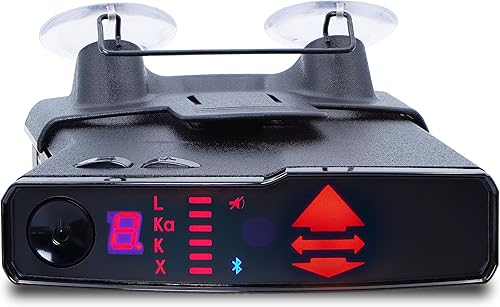
- Rear radar antenna
- Directional indicator
- Bluetooth 5.0
- V1Connection app support
An option for drivers who want direction information and a closer look at live detector information through an app. It includes both windshield and visor mounting options.
Pros
- Directional indicator
- Live detector information through V1Connection
- Direct-wire adapter included
Cons
- App access needs a compatible smartphone or tablet
The Valentine One Gen 2 fits drivers who enjoy understanding detector information in more detail. A rear radar antenna and directional indicator provide context, while V1Connection opens access to live information through a compatible phone or tablet.
Bluetooth 5.0 supports that connection with Apple and Android devices. Treat the app as something to configure before travel, rather than a reason to study a phone while moving.
Its supported radar bands include X, K, Ka, Super Wideband Ka and Ku. Broader band coverage should still be weighed against the signals relevant to your routes.
Valentine Research says K-Verifier reduces false alerts from blind spot detection systems and automatic store-door openers. The supplied accessories include windshield and visor mounts, plus a direct-wire adapter.
Choose it if direction information and app-based signal detail interest you. Skip it if your priority is a straightforward built-in GPS memory workflow.
For that need, start with the GPS-focused choices above rather than buying extra information you won't use.
What should you compare before choosing a detector?
Compare false alert control, direction cues and connection needs before minor display details. These choices determine how much attention the detector asks from you during an ordinary drive.
Does GPS filtering help a radar and laser detector?
GPS filtering helps most when the same fixed sources cause alerts on roads you drive often. A store entrance that triggers a repeat signal is a different problem from a nearby moving vehicle producing radar interference.
Location memory addresses the first problem. Signal filtering addresses the second, so a detector may need both tools to suit a busy commute.
Manual lockouts give you control over what gets saved. Automatic learning reduces the work, but you should still understand how to review or remove a saved location.
Camera alerts are another GPS use. They warn about stored locations and should not be confused with receiving a live speed-measuring signal.
Learn how radar detector bands work before changing band settings. Silencing an entire band is a much broader step than muting one recurring false source.
Do directional arrows make a difference?
Arrows add context by showing the direction of a received signal. They are especially useful if you want to understand whether an alert has moved behind you or remains ahead.
They don't identify a particular vehicle, prove a source is harmless or tell you what is around the next bend. Reflections can also complicate the picture.
Choose direction cues if that extra context will help you interpret warnings. Our guide to radar detectors with directional arrows focuses on this feature.
Are shared alerts and phone connections useful?
Shared alerts are useful if you already keep a compatible phone connected during trips. Other app connections may provide detector information or controls without offering the same community-report features.
Don't treat Bluetooth as proof that every connected detector does the same thing. Compare the named app and the function you need.
Before buying, check phone compatibility, vehicle display support and any current service requirements. If you often leave your phone disconnected, judge the detector mainly by what it does on its own.
Should range claims decide your choice?
Range claims should not outweigh usability or be treated as a direct ranking across brands. Different roads and signal conditions make a single distance promise a poor buying shortcut.
Instant-on radar may stay silent until activated, and a detector cannot receive a signal that isn't being transmitted. A quiet unit does not prove the road is clear.
Choose features that make received alerts easier to understand. More information only helps if you can use it without losing focus on traffic.
How should you choose between radar and laser detection?
Choose a combo unit for both signal types, while keeping expectations different for radar and laser alerts. Laser detection can provide much less useful advance warning.
Radar signals can spread and reflect, which may let a detector receive energy before your vehicle reaches the source. Road shape and how the equipment is used still affect that opportunity.
Lidar uses a narrow light beam. Your detector's sensor must receive that light, and an alert may arrive while a speed reading is already being taken.
A detector also does not cover every way vehicle speed can be measured. It cannot replace watching road signs, traffic conditions or your speedometer.
Review radar detector laws and safe use before installation, and check current requirements along your route. Include vehicle type and mounting rules in that check.
How do you set up a detector for useful alerts?
Set up the detector while parked, beginning with a secure, unobstructed mount and the correct power connection. Then adjust alerts in small steps instead of changing every menu option at once.
Choose a clear mounting position
Follow the detector and vehicle instructions for placement. Keep the unit level, secure and clear of your driving view, airbags and vehicle sensors.
Avoid blocking its receiving areas with trim, wipers or other objects. Some windshield coatings can affect reception, so check your vehicle's guidance if it uses treated glass.
A position that looks tidy may still block a sensor or make controls awkward to reach. Our guide to where to mount a radar detector explains the placement tradeoffs.
Secure power before arranging the rest
Use the correct power equipment and route the cable away from pedals, steering controls and passenger movement. Leave enough slack for a secure connection without a hanging loop across the cabin.
Check whether the vehicle outlet remains powered after you shut off the car. That helps you decide whether unplugging the detector belongs in your parking routine.
For a permanent connection, use compatible equipment and follow vehicle-specific instructions. Have a qualified installer handle work you're not comfortable completing.
Learn the alerts before changing settings
Start with the manual's recommended setup and learn the difference between a band alert, a camera reminder and a shared report. Set volume and brightness so you can understand warnings without repeatedly looking down.
Review recurring nuisance signals after a drive. Change one setting at a time so you can tell whether it addressed the problem.
Avoid copying another driver's full settings just because you use the same model. Their routes and local signal environment may differ from yours.
How do you keep alerts useful over time?
Keep the detector secure, clean and maintained so its setup stays consistent. A loose mount, blocked sensor or neglected connection can undermine an otherwise sensible choice.
Keep software and saved locations current
Follow the brand's instructions for firmware and database maintenance. Firmware and camera databases serve different purposes, so check whether each needs separate attention.
Before making changes, note your settings or save them if the device supports it. Our guide to radar detector firmware updates explains how to approach maintenance without losing track of your setup.
Revisit saved locations if your route changes or a nuisance signal disappears. A lockout should remain a deliberate choice, not something you forget permanently.
Care for the mount and sensor areas
Clean sensor windows and the display as directed by the manufacturer. Avoid abrasive materials or spraying cleaner directly into openings.
Inspect suction cups, brackets and cable connections when the unit starts shifting or vibrating. Secure the cause instead of compensating by tilting the detector.
Follow storage guidance for heat and cold. Removing a portable unit when parked can also keep it out of sight.
Which mistakes make a detector less useful?
The biggest mistakes are silencing too much, trusting silence and reacting without context. A detector should support steady attention rather than create a cycle of nuisance sounds and abrupt responses.
- Saving every recurring alert as harmless: A location can contain more than one signal source, so learn the lockout process before using it.
- Disabling bands to quiet the cabin: Use informed filtering choices instead of assuming a frequently heard band is irrelevant.
- Treating community reports as live detection: A shared report describes information from elsewhere and may no longer match current conditions.
- Expecting a laser warning to provide time: A lidar alert may arrive during the speed measurement.
- Making changes while moving: Adjust controls, apps and saved locations after pulling over safely.
- Braking sharply at every sound: Maintain control, check traffic and interpret the alert without a sudden response.
Also avoid shopping only by the number of features. If you won't connect an app or use direction information, those features should carry little weight in your decision.
Which radar and laser detector should you pick?
Pick the Uniden R7 for a mix of familiar routes and new roads where direction information matters. Choose the Uniden R3 when a regular commute, location memory and spoken warnings define your needs.
The Cobra RAD 700i fits drivers who will use shared reports through a connected phone. Choose the Escort MAX 360 MKII if you want that approach with directional arrows too.
The Uniden R4W suits a connected Uniden setup. Pick the Radenso XP for deliberate control over local lockouts and low-speed muting, or the Valentine One Gen 2 if live signal detail is part of the appeal.
Before ordering a radar and laser detector, settle on your mounting position, connection routine and most useful alert feature. If the value still feels unclear, read whether radar detectors are worth it before choosing.
Our top 3 picks at a glance
-
1
-
2
-
3
Frequently asked questions
What is the difference between a radar detector and a laser detector?
Radar detectors receive radio signals, while laser detectors sense the light pulses used by lidar speed equipment. A combo unit handles both signal types, but the warning time can differ greatly.
Learn how radar detectors work before treating every alert as the same kind of warning.
Can a radar and laser detector detect lidar?
Yes, a radar and laser detector with laser detection can alert when a lidar signal reaches its sensor. That signal may arrive while your vehicle's speed is already being measured, leaving little useful warning.
Read what a radar detector can detect about lidar for the practical limits.
Do GPS features matter in a radar detector?
GPS matters most if your usual roads produce recurring false alerts at fixed locations. Memory tools can quiet those locations, while camera databases provide a different kind of location-based warning.
Compare radar detectors with GPS and choose between manual lockouts and automatic learning based on how much control you want.
Are radar and laser detectors legal everywhere?
No, and the rules can depend on your location, vehicle type and how the detector is mounted or used. Check current requirements for every place on your route before installing one.
Start with radar detector laws and safe use, including whether detectors are legal where you plan to drive.


